
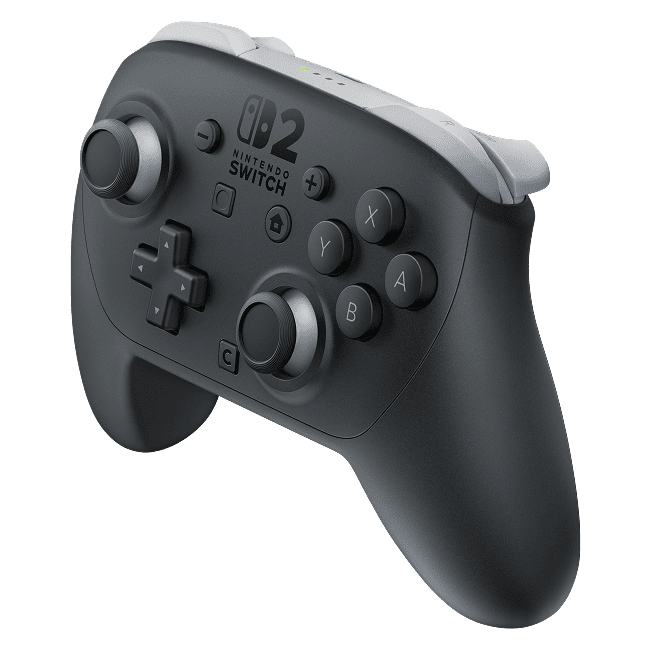
Switch Pro Controller vs Switch 2 Pro Controller compatibility is straightforward in one important respect: the original Nintendo Switch Pro Controller works with both Switch and Switch 2, while the newer Switch 2 Pro Controller works only with Switch 2. If you’re keeping both consoles, the older pad is the one with backwards and forwards compatibility.
The newer controller has its advantages, though, including a C Button for GameChat, customisable GL/GR buttons and a headset socket. The original pad can still play compatible games on Switch 2, but it cannot do everything the new one can, including waking the new console from sleep with its HOME Button.
Switch Pro Controller vs Switch 2 Pro Controller compatibility: which works with which console?
Nintendo confirms that the original Pro Controller (HAC-013) can pair wirelessly with both console generations. Nintendo’s Switch 2 Pro Controller, model BEE-008, only supports Switch 2. Connecting it to the original console isn’t an officially supported pairing option, even if the USB connector fits.
| Question | Original Switch Pro Controller | Switch 2 Pro Controller |
|---|---|---|
| Works with original Nintendo Switch? | Yes | No |
| Works with Nintendo Switch 2? | Yes, wirelessly | Yes |
| Charge from Switch 2 dock via USB? | Yes | Yes |
| Wake Switch 2 with HOME? | No | Designed for Switch 2 HOME control |
| Dedicated C Button? | No | Yes |
| Mappable rear GL/GR? | No | Yes |
| Headset audio socket? | No dedicated socket | Yes |
| Official full-charge estimate | About 6 hours | About 3 hours |
The table compares Nintendo’s supported features for both generations, rather than future updates. An old Switch Pro Controller is still a sensible spare for local multiplayer on the new console. What it cannot do is gain the extra buttons and audio hardware that were physically added to the Switch 2 version.
Can the original Switch Pro Controller wake Switch 2?
No. Nintendo’s accessory compatibility list specifically says the HOME Button on first-generation Nintendo Switch controllers cannot wake a Switch 2 from sleep. This limitation can make the old Pro Controller appear unresponsive when the console is sleeping, even though the controller works normally once the Switch 2 is awake.
That HOME-button limitation is easy to mistake for a faulty controller. Wake the Switch 2 using the console itself or a supported method, then connect the old controller. Don’t buy a replacement pad solely because pressing HOME on your old controller doesn’t wake the new console.
Can you charge the older Pro Controller using a Switch 2 dock?
Yes. The original Nintendo Switch Pro Controller can be charged via USB using the Switch 2 dock, according to Nintendo. You do not have to buy a new controller simply because the original charging lead was used with an older Switch. Use the correct cable and a compatible powered dock setup.
The Switch Pro Controller vs Switch 2 Pro Controller compatibility difference is also visible in the official charge-time estimates: roughly six hours for the original Pro Controller and around three hours for the Switch 2 Pro Controller. Actual charging conditions can vary. These estimates don’t mean the old controller’s battery is faulty just because it takes longer to fill.
What do C, GL and GR add to the Switch 2 Pro Controller?
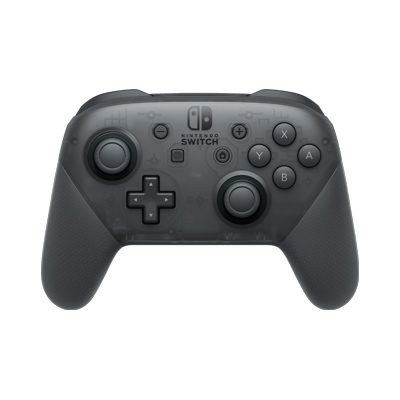
The original Switch Pro Controller has the familiar HOME, Capture, shoulder and face buttons. The newer model adds a dedicated C Button to access GameChat, two rear GL and GR buttons that you can map to other controls, and a 3.5mm headset audio connection. Those are hardware features, not settings that can be enabled on the older pad.
This is the main reason a player might upgrade even when Switch Pro Controller vs Switch 2 Pro Controller compatibility isn’t a concern. The newer model suits someone who wants its additional inputs and built-in headset support. You can still play compatible games with the original controller and use the console’s other supported chat or audio options as appropriate.
Do you need Nintendo Switch Online to use either controller?
You don’t need a Nintendo Switch Online membership to pair either controller or play offline. Using GameChat does require a Nintendo Switch Online membership, however. That’s a service requirement, not a requirement to use the controller.
The Switch Pro Controller vs Switch 2 Pro Controller compatibility question is about physical and wireless controller support, not whether a particular online multiplayer title needs a subscription. Always check a game’s software requirements separately, particularly for games that use specific motion, microphone or other input features.
Switch Pro Controller vs Switch 2 Pro Controller compatibility: multiplayer limits
Nintendo allows up to eight wireless controllers in general, but the maximum varies by game, controller type and enabled features. A Bluetooth audio device can reduce the available wireless controller connections. If a third wireless controller won’t connect while Bluetooth headphones are active, disconnect the headphones and try again.
For a newer Switch 2 Pro Controller, Nintendo’s official pairing route uses USB-C or the HOME Menu’s Controllers then Change Grip/Order screen. Our Switch 2 Pro pairing guide walks through the supported steps and how to deal with a controller that loses its connection.
Switch Pro Controller vs Switch 2 Pro Controller compatibility: which should you buy?
If you want one controller to use on an original Switch and a Switch 2, keep the older Pro Controller. If you only use Switch 2 and want GameChat’s C Button, rear GL/GR controls and a headset socket, the newer pad offers features the old one cannot add. The Switch Pro Controller vs Switch 2 Pro Controller compatibility answer depends on the consoles you own, not just their similar names.
Nintendo has also announced a replaceable-battery revision of the Switch 2 Pro Controller for winter 2026, but that changes serviceability rather than which console it supports. Check the exact retail model before ordering. Nintendo plans to stop selling the original Pro Controller on Nintendo Store after mid-February 2027. That doesn’t mean existing controllers will stop working on Switch 2.
Related Guides
Official source: Nintendo UK, Compatibility with Nintendo Switch Accessories.





