
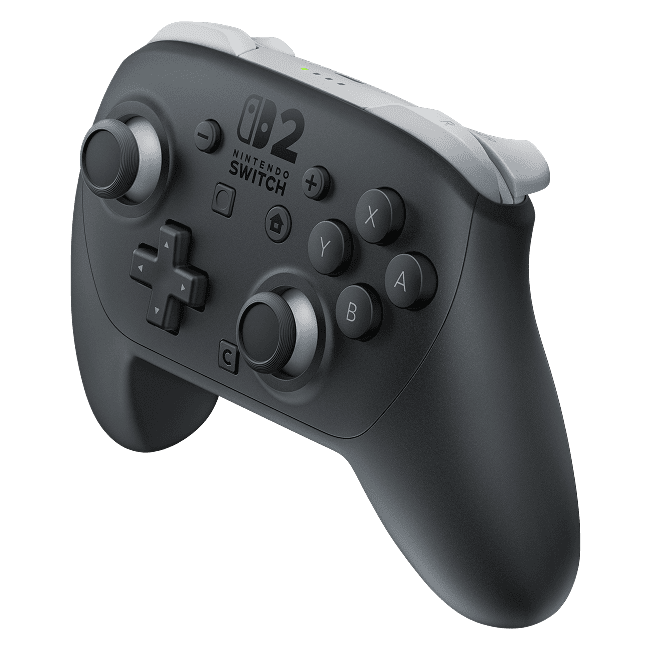
Nintendo Switch 2 Pro Controller not connecting can usually be troubleshot by connecting it with the supplied USB-C cable or pairing it again from the Switch 2 HOME Menu. Nintendo recommends updating and restarting the console, then connecting the controller to its dock and pressing A. If that doesn’t work, the wireless SYNC method is another option.
First make sure the controller has some charge and is actually a Switch 2 Pro Controller. Nintendo’s support page gives its model number as BEE-008, printed on the back underneath the Nintendo logo. An original Switch Pro Controller looks similar, but its pairing and compatibility details are different.
Nintendo Switch 2 Pro Controller not connecting: try the official USB pairing method
If the controller refuses to pair, start with a cable connection. Switch on the console, seat it in the Switch 2 dock and plug the controller into the dock with the included USB-C charging cable. Press A on the controller after connecting. Nintendo lists these steps for pairing through the dock.
- Make sure the Nintendo Switch 2 is powered on and placed in its dock.
- Connect the Switch 2 Pro Controller to a dock USB port with its charging cable.
- Press A or another controller button to wake the pad and register it.
- Unplug the cable and check that the controller responds wirelessly after pairing.
Nintendo also supports pairing directly with a suitable USB-C cable connected to the powered-on Switch 2 console. The important difference is that a dock-based pairing test requires the console to be seated in the dock. Charging from a dock is a separate matter and doesn’t always require the console to be inserted.
Nintendo Switch 2 Pro Controller not connecting: wireless SYNC pairing
If USB pairing fails, move on to wireless pairing from the HOME Menu. Select Controllers, then Change Grip/Order, and hold the controller’s SYNC Button for at least one second. The corresponding player LED should remain lit once pairing succeeds.
The SYNC Button is on the top edge of the controller, near its USB-C charging connection. Make sure the console is awake and the Change Grip/Order screen is visible before holding it. If the player light flashes and then disappears, make sure the controller has some charge before trying again.
Update and restart the Nintendo Switch 2
Nintendo’s first check is that the console has its latest system update. If the console is already up to date, hold POWER for at least three seconds, choose Power Options and select Restart. Once the HOME Menu returns, try USB pairing again.
If the controller still won’t register by cable, Nintendo advises pressing SYNC once, then pressing A or another button to wake it. Pressing SYNC here refreshes the controller connection; it does not erase your games. Try a different dock USB port or USB-C cable if the first one fails.
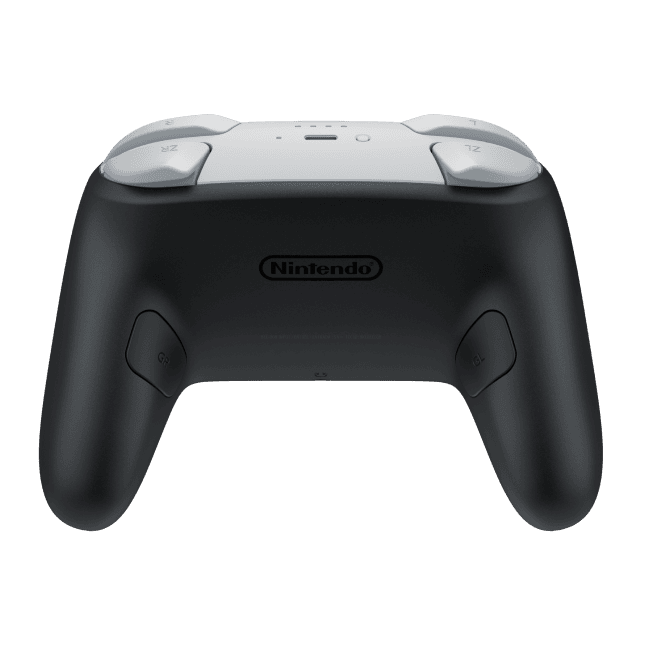
Nintendo Switch 2 Pro Controller not connecting even after resetting SYNC?
A Nintendo Switch 2 Pro Controller not connecting problem can come down to a faulty dock connection. Nintendo suggests another USB port, a different cable and, if you have one, another dock. If the controller pairs wirelessly but not by USB through one dock, the dock’s port may be the part that needs attention, rather than the controller itself.
When no player light appears at all, rule out a power problem. Plug the controller into a compatible Switch 2 charger and leave it for at least 15 to 30 minutes before another attempt. The separate charging troubleshooting guide explains Nintendo’s recharge LED checks and when a repair is recommended.
Can Bluetooth interference stop it pairing?
Yes, controller limits matter. Nintendo says Switch 2 can connect up to eight wireless controllers in general, although the number varies with software, features and controller types. When Bluetooth audio is in use, the limit can be two wireless controllers. Disconnect the Bluetooth audio device if you’re trying to connect an additional controller.
A Nintendo Switch 2 Pro Controller not connecting issue affecting just one game may instead relate to the game’s supported controls. Test the pad on the HOME Menu and another supported title. That helps separate a failed system connection from a particular game’s controller setup without promising that every game accepts every peripheral.
Will the Switch 2 Pro Controller work with the original Switch?
No. Nintendo states that Switch 2 Pro Controller model BEE-008 is made only for Nintendo Switch 2. If the Nintendo Switch 2 Pro Controller not connecting issue is happening on a first-generation Nintendo Switch, it isn’t a pairing fault you can fix with an update. The older Nintendo Switch Pro Controller works with Switch 2, but the newer controller does not work backwards with Switch.
Likewise, an unverified third-party controller or a controller marketed for a PC should not be treated as equivalent to the official model. Nintendo’s instructions cover its own Switch 2 Pro hardware and recommend contacting a third-party manufacturer for support with other devices.
Nintendo Switch 2 Pro Controller not connecting: when to book a repair
If the Nintendo Switch 2 Pro Controller not connecting problem survives a console update, restart, charge check, direct and dock USB pairing, wireless SYNC pairing and another cable or port, Nintendo’s support guidance says the controller needs repair. Don’t open it to move the battery or try unverified Bluetooth commands.
Once you know the power supply works and neither pairing method registers the pad, you have a useful description of the fault for Nintendo support. That is better than replacing the console or buying a new controller without checking the simpler causes first.
Related Guides
- Switch 2 Pro Controller Not Charging
- Switch 2 Pro Controller Battery Revision
- Nintendo Switch 2 Pro Controller Review
- Joy-Con 2 Connection Problems
- Switch 2 Battery Model Identification
- Nintendo Switch 2 GameChat Friends Fix
- Nintendo Switch 2 Battery Replacement
- Switch Pro Controller vs Switch 2 Compatibility
Official source: Nintendo UK, Unable to Pair or Sync the Switch 2 Pro Controller.





