
Sims 4 Lock Television is a free access feature added in the October 27, 2026 update. It lets households restrict who uses a particular television, borrowing the idea of access settings already found on computers.
If adults keep wandering into your child’s room to use the TV, you can now restrict that particular screen without locking the bedroom door. The feature was included in the free October 27 patch, and the steps below show how to set it up.
How to find Sims 4 Lock Television settings
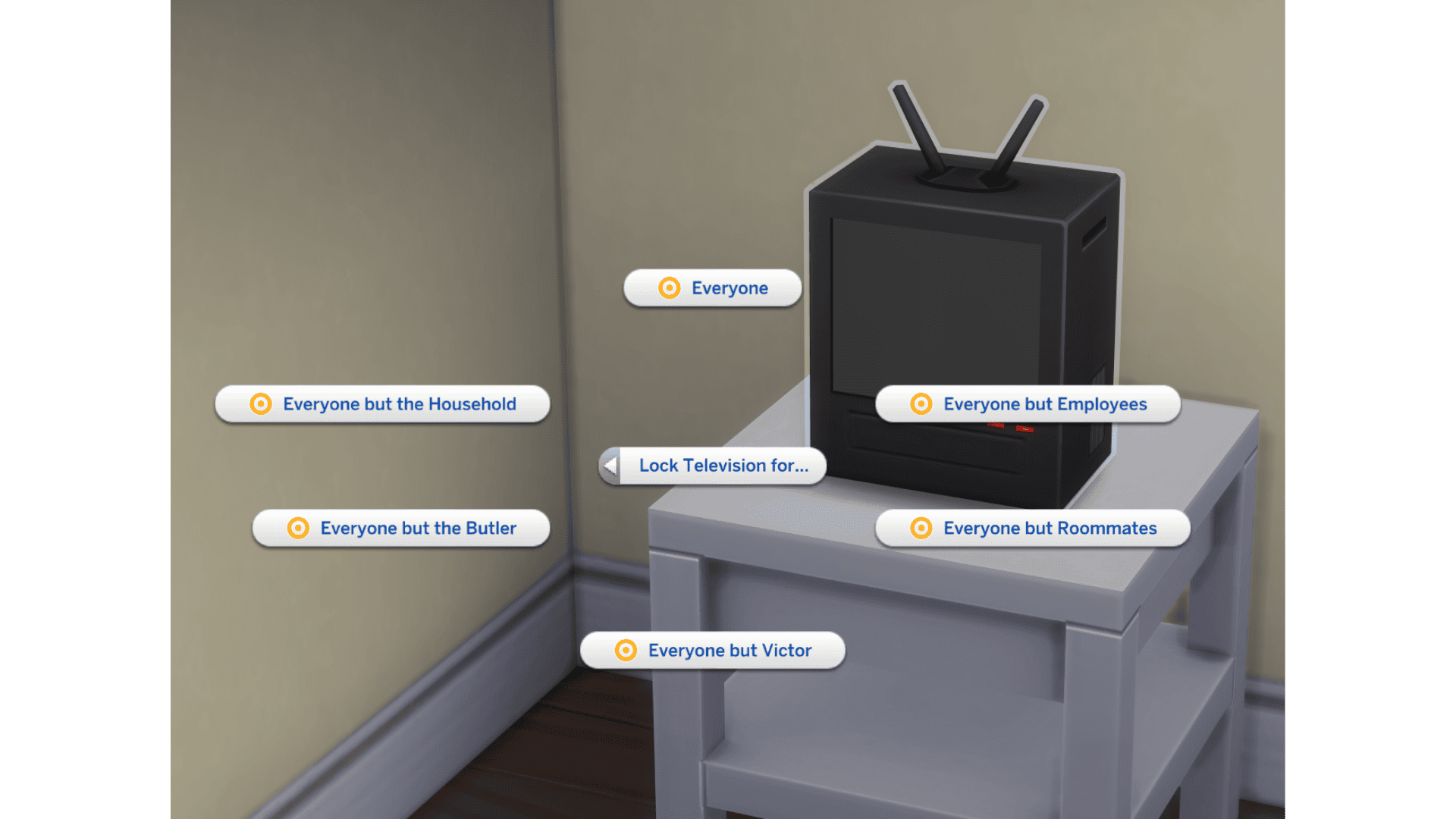
In Live Mode, click the TV you want to control and choose Lock Television for… from its interaction menu. Select who should be blocked, such as everyone, household members, visitors or an individual Sim. Restrictions apply to that particular set, so the living-room TV can stay available while the one in a child’s room is reserved for them.
The lock applies to that individual object, not every television in the save. You’ll have to change another set separately if you want it to follow the same rules.
Sims 4 Lock Television: Can you reserve a TV for a child?
Yes. EA introduced Sims 4 Lock Television using exactly this example: adults keep taking over a child’s playroom TV. Click that set and restrict the adults who shouldn’t use it. You don’t have to prevent them entering the room just to stop them watching.
If you want everyone to use the family room TV, leave that object unrestricted. That way adults have somewhere else to watch without repeatedly interrupting the playroom. The lock applies to that TV, not the room or every entertainment activity.
Sims 4 Lock Television: Which Sims can you restrict?
The menu shown by EA allows restrictions for everyone, household members, visitors and individual Sims. Sims 4 Lock Television uses object-specific permissions, much like the computer lock. EA hasn’t documented every roommate or unusual household arrangement, so check what the menu offers in your save rather than assuming all relationships are covered.
To keep guests off a living-room TV, select its visitor restriction. To reserve a child’s screen, choose the adults you want excluded. Test the restriction by switching to another household Sim and selecting the TV. If they still use it, reopen the TV’s permissions and check which Sims are excluded.
Does Sims 4 Lock Television work like a computer lock?
EA says it does. Computers have long offered access controls that help reserve a machine for particular Sims. The October addition brings a similar idea to the TV interaction menu, letting you manage entertainment equipment more precisely instead of rearranging furniture to discourage unwanted use.
If you change your mind, click the same television and review its access settings. This isn’t the Sim Options menu or a global autonomy switch: the permission stays with the TV you’ve selected.
What Sims 4 Lock Television will not fix
This feature manages access, not all household autonomy. A Sim who cannot use one TV may still watch another unrestricted television, and nothing in EA’s announcement promises to stop every attempt to seek entertainment elsewhere. If you want a different behaviour across the entire household, you may still need to arrange which TVs remain available.
Nor is it a repair for a TV that cannot be reached, a missing interaction caused by a faulty mod or objects stuck behind furniture. For those problems, investigate routing and test any custom content separately. The October patch includes other fixes, but those do not automatically make every television-related issue disappear.
Sims 4 Lock Television option missing?
The Sims 4 Lock Television menu was added on October 27. If it is missing, first confirm your game finished updating, then try an ordinary base-game TV rather than a custom-content object.
If it still doesn’t appear, test another TV in a new, disposable save. If you use UI or object mods, check their October compatibility before testing again without them. On PC and Mac, outdated interface or object mods can complicate patch-day testing. Our guide to testing without mods shows how to isolate a problem while protecting your save.
When does Sims 4 Lock Television release?
EA released the free October 27 update with the new TV locks. It didn’t announce a separate paid pack or unlock requirement for this feature. Once your copy is patched, the menu belongs to the television itself.
The same patch also expands Businesses & Hobbies Family Recipes, moves the fridge’s Open interaction forward, improves eating behaviour and adds new muscle and weight settings. Our October 27 update overview covers the wider release.
Related Guides
Official source: EA’s October 20 Laundry List.





