
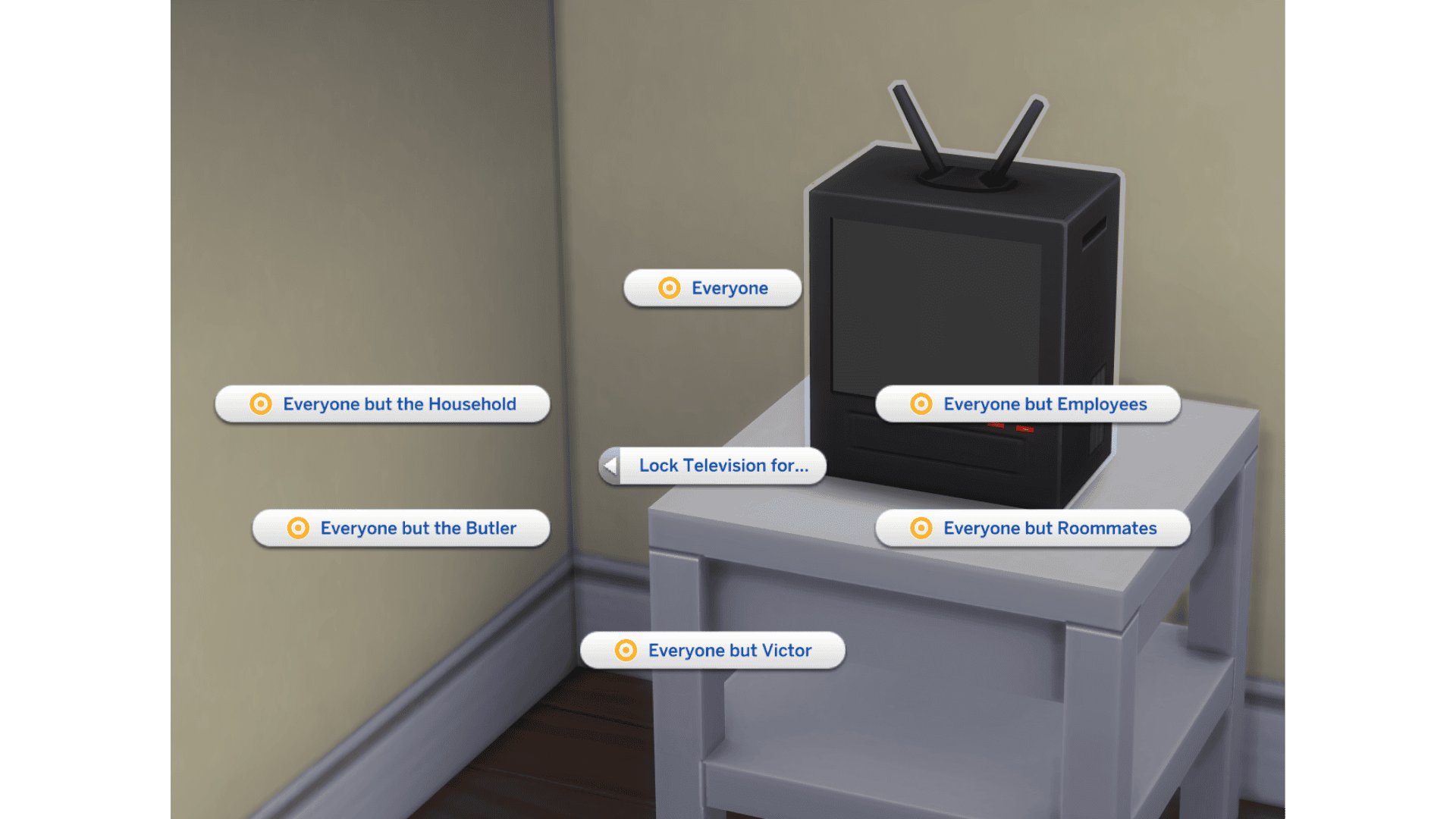
Sims 4 Lock Television is a free control added in the October 27, 2026 base-game update. It lets you stop certain Sims from using a particular television, similar to the access settings that already exist on computers. A child’s bedroom TV, for example, can be reserved for that child rather than becoming the family’s favourite screen.
The setting applies to one TV at a time, so you can keep a child’s television for that child while leaving the living-room set available to everyone. Here’s where to find the menu and what to do if it isn’t showing.
How to use the Sims 4 Lock Television setting
After installing the October 27 update, select the television you want to restrict in Live Mode. EA’s preview shows a new pie-menu category called Lock Television for…. Open that category and choose the Sims you want to prevent from using that particular set.
The Sims 4 Lock Television menu works at the level of an individual TV. That is the point of the feature: you can keep a screen in one room private without making every TV in the home off-limits. EA says you will be able to choose access so only a specified child uses a TV, even when adults are nearby and would otherwise watch it.
The TV’s menu provides options for blocking everyone, household members, visitors or individual Sims. Select the category or Sim you want to restrict, then select the same TV again to review or change the lock. EA compares it to computer access controls, but doesn’t document every guest and roommate edge case.
Can you lock a TV for one Sim or a household?
EA explicitly describes using the Sims 4 Lock Television feature to reserve a playroom television for one specific child. It is therefore not limited to placing a TV behind a locked door or stopping the whole household from watching television.
Think about a home where an adult keeps choosing the TV in the children’s playroom. The upcoming permissions mean you should be able to restrict that set to the intended child while leaving the living-room television available to everyone. This is especially useful when you have multiple screens and want to control which members of the household use each one.
EA’s example confirms the individual-child use case; it has not separately documented how every guest, visitor, roommate or age-based category behaves with these locks. Those finer points should be tested after release instead of treating the computer-permissions system as an exact copy.
Is the Sims 4 Lock Television control free?
Yes. EA lists the Sims 4 Lock Television change among the bonus quality-of-life improvements for the October 27 base-game update. The announcement does not name an expansion pack as a requirement. As with other base-game controls, players should first check that their game is on the new version before looking for the menu.
This is separate from the new muscle and weight controls, which adjust how Sims’ bodies change, and from the October 27 update’s food and dining repairs. You can use the TV restrictions without turning on any of those unrelated settings.
How is locking a television different from locking a door?
When you lock a bedroom door, you control who can enter the entire room. The Sims 4 Lock Television feature instead concerns the use of that specific object. A Sim should still be able to enter the room and interact with other furniture even if that TV is restricted.
For a shared playroom, object-specific permissions offer a more flexible approach than sealing off the room. Another Sim can still sit on a sofa, talk or play with toys. The new setting is intended to prevent the unwanted television interaction, not to change access to the rest of the lot.
EA has not described it as a channel blocker, parental content filter or way to hide particular shows. It is an access control on the television. If your concern is which Sim keeps turning on a screen, it should address that. If you want to block one specific TV channel, there is no announced channel-level feature in this update.
What if Sims 4 Lock Television is missing?
The option requires the October 27 update. If it is missing, check that the patch installed, enter Live Mode and select an ordinary TV. It is not a choice under Sim Options. The new option belongs to the television’s menu, not the Sim Options menu.
If the Sims 4 Lock Television category does not appear after updating, check another ordinary television in the same save, then try an unmodded test save. Outdated interaction-menu mods may interfere with new options, although EA has not identified a specific October mod conflict yet. Protect important progress first using our save backup guide and testing steps.
The Sims 4 Lock Television setting lets you manage one screen without locking doors or preventing Sims from using a different television. If one TV keeps attracting the wrong household members, this is the object to change.
Related Guides
Official source: EA’s October 20 Sims 4 Laundry List.





