
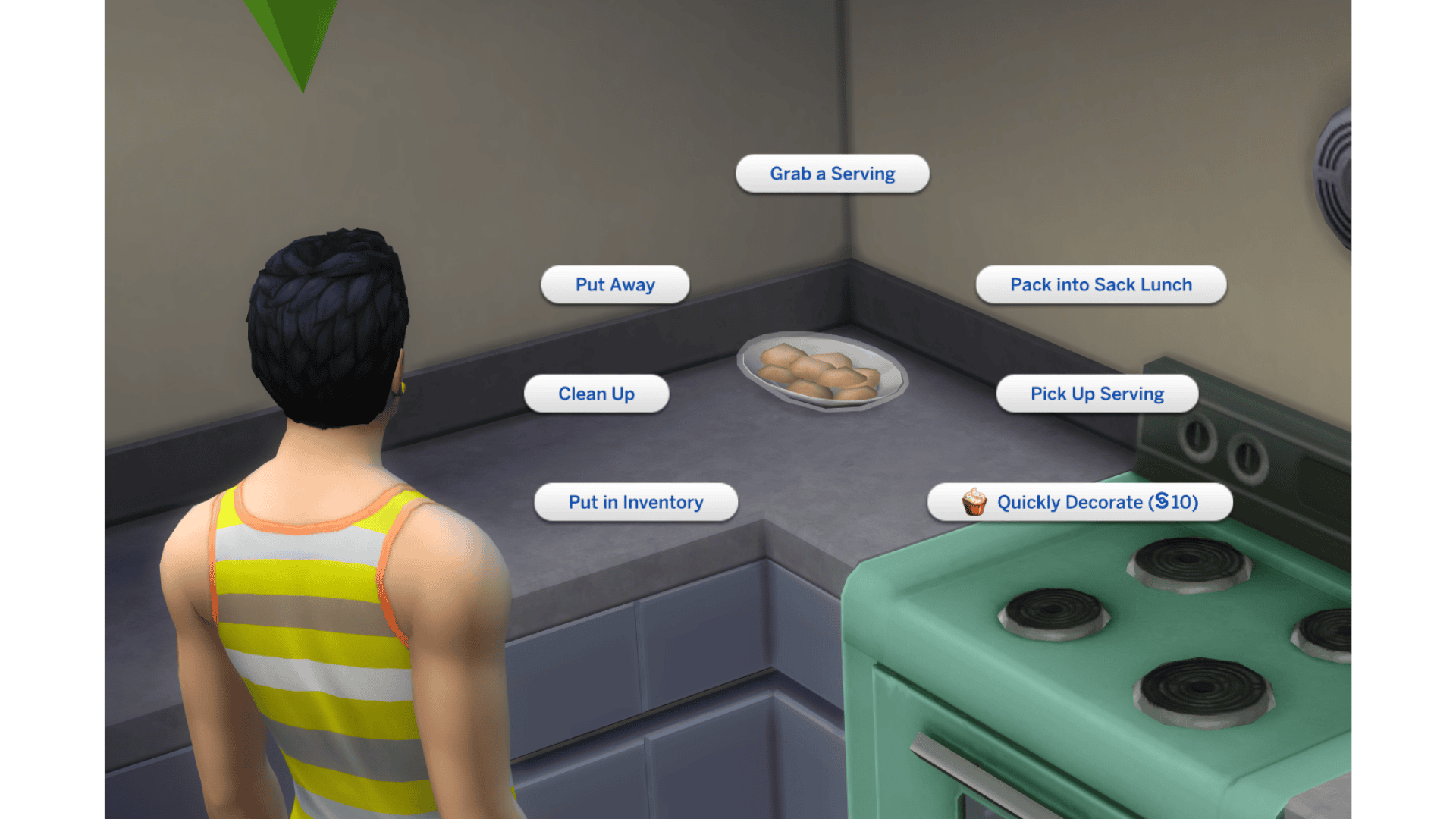
Sims 4 Quickly Decorate received a fix in The Sims 4’s October 27, 2026 update. Some Get to Work baked goods couldn’t be decorated when they weren’t sitting in the centre of a countertop. Sims would fail to reach the dish, even though it looked perfectly accessible. EA added a Quickly Decorate action with a short swipe animation to get around that particular positioning problem.
If your Sim still refuses to decorate baked goods, click the food and look for the new action. It applies to eligible Get to Work Baking items, not every cake or meal in the game. Here’s what to check if it isn’t available or still cancels.
How to use Sims 4 Quickly Decorate after the October patch
The new option belongs to eligible baked goods made through the Get to Work Baking skill. Install the October 27 update, load a household that can bake the item you want and prepare it as usual. Once the finished food is placed, click the baked item and look for Quickly Decorate among its available interactions.
- Install the October 27 patch and restart The Sims 4.
- Make sure Get to Work is installed and active.
- Have a Sim prepare a baked good they can make using the Baking skill.
- Click the finished baked item and choose Quickly Decorate, when available.
- Let the action finish without queuing a different task that could interrupt it.
- If the option does not appear, test another eligible baked good in a clean, accessible kitchen.
Sims 4 Quickly Decorate is meant to work when a baked item is off-centre on the countertop. You shouldn’t need to move the tray to the middle of the surface just to get the decoration interaction to complete.
Why is Sims 4 Quickly Decorate missing from the menu?
When using Sims 4 Quickly Decorate, not every cooked meal is part of the Get to Work Baking system. If you’re clicking an ordinary serving of dinner or a recipe from another pack, don’t assume it should show the new interaction. First test with a baked good your Sim can make and decorate, and check their Baking skill and available item interactions.
Next, confirm the game really has the October 27 update. Check your launcher and the current game version. If you’re using Get to Work on a different platform or save, make sure the expansion is installed there too. The fix was announced for that pack, so a base-game-only household should not expect the same baking interaction.
What to try if Sims 4 Quickly Decorate still cancels

Check the counter or work surface. Even though the October update addresses off-centre baked goods, Sims still need room to reach their work area. Try placing the same kind of food on an ordinary, uncluttered counter with a clear path in front of it. A cramped kitchen or custom counter can introduce a different routing problem.
If Sims 4 Quickly Decorate works in a simple kitchen but not your own build, check for clutter, overlapping objects and custom counters that could still interfere with the Sim’s route. Test in a copy of the save, not by permanently tearing apart a kitchen you’ve spent hours building.
On PC and Mac, outdated baking, interaction-menu and recipe mods can also affect what appears when you select food. Back up your Saves and Mods folders, then open a separate test save without those files. Don’t overwrite a favourite modded household while its custom content is disabled. Our mod-free testing guide explains how to do that safely.
Does Sims 4 Quickly Decorate work on every cake and dessert?
EA described the October change as a Get to Work Baking improvement, particularly for items that were not centred on a counter. It did not provide a complete list of every food object that supports the new interaction. It’s therefore safer to check the actual action on your baked good than to claim all cakes, pastries and desserts can be decorated in exactly the same way.
The wider patch also updates food prices and calories, improves Sims’ preference for leftovers and expands Businesses & Hobbies Family Recipes. Those are separate changes. Quickly Decorate isn’t a shortcut for creating a Family Recipe or a new universal option for all cooking objects.
Was Sims 4 Quickly Decorate fixed on October 27?
Yes, the patch adds the new interaction to address the specific Get to Work baking-routing problem. If it fails on an eligible item after updating, note the recipe, Baking skill level, counter used and whether the issue occurs in a clean save. That gives EA a reproducible problem rather than only the message that decorating is broken.
Start with one eligible baked good on an ordinary counter. If the action works there but not in your original kitchen, you’ve narrowed the problem down without risking your main build.
Related Guides
Official source: EA’s October 27 final patch notes.




