
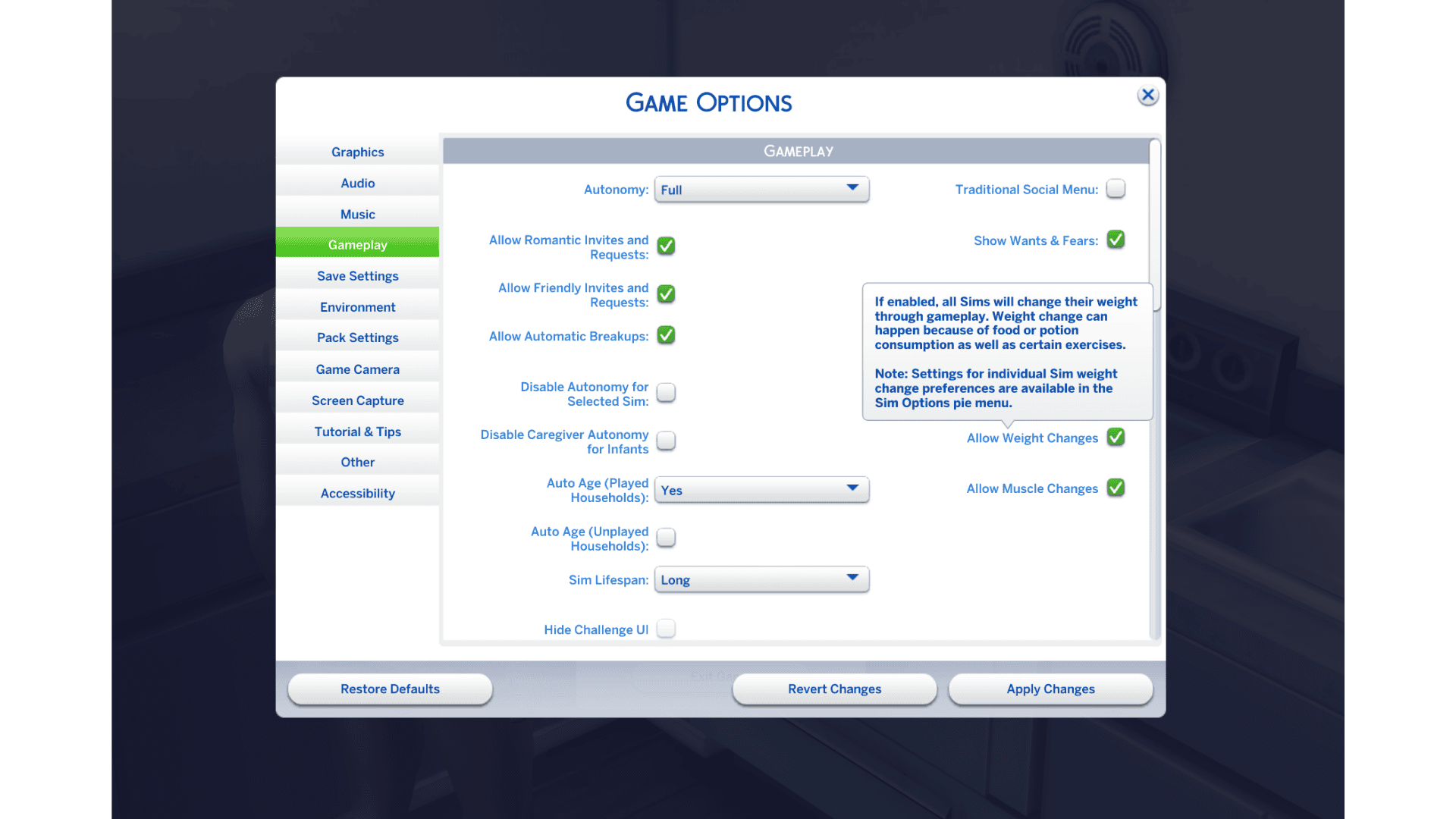
Sims 4 food calories received a balancing pass on October 27, 2026, along with new options to stop a Sim’s weight and muscle from changing. EA adjusted the calorie and price values attached to food and drinks across the base game and its packs. It has not published a complete numerical list of the changed foods, so an old chart of exact calorie values may no longer be accurate.
You can now decide whether Sims 4 food calories affect a particular Sim’s weight at all. The patch adds separate weight and muscle switches for an entire save or one Sim. Here’s where to find them and what the food rebalance changes.
What changed for Sims 4 food calories in the October update?
EA describes a comprehensive tuning pass to make food and drink calories and prices more consistent. This affects the base game and packs, not just a handful of newly added recipes. The developer hasn’t released a complete recipe-by-recipe table showing old and new values, and the patch doesn’t add an in-game calorie-counting interface.
You don’t have to unlock a new system. Sims 4 food calories have changed behind the scenes, so older community tables might be out of date. You may notice a Sim’s weight change over time, but one particular meal won’t always have a visible effect.
How to turn off weight changes from Sims 4 food calories
- Install the October 27 update.
- Open the game’s Game Options menu.
- Find Allow Weight Changes and turn it off if you want to preserve Sims’ current weight.
- Change Allow Muscle Changes separately if you also want to prevent muscle changes.
- Apply your settings and return to the save.
The two switches are independent. You can stop weight changes while still allowing muscle development, or preserve muscle while allowing weight to change. Turning them off does not prevent Sims from eating or exercising. You can still build the Fitness skill without the same automatic physique changes.
Can you change the Sims 4 food calories settings for one Sim?
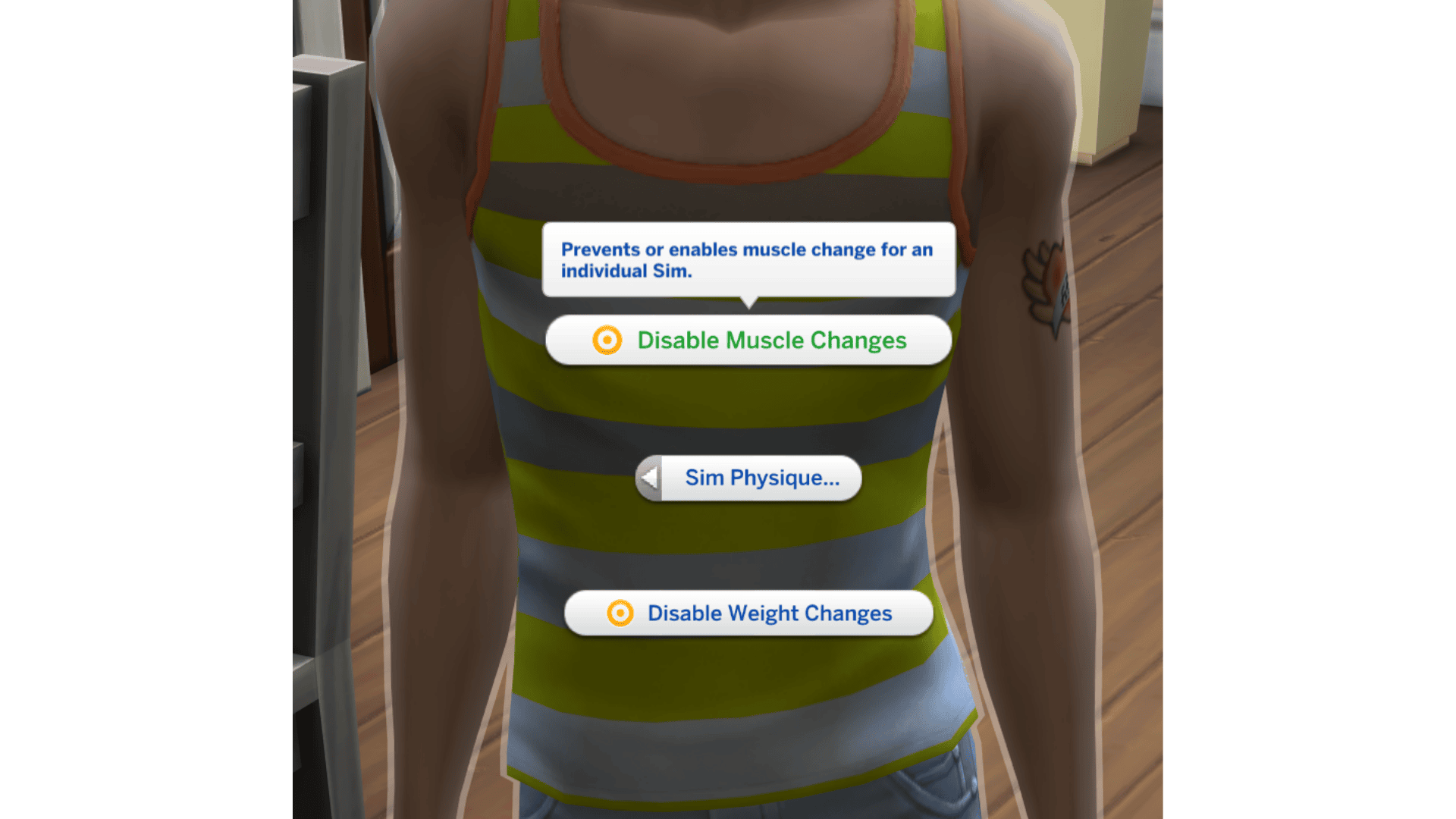
Yes. Click the active Sim, choose Sim Options and open Sim Physique. EA’s example shows Disable Weight Changes and Disable Muscle Changes as separate self-interactions. That lets you adjust one character while other Sims in the save continue using the general rules.
For example, you could leave weight changes on for one Sim while disabling them for another. The controls don’t set a target weight and, according to EA, don’t affect dogs, cats or horses.
Why Sims 4 food calories changes might still affect a Sim
Check whether you changed the whole-save setting or just one character’s Sim Physique option. The October update lets those controls operate independently. If a Sim keeps changing unexpectedly, confirm which switches are active before changing food or deleting the household.
The toggles affect changes from that point forward. They won’t return a Sim to the body shape they had in a previous save. If that’s your goal, consider restoring an earlier save instead.
Is there a list of all updated Sims 4 food calories values?
Not from EA at the time of the October 27 release. The announcement confirms that calories and pricing were tuned across food and drink items, but doesn’t supply exact before-and-after values for every dish. Anyone publishing exact Sims 4 food calories after this patch needs to check the updated game data rather than copying older numerical charts.
If you’re comparing foods in a modded game, test without mods that alter recipe tuning, hunger or metabolism before concluding the base game is using an unexpected value. The patch changed the underlying food system, and older modded data may not match it.
The October update also makes Sims prefer leftovers and expands Businesses & Hobbies Family Recipes with over 375 existing dishes. Neither means those meals are automatically calorie-free. To keep a Sim’s weight consistent regardless of their diet, use the weight-change switch rather than trying to control every meal.
Related Guides
Official source: EA’s October calorie tuning and Sim Physique announcement.




