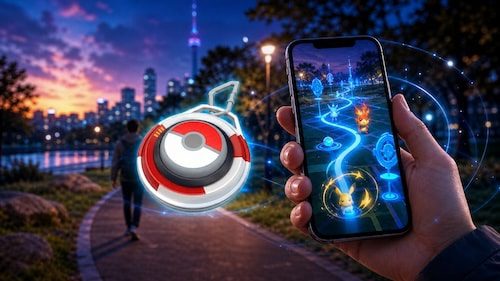
The Pokémon GO Explorer Gadget daily limit controls how many Pokémon the new built-in auto-catcher can catch and how many PokéStops it can spin each day. Unlike a fixed allowance that applies to every player, the Explorer Gadget limit is based on your Trainer level, meaning higher-level and lower-level Trainers may not receive the same daily capacity.
Pokémon GO has confirmed that daily limits exist, but it has not published a complete official table showing the exact number of catches and PokéStop spins available at every Trainer level.
What Is the Pokémon GO Explorer Gadget Daily Limit?
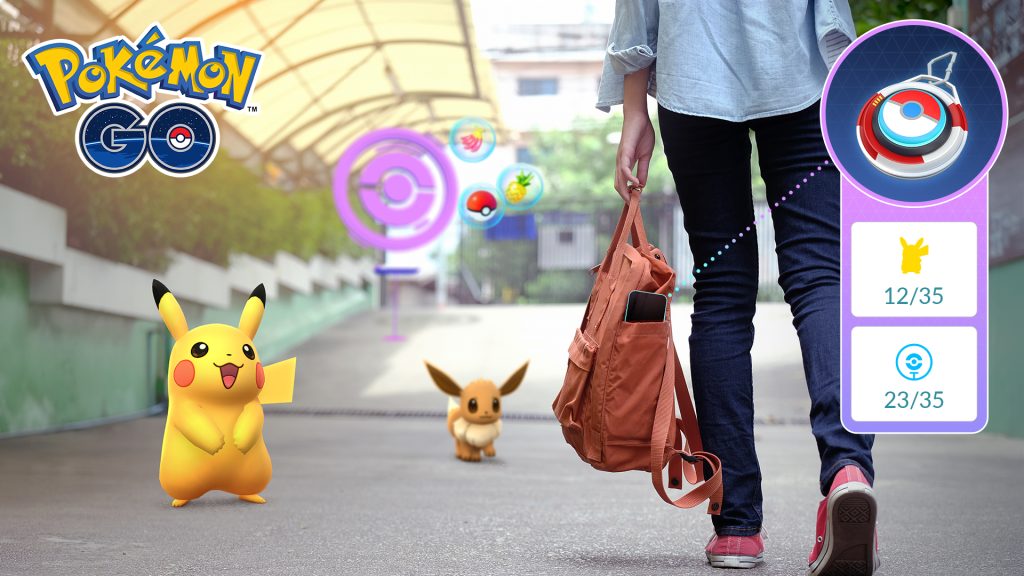
The Pokémon GO Explorer Gadget daily limit applies separately to the Pokémon it can catch and the PokéStops it can spin while running in the background.
Once you activate the Explorer Gadget, it can automatically attempt to catch eligible Pokémon using regular Poké Balls and spin nearby PokéStops as you move around.
However, this does not continue indefinitely.
The Explorer Gadget has a maximum number of catches and spins it can complete each day, with the available allowance determined by your Trainer level.
Once the Pokémon GO Explorer Gadget daily limit for an activity has been reached, the Gadget stops performing that activity for the rest of the day.
Use our interactive Pokémon GO trackers to record shinies, regional Pokémon, costumes, patterns and event collections.Track Your Pokémon GO Collection
 Shiny Pokémon TrackerTrack every shiny Pokémon you have caught.
›
 Regional Pokémon TrackerRecord every regional Pokémon in your collection.
›
 Costume Pikachu TrackerTrack every costume Pikachu released in Pokémon GO.
›
 Vivillon TrackerTrack Vivillon patterns and regional postcard progress.
›
 Unown TrackerRecord every Unown letter and symbol collected.
›
 Costume Eevee TrackerTrack costume Eevee and every available evolution.
›
 Ultra Unlock Event TrackerTrack limited Ultra Unlock Pokémon and rewards.
›
 Summer Marathon Event TrackerTrack event encounters and collection progress.
›
 Pokemon GO XP Calculator
›
 Raichu Costume Tracker
›
 Pichu Costume TrackerDescribe what players can track.
›
 Pokémon GO Costume Pokémon Tracker
›
How Many Pokémon Can the Explorer Gadget Catch Per Day?

There is currently no single official catch number that applies to every Pokémon GO player.
Pokémon GO states that the Explorer Gadget’s daily limits depend on Trainer level. This means it would be misleading to give one number and claim that every Trainer can automatically catch that many Pokémon each day.
Early testing has produced different limits across different accounts, reinforcing that the allowance is not universal. However, these player-reported figures should not be treated as the final official level-by-level limits while the feature remains in phased rollout.
For now, the safest way to determine your own Pokémon GO Explorer Gadget daily limit is to check the Explorer Gadget information displayed on your account.
Does the Pokémon GO Explorer Gadget Daily Limit Include PokéStops?
Yes. The Pokémon GO Explorer Gadget daily limit covers PokéStop spinning as well as automatic Pokémon catching.
The Explorer Gadget can spin nearby PokéStops while you are moving around without actively keeping Pokémon GO open on your screen.
Like automatic catches, PokéStop spins are limited each day.
Reaching the catch limit does not mean that a full Item Bag caused the Gadget to stop, and reaching the spin limit does not mean that there is necessarily a problem with the feature. Players should check both their Explorer Gadget activity and available storage before assuming it has stopped working incorrectly.
Does Trainer Level Change the Explorer Gadget Daily Limit?
Yes. Trainer level affects the Pokémon GO Explorer Gadget daily limit.
Pokémon GO specifically states that the daily number of Pokémon the Gadget can catch and PokéStops it can spin is based on Trainer level.
However, an official chart showing the precise limit at Level 20, Level 21, Level 30 and every other Trainer level has not been included in the initial announcement.
That distinction matters while the Explorer Gadget is rolling out. Reports from other players may show different numbers without either account necessarily being bugged.
If Pokémon GO publishes a full level-by-level Explorer Gadget limit table, the exact allowances will become much easier to compare.
What Happens When You Reach the Pokémon GO Explorer Gadget Daily Limit?
Once you reach the Pokémon GO Explorer Gadget daily limit, the Gadget stops the relevant activity for that day.
This is different from the Explorer Gadget stopping because you have run out of space.
If your Pokémon Storage is full, the Explorer Gadget stops catching Pokémon because there is nowhere to store additional catches.
If your Item Bag is full, it stops spinning PokéStops because you cannot collect the items they provide.
Clearing storage can address those storage-related interruptions. Reaching the actual daily limit, however, means that activity is finished for the day.
Running Out of Poké Balls Is Not the Daily Limit
The Explorer Gadget only uses regular Poké Balls for its automatic catch attempts.
It does not automatically switch to Great Balls or Ultra Balls.
This means running out of Poké Balls can prevent automatic catches even if you have not reached the Pokémon GO Explorer Gadget daily limit.
Players planning to use the feature while walking for longer periods should therefore keep an eye on their regular Poké Ball supply as well as Pokémon Storage.
Having hundreds of Great Balls or Ultra Balls will not keep Explorer Gadget catches going if your supply of standard Poké Balls has been exhausted.
Use our interactive Pokémon GO trackers to record shinies, regional Pokémon, costumes, patterns and event collections.Track Your Pokémon GO Collection
Shiny Pokémon TrackerTrack every shiny Pokémon you have caught.
›
Regional Pokémon TrackerRecord every regional Pokémon in your collection.
›
Costume Pikachu TrackerTrack every costume Pikachu released in Pokémon GO.
›
Vivillon TrackerTrack Vivillon patterns and regional postcard progress.
›
Unown TrackerRecord every Unown letter and symbol collected.
›
Costume Eevee TrackerTrack costume Eevee and every available evolution.
›
Ultra Unlock Event TrackerTrack limited Ultra Unlock Pokémon and rewards.
›
Summer Marathon Event TrackerTrack event encounters and collection progress.
›
Pokemon GO XP Calculator
›
Raichu Costume Tracker
›
Pichu Costume TrackerDescribe what players can track.
›
Pokémon GO Costume Pokémon Tracker
›
Pokémon GO Plus+ Can Also Stop the Explorer Gadget for the Day
There is another situation that can look similar to reaching the daily limit.
Pokémon GO allows players to keep an accessory such as Pokémon GO Plus+ paired while also having access to the Explorer Gadget, but the two cannot be active simultaneously.
If you switch to an accessory device while the Explorer Gadget is active, the Explorer Gadget stops. More importantly, Pokémon GO states that you cannot use the Explorer Gadget again until the following day.
That restriction is separate from the normal Pokémon GO Explorer Gadget daily limit, so players using both systems should be careful when switching between them.
How to Check Your Pokémon GO Explorer Gadget Daily Limit
Players can access the Explorer Gadget through its icon on the Map View or through the Key Items section of the Item Bag.
The Explorer Gadget provides a summary of its activity, including how many Pokémon have been caught and how many PokéStops have been spun.
Checking this information is particularly useful while the feature is in phased rollout because the exact limit is linked to Trainer level rather than one publicly confirmed universal number.
If your Explorer Gadget suddenly stops catching or spinning, check your daily activity, Pokémon Storage, Item Bag space and Poké Ball supply before assuming the feature is broken.
For now, the key point about the Pokémon GO Explorer Gadget daily limit is that it varies according to Trainer level. Pokémon GO has confirmed the level-based system, but until exact limits for every level are officially detailed, any single number circulating online should not be treated as the limit for every Trainer.