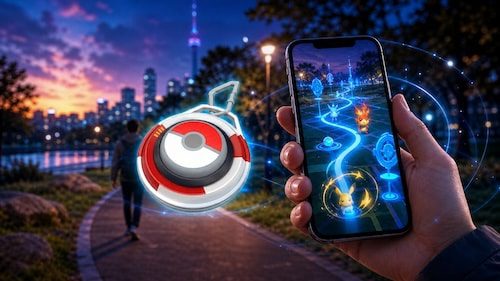
If you are trying to work out how to get the Explorer Gadget in Pokémon GO, the main thing to know is that the feature is not being released to every Trainer at once. The Explorer Gadget is entering a phased rollout, and only Trainers at Level 20 or higher are eligible to use it.
That means two players can currently have different experiences even if they are playing in the same general period. One account may already have access to the Explorer Gadget while another eligible Trainer may still be waiting for the feature to appear.
How to Get the Explorer Gadget in Pokémon GO
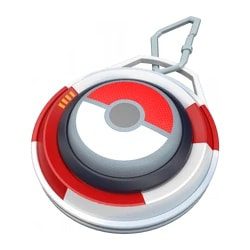
To get the Explorer Gadget in Pokémon GO, you first need to reach Trainer Level 20.
Once the feature has been enabled for your account as part of the phased rollout, the Explorer Gadget should appear in one of two places:
- The Explorer Gadget icon in the top-right area of the Map View
- The Key Items section of your Item Bag
There is no physical Explorer Gadget to buy and no separate accessory that needs to be paired with your phone. The Explorer Gadget is a built-in Pokémon GO feature.
If you are already Trainer Level 20 or above but cannot find it, that does not necessarily mean there is anything wrong with your account. The phased rollout means availability is currently limited, with broader global availability due to be detailed later.
Use our interactive Pokémon GO trackers to record shinies, regional Pokémon, costumes, patterns and event collections.Track Your Pokémon GO Collection
 Shiny Pokémon TrackerTrack every shiny Pokémon you have caught.
›
 Regional Pokémon TrackerRecord every regional Pokémon in your collection.
›
 Costume Pikachu TrackerTrack every costume Pikachu released in Pokémon GO.
›
 Vivillon TrackerTrack Vivillon patterns and regional postcard progress.
›
 Unown TrackerRecord every Unown letter and symbol collected.
›
 Costume Eevee TrackerTrack costume Eevee and every available evolution.
›
 Ultra Unlock Event TrackerTrack limited Ultra Unlock Pokémon and rewards.
›
 Summer Marathon Event TrackerTrack event encounters and collection progress.
›
 Pokemon GO XP Calculator
›
 Raichu Costume Tracker
›
 Pichu Costume TrackerDescribe what players can track.
›
 Pokémon GO Costume Pokémon Tracker
›
What Level Do You Need for the Explorer Gadget?
You must be Trainer Level 20 or higher to use the Explorer Gadget in Pokémon GO.
Players below Level 20 are not eligible for the feature yet.
Reaching Level 20 does not necessarily mean the Explorer Gadget will immediately appear, however. The level requirement and rollout availability are separate conditions.
You need both:
- A Trainer account at Level 20 or above
- Explorer Gadget access to have reached your account during the phased rollout
This is particularly important for anyone searching for how to get the Explorer Gadget in Pokémon GO and assuming they need to complete a quest, buy an item or unlock it through an event. None of those methods are part of the announced system.
Do You Need to Buy the Pokémon GO Explorer Gadget?
No. There is no physical Explorer Gadget that players need to purchase.
The Explorer Gadget is built directly into Pokémon GO and functions through the game itself.
This separates it from accessories such as Pokémon GO Plus+, which are external devices that connect to Pokémon GO.
Once your account receives Explorer Gadget access, you can activate the feature directly from Pokémon GO without buying additional hardware.
Where Is the Explorer Gadget in Pokémon GO?
Once available, the Explorer Gadget in Pokémon GO can normally be accessed from the Map View.
Look for the Explorer Gadget icon near the top-right of the screen.
Players can also find the feature inside the Key Items section of the Item Bag.
If you have an accessory device such as Pokémon GO Plus+ paired with Pokémon GO, you can still use the Explorer Gadget. You do not need to unpair your physical accessory.
However, the Explorer Gadget and an accessory device cannot both be active at the same time.
Players with a paired accessory can activate the Explorer Gadget through the Key Items section of the Item Bag.
Why Don’t I Have the Explorer Gadget Yet?
The most likely reason you do not yet have the Explorer Gadget is the phased rollout.
The feature has not been made globally available to every Pokémon GO account at the same time.
If you are Trainer Level 20 or higher and the Explorer Gadget is not appearing, you may simply need to wait until access reaches your account.
There is currently no announced method for forcing the Explorer Gadget to appear early.
Restarting Pokémon GO, repeatedly reinstalling the app or buying another accessory is therefore not an announced requirement for getting access.
A global availability date has not yet been confirmed.
How Do You Activate the Explorer Gadget?
Once you have access, activating the Explorer Gadget is straightforward.
Open Pokémon GO and select the Explorer Gadget icon from the Map View or open the Key Items section of your Item Bag.
Activate the Explorer Gadget, then continue moving around with your smart device on you.
The feature can operate in the background, allowing you to lock your screen while it automatically attempts to catch eligible Pokémon and spin nearby PokéStops.
The Explorer Gadget only uses regular Poké Balls when catching Pokémon. It will not automatically use Great Balls or Ultra Balls.
It also has daily catch and PokéStop spin limits that vary according to Trainer level.
Can You Unlock the Explorer Gadget Through a Quest?
There is currently no announced quest, Timed Research or Special Research required to unlock the Explorer Gadget.
The feature’s availability is determined by the Trainer Level 20 requirement and the ongoing rollout.
If the Explorer Gadget has not appeared for your account, completing additional Research tasks will not currently provide a confirmed way to unlock it.
This is worth keeping in mind because new Pokémon GO features are often tied to events, Research or Shop items. The Explorer Gadget is different and is being introduced directly as a built-in game feature.
When Will Everyone Get the Explorer Gadget in Pokémon GO?
A date for the worldwide release of the Explorer Gadget has not yet been announced.
The initial announcement confirms that the Explorer Gadget is entering a phased rollout and that more information about when the feature will be available globally will be shared later.
For now, the answer to how to get the Explorer Gadget in Pokémon GO is therefore straightforward: reach Trainer Level 20 and wait for the feature to become available on your account.
Once access arrives, there is nothing extra to purchase. Check the top-right of the Pokémon GO Map View or the Key Items section of your Item Bag, activate the Explorer Gadget and it will be ready to use.