
Gears of War E-Day high CPU usage can be normal on a capable PC because the game is unusually processor heavy, but high utilisation becomes a troubleshooting problem when it is paired with unstable frame times, severe stutter, thermal throttling or a clear CPU bottleneck. Independent testing across 25 processors has measured utilisation around 80 to 90 percent in some scenarios and found meaningful scaling between faster and slower CPUs, so a busy processor is not automatically evidence that something is broken.
The useful question is what the CPU load is doing to the game. If the graphics card is sitting well below full utilisation while one or more CPU threads are limiting frame delivery, the processor can be the bottleneck even when the total CPU figure is below 100 percent. If the GPU is fully loaded and frame rate rises when graphics settings are reduced, the system is more likely GPU limited. Gears of War: E-Day high CPU usage should therefore be diagnosed with utilisation, frame times, temperatures and repeatable performance together rather than one Task Manager percentage.
Why Gears of War E-Day high CPU usage happens
Gears of War: E-Day is built from the ground up in Unreal Engine 5 and the PC version can make unusually strong use of modern multicore processors. Testing has shown substantial scaling between CPUs at 1080p and high settings, which means the game is capable of turning extra processor performance into more frames. That is good when the CPU has headroom, but it also means slower processors can become the limiting component sooner than players expect.
Gears of War E-Day high CPU usage also changes with graphics conditions. At a low enough resolution or with an aggressive upscaling mode, the GPU can finish frames faster and expose the processor as the next limit. At a higher resolution or with heavier visual settings, the GPU does more work and the CPU difference can become less visible. That is why lowering every graphics option can sometimes make Gears of War E-Day high CPU usage look worse even though the game is producing more frames.
Is 80 to 100 percent CPU usage bad?
Gears of War E-Day high CPU usage is not bad by itself. A game is allowed to use the processor resources that are available. High utilisation is useful if it produces stable performance and the CPU remains within the operating limits specified by its manufacturer. The warning signs are symptoms such as repeated frame time spikes, the GPU waiting idle for the CPU, clock speeds falling because of heat or power limits, or other applications becoming unresponsive.
Gears of War E-Day high CPU usage can also hide a bottleneck when only the total utilisation figure is considered. A processor with many cores might show 60 or 70 percent overall while the threads most important to the game are already saturated. Conversely, 90 percent usage spread efficiently across many cores can be perfectly healthy. Use per core monitoring and frame time data if you need to understand a difficult case.
Check the official PC requirements first
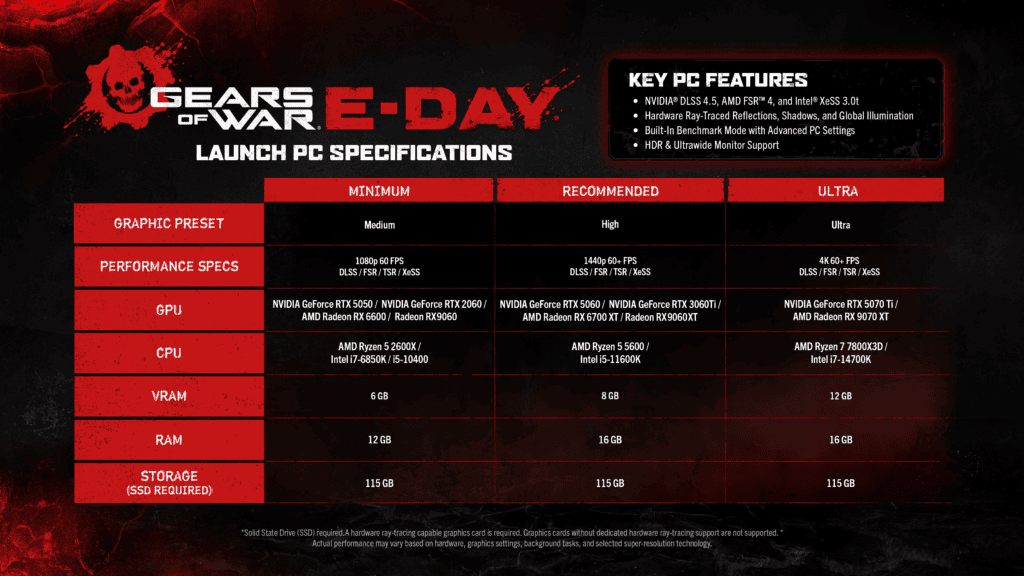
Before changing advanced settings for Gears of War E-Day high CPU usage, compare the PC against the Gears of War E-Day PC Requirements. The minimum CPU list includes the Ryzen 5 2600X, Core i7-6850K and Core i5-10400, while the recommended tier moves to the Ryzen 5 5600 or Core i5-11600K. The launch build also requires an SSD and DirectX 12 graphics hardware with ray tracing support. A machine below the supported CPU baseline can still launch in some cases, but troubleshooting advice cannot turn unsupported hardware into a guaranteed configuration.
If the processor meets the requirements and Gears of War E-Day high CPU usage is still causing problems, update the game and graphics driver before making a long list of tweaks. A launch period PC game can receive performance fixes quickly, and any comparison should be made on the current build. Restart after major driver or Windows updates so background installation tasks are not competing with the game during the test.
Low Core Mode is not a general high CPU fix
When diagnosing Gears of War E-Day high CPU usage, Gears of War E-Day Low Core Mode is easy to misread as a switch designed to lower processor usage on every system. Current independent testing found that enabling it usually reduced performance on normal modern CPUs. Its clearest benefit appeared in an extreme two core configuration where it corrected severe asset streaming and freezing behaviour. That makes it a fallback for very constrained processors, not the first fix for Gears of War E-Day high CPU usage.
On a six core or better modern desktop CPU, start with Low Core Mode disabled. If you have a genuinely unusual system with very few cores exposed to the game and severe streaming freezes, then test the option with the same scene before and after. Keep it only when it fixes the actual problem.
Use a frame rate cap to reduce unnecessary CPU work
A frame rate cap can help Gears of War E-Day high CPU usage when the CPU is working flat out to produce frames you do not need. If a 165 Hz display is being fed 220 frames per second in a light area and the processor is constantly near its limit, capping the game at a stable target can reduce the amount of frame preparation work. The best cap depends on the display, variable refresh setup and performance you can hold consistently, so there is no single number for every PC.
The goal is consistency rather than forcing the processor to run at maximum output in every scene. A stable cap can also make testing easier because you can see whether the system holds that target without large frame time spikes. Low latency gaming explained covers the relationship between FPS, frame time and responsiveness in more detail.
Close background CPU tasks before changing graphics
Background applications can make Gears of War E-Day high CPU usage worse when the game is already CPU limited. Web browsers with many active tabs, game launchers updating another title, recording software, RGB utilities, antivirus scans and development tools can all consume processor time. Close anything unnecessary, then retest the same section. Do not disable security software or Windows protections as a first step. The aim is to remove optional workload, not reduce the safety of the PC.
If Windows 11 security settings changed during the same period, Windows 11 Memory Integrity gaming explains why newer and older processors can experience different overhead. Treat that as a separate controlled test rather than assuming a security feature is responsible for every CPU spike.
Do not confuse shader compilation with a CPU bottleneck
Gears of War E-Day high CPU usage should not be confused with shader compilation. Gears of War: E-Day also supports Advanced Shader Delivery, which can reduce shader compilation work at first launch on supported Windows 11 hardware. A shader compilation hitch tends to appear as a short interruption when new shader work is needed. A CPU bottleneck is more persistent and usually follows the complexity of a scene, the target frame rate and how quickly the processor can prepare frames.
If the game reports that precompiled shaders were installed and the system still shows sustained high CPU usage, diagnose processor load separately. If performance is generally smooth and only a new effect causes a momentary hitch, shader or asset streaming behaviour is a stronger lead than total CPU utilisation.
Check temperatures without guessing at one universal limit
Gears of War E-Day high CPU usage naturally raises power consumption and temperature. Use a monitoring tool to compare the CPU temperature and clock speed against the limits published for your exact processor and against its normal behaviour in other demanding workloads. A hot reading is most meaningful when clock speed drops, the system reports thermal throttling or performance deteriorates as the session continues.
Make sure the cooler is mounted correctly, fans are operating, vents are clear and the case has reasonable airflow. Laptop processors are designed around different thermal and power behaviour from desktop chips, so copying a temperature rule from a different CPU family can be misleading. Use the processor manufacturer’s specification rather than an arbitrary number from a forum post.
How to tell whether the CPU or GPU is the limit
To diagnose Gears of War E-Day high CPU usage, run a repeatable scene and watch GPU utilisation, CPU thread utilisation and frame time. If the GPU is close to full utilisation and lowering resolution increases FPS substantially, the GPU is probably the main limit. If the GPU has spare capacity, several CPU threads are saturated and lowering resolution does little, the CPU is more likely holding the frame rate back. Upscaling can expose that CPU limit because it reduces the amount of work the GPU performs.
- Update the game and graphics driver.
- Confirm the PC meets the official CPU requirement.
- Start with Low Core Mode off on a normal modern CPU.
- Close unnecessary background applications.
- Use a sensible frame rate cap if the CPU is rendering more frames than you need.
- Compare CPU threads, GPU utilisation and frame time in the same scene.
- Check temperature and clock behaviour against the specification for your exact processor.
For the current supported hardware baseline, storage requirement and official launch specification, use the official Gears of War E-Day PC specifications. That should be checked again if a later patch changes the published PC targets.
Gears of War E-Day high CPU usage is best treated as a diagnosis rather than a fault code. The game can legitimately use a large amount of processor performance, especially when the GPU is not the limiting component. Focus on whether the load causes unstable frame times, thermal throttling or a measurable CPU bottleneck, then change one variable at a time. That approach is slower than applying a random list of tweaks, but it is far more likely to identify the real cause.
Related Guides
- Gears of War E-Day Low Core Mode
- Advanced Shader Delivery
- Windows 11 Memory Integrity gaming
- Gears of War E-Day PC Requirements
- Gears of War E-Day release time
- Gears of War E-Day preload date
- Gears of War E-Day early access
- Gears of War E-Day Horde Siege
- Gears of War E-Day Xbox Play Anywhere
- Gears of War E-Day co op




