
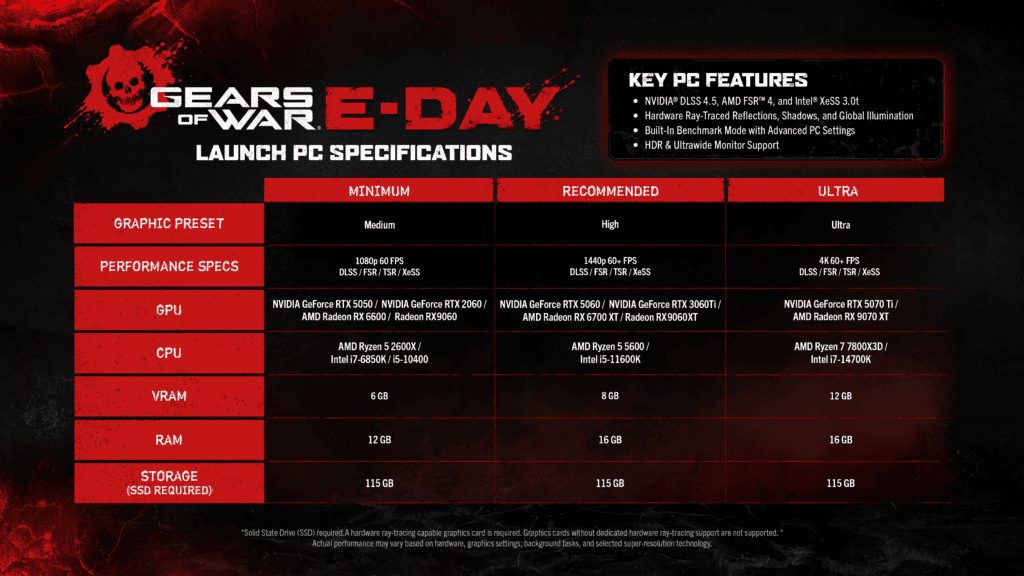
Advanced Shader Delivery is Microsoft’s Windows 11 system for delivering precompiled game shaders with a download so supported PCs can spend less time compiling them locally at first launch. Microsoft expanded the feature across compatible AMD, Intel, NVIDIA and Qualcomm hardware on October 21, 2026. The practical goal is simple: reduce long shader preparation screens and cut the type of stutter that can happen when shaders are compiled while a game is already running.
The feature is becoming more important because it is moving beyond a small handheld and AMD preview. Gears of War: E-Day and Call of Duty: Modern Warfare 4 now support the expanded delivery path in compatible Xbox PC app installations. Advanced Shader Delivery does not make an unsupported graphics card faster, change a game’s normal system requirements or guarantee a particular frame rate. It targets shader compilation work specifically, so it should be thought of as a launch and stutter improvement rather than a general performance preset.
What Advanced Shader Delivery does
Advanced Shader Delivery changes where part of the shader compilation process happens. A PC game normally sends shader information to a graphics driver so it can be compiled for the specific GPU and driver combination in that machine. That work can happen at launch or while playing, which is why some games spend minutes preparing shaders and others hitch the first time a new effect appears. Microsoft’s system lets developers package shader state information in a standard database, then uses vendor compiler components to build a precompiled shader database that can be delivered alongside the game.
With Advanced Shader Delivery on a supported setup, the game can find those precompiled shaders in the Windows cache instead of making the player’s CPU do all of that work on the first run. Microsoft says Gears of War: E-Day can complete its applicable first launch shader work in seconds rather than several minutes, with an approximately 95 percent reduction in shader compilation time in its demonstration. That figure is specific to the tested shader preparation scenario, so it should not be read as a 95 percent FPS increase or a promise that every supported game will load 95 percent faster.
Advanced Shader Delivery requirements
Microsoft requires Windows 11 24H2 or newer for the current Advanced Shader Delivery rollout. AMD supports RDNA 1, RDNA 2, RDNA 3, RDNA 3.5 and RDNA 4 with Adrenalin 26.6.1 or later. Intel supports Arc B570, B580 and specified Core Ultra Series 2 and Series 3 systems with driver 32.0.101.9150 or later. NVIDIA supports all GeForce RTX GPUs and RTX Spark with driver 621.01 or later, and Qualcomm supports Snapdragon X2 Series with driver 2026.08.3 or later. The game also needs to deliver its prepared shaders through a compatible storefront.
| Vendor | Supported hardware | Driver requirement |
|---|---|---|
| AMD | RDNA 1, RDNA 2, RDNA 3, RDNA 3.5 and RDNA 4 | Adrenalin 26.6.1 or newer |
| Qualcomm | Snapdragon X2 Series | 2026.08.3 or newer |
| Intel | Arc B570, Arc B580, Core Ultra Series 2 and Core Ultra Series 3 | 32.0.101.9150 or later |
| NVIDIA | All GeForce RTX GPUs and RTX Spark | 621.01 or later compatible version |
The GPU drivers are now available across the supported hardware families, but the game and storefront must still supply the compiled shaders. Microsoft recommends installing the Xbox PC app before downloading Gears of War: E-Day or Modern Warfare 4. Supported games can show “Precompiled shaders installed” during startup when delivery has succeeded.
Advanced Shader Delivery on NVIDIA GeForce RTX GPUs
NVIDIA’s GeForce Game Ready 621.01 WHQL driver released on October 21, 2026 adds Advanced Shader Delivery support for compatible RTX systems in Gears of War: E-Day and Modern Warfare 4. NVIDIA describes a near-100% shader cache hit rate in its supported scenario. That means the delivered cache covers almost all shader requests in that scenario. It is not a claim of twice the frame rate or an instant cure for every hitch.
Check the installed driver in NVIDIA App’s Drivers section and download compatible releases from the official NVIDIA app or driver site. NVIDIA has also issued hotfix 621.12 for some 621.01 black-screen and video-freezing problems. S-GAME separately recommended older driver 617.42 for Phantom Blade Zero launch instability. Those are game and hardware-specific situations, so a driver choice should take your other games into account.
Can Advanced Shader Delivery work on Steam or Epic Games Store?
Microsoft says Steam and Epic Games Store integration is coming, but the confirmed Modern Warfare 4 and Gears of War: E-Day path currently uses the Xbox PC app. Install that app before downloading the supported Xbox-distributed version. Simply installing it alongside a Steam or Battle.net copy does not make that other store deliver Microsoft’s precompiled shaders.
Game Pass is not a universal requirement. The underlying technology needs a compatible game, GPU, driver and Windows build, plus a storefront that distributes the prepared data. A supported game can still perform some compilation when it encounters data outside the delivered cache.
Advanced Shader Delivery supported games
The table below preserves the broader games Microsoft listed during its earlier Xbox PC app rollout. Those games should not all be described as NVIDIA-tested with driver 621.01. NVIDIA specifically confirms the expanded GeForce feature for Gears of War: E-Day and Modern Warfare 4, using supported Xbox PC app delivery configurations.
| Game | Status |
|---|---|
| 007 First Light | Supported / announced by Microsoft |
| Ark: Survival Ascended | Supported / announced by Microsoft |
| Avowed | Supported / announced by Microsoft |
| Call of Duty: Black Ops 6 | Supported / announced by Microsoft |
| Call of Duty: Black Ops 7 | Supported / announced by Microsoft |
| Clair Obscur: Expedition 33 | Supported / announced by Microsoft |
| Control Standard Edition | Supported / announced by Microsoft |
| Crimson Desert | Supported / announced by Microsoft |
| Dead Island 2 | Supported / announced by Microsoft |
| Deep Rock Galactic | Supported / announced by Microsoft |
| Farming Simulator 25 | Supported / announced by Microsoft |
| Final Fantasy VII Remake Intergrade | Supported / announced by Microsoft |
| Final Fantasy XVI | Supported / announced by Microsoft |
| Forspoken | Supported / announced by Microsoft |
| Forza Horizon 5 | Supported / announced by Microsoft |
| Forza Horizon 6 | Supported / announced by Microsoft |
| Forza Motorsport | Supported / announced by Microsoft |
| Gears of War: Reloaded | Supported / announced by Microsoft |
| Gears Tactics | Supported / announced by Microsoft |
| Grand Theft Auto V Enhanced | Supported / announced by Microsoft |
| Grounded 2 | Supported / announced by Microsoft |
| Hades 2 | Supported / announced by Microsoft |
| High On Life 2 | Supported / announced by Microsoft |
| Hogwarts Legacy | Supported / announced by Microsoft |
| Keeper | Supported / announced by Microsoft |
| Lies of P | Supported / announced by Microsoft |
| Metro Exodus | Supported / announced by Microsoft |
| Microsoft Flight Simulator 2024 | Supported / announced by Microsoft |
| Monster Hunter Rise | Supported / announced by Microsoft |
| NBA 2K26 | Supported / announced by Microsoft |
| Ninja Gaiden 4 | Supported / announced by Microsoft |
| Persona 3 Reload | Supported / announced by Microsoft |
| Resident Evil 2 (2019) | Supported / announced by Microsoft |
| Resident Evil 3 | Supported / announced by Microsoft |
| S.T.A.L.K.E.R. 2: Heart of Chornobyl | Supported / announced by Microsoft |
| Sea of Thieves | Supported / announced by Microsoft |
| Silent Hill f | Supported / announced by Microsoft |
| Sniper Elite: Resistance | Supported / announced by Microsoft |
| South of Midnight | Supported / announced by Microsoft |
| Starfield | Supported / announced by Microsoft |
| Subnautica 2 | Supported / announced by Microsoft |
| The Callisto Protocol | Supported / announced by Microsoft |
| The Elder Scrolls IV: Oblivion Remastered | Supported / announced by Microsoft |
| The Outer Worlds 2 | Supported / announced by Microsoft |
| Where Winds Meet | Supported / announced by Microsoft |
| Gears of War: E-Day | Current Xbox PC app support; NVIDIA 621.01 confirmed |
| Call of Duty: Modern Warfare 4 | Current Xbox PC app support; NVIDIA 621.01 confirmed |
Do you need to enable Advanced Shader Delivery manually?
For normal players, Advanced Shader Delivery does not use a universal graphics menu switch that has to be enabled in every game. The feature depends on the game, the Windows build, the Xbox PC delivery path and a compatible graphics driver. The safest setup is to update Windows, update the GPU driver, install the Xbox PC app when the game’s instructions require it, then download or update the supported game. If the feature is active, the game or launch process can report that precompiled shaders were installed.
Advanced Shader Delivery is also why players should not confuse this feature with deleting shader caches, forcing a driver cache size or changing an in game shader quality option. Those actions affect different parts of the pipeline. Clearing a cache without a specific reason can actually make a first run less representative because locally cached work may need to be recreated.
Does Advanced Shader Delivery remove shader stutter?
Advanced Shader Delivery is designed to reduce stutter caused by just in time shader compilation, but it cannot remove every form of stutter. A game can still hitch because of asset streaming, CPU limits, storage activity, background software, driver problems or a separate engine bug. That distinction is useful when troubleshooting. If a game holds a good average frame rate but produces short hitches when new effects appear, shader compilation is plausible. If performance stays low for an entire scene, the problem is more likely to involve sustained CPU or GPU load.
Advanced Shader Delivery only targets one class of stutter, and the difference is visible in other PC performance cases covered by The Click. Silent Hill: Townfall stuttering was tied to shader precompilation in an official patch, while Gears of War: E-Day high CPU usage is a processor load problem that needs a different diagnosis. Modern Warfare 4 Advanced Shader Delivery also covers the game specific implementation rather than replacing this broader compatibility hub.
How to check whether your PC is ready
To prepare for Advanced Shader Delivery, start with Windows 11 24H2 or newer, then identify the GPU vendor and exact model. AMD users should compare the card against the RDNA architecture list and install Adrenalin 26.6.1 or later. Qualcomm users need the listed Snapdragon X2 hardware and driver. Intel Arc B570, B580 and supported Core Ultra systems need driver 32.0.101.9150 or newer. GeForce RTX systems need NVIDIA 621.01 or a later compatible driver.
- Update Windows 11 to version 24H2 or newer.
- Install the current graphics driver for your GPU.
- Install the Xbox PC app before downloading a title when Microsoft or the publisher specifies it.
- Download or update a game that is actually on the supported list.
- Look for the precompiled shader confirmation during launch when the title exposes it.
Players comparing hardware should also keep the normal game requirements in view. Gears of War E-Day PC Requirements and Modern Warfare 4 PC System Requirements remain the relevant baseline for whether the games themselves are supported. Advanced Shader Delivery sits on top of those requirements instead of replacing them.
What changes next
The October hardware expansion is now live. Microsoft plans to add Steam and Epic Games Store support, but that wider distribution is a separate step from enabling compatible graphics drivers. Game integration, storefront delivery, Windows version and graphics driver all matter.
The latest Microsoft DirectX post confirms current hardware support and the minimum graphics driver versions, including the new NVIDIA RTX rollout.
Advanced Shader Delivery is most useful when it is treated as a targeted solution to shader preparation rather than a catch all performance boost. Keep Windows and the graphics driver current, confirm that the game is supported and use the precompiled shader message as the clearest player facing sign that the feature has been delivered. As Microsoft expands the list, this page can be updated without changing the underlying question players are trying to answer.
Official source: Microsoft DirectX: October 21 Advanced Shader Delivery hardware and driver requirements.




