
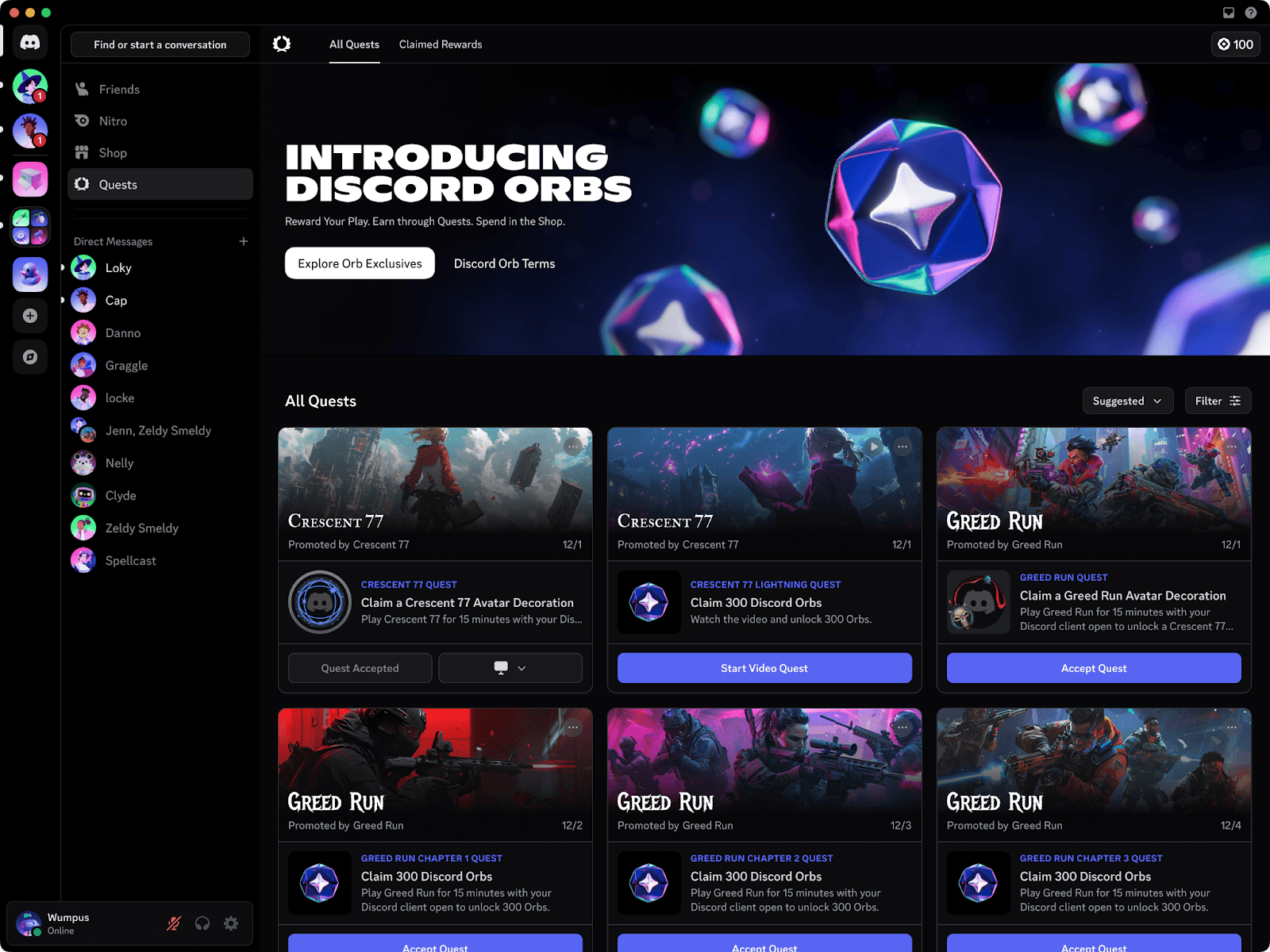
How to get Discord Orbs is simple: open Discover → Quests on desktop or in your browser, pick a Quest offering Orbs, finish its task and press Claim Reward. Your balance appears in Quest Home and the Shop, ready to spend on selected cosmetics or Nitro credits.
You don’t need a paid Nitro subscription to take part. What matters is the reward on the Quest card: some give Orbs, others give a cosmetic or an in-game item. Offers change, and two players may not see the same ones.
How to Get Discord Orbs From Quest Home
From the left-hand side of Discord, open Discover → Quests. You might also see a Quest Bar near the bottom-left corner. Both let you check a reward and its closing date before you accept.
- Choose an eligible Quest displaying Orbs.
- Press Accept Quest or Start Video Quest.
- Follow its specific play, streaming, video or in-game task.
- Return to Quest Home and press Claim Reward.
- Check the Orb balance at the top of Quest Home or Shop.
Make sure Discord can actually track the task. Play Quests require the desktop app for gameplay tracking, streaming Quests require sharing the game with a friend, and video progress pauses when you switch away from the Discord window.
How to Get Discord Orbs on Mobile
On mobile, tap your avatar and open Settings → Quests, or tap your Orbs Balance. You can accept and finish supported mobile Quests here. Not every Quest works on a phone, so use desktop for any task that calls for PC gameplay.
Trying to work out how to get Discord Orbs from a promotion your friend has? Check the region, platform and closing date. That offer might not be available to your account, and even eligible rewards need to be claimed after completion.
How to Get Discord Orbs Through Other Offers
| Method | Requirement |
|---|---|
| Quest | Complete a Quest that specifies an Orbs reward. |
| Orb Challenge | Complete an eligible action shown in Quest Home, Shop or profile. These challenges remain experimental. |
| Selected promotion | Follow the individual Discord promotion rules. |
| Paid Nitro bonus | Eligible full Nitro subscribers receive a 1.2× Quest Orb multiplier and a 250-Orb monthly drop. |
Those bonuses are optional. The multiplier does not apply to Nitro Basic or Nitro obtained through credits. You can still earn the normal Quest reward without paying for a subscription.
How to Redeem Orbs in the Discord Shop
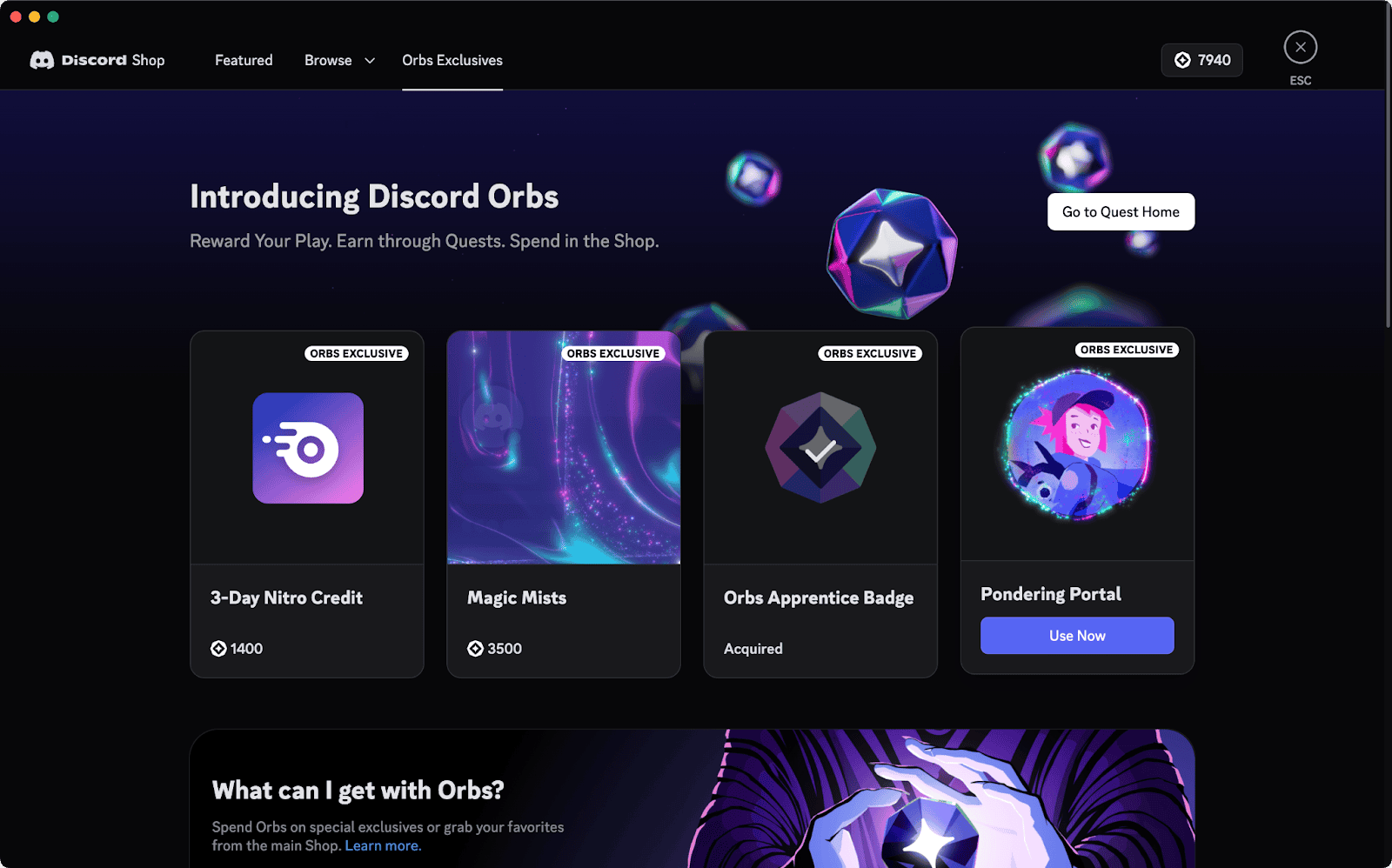
On desktop or browser, open the Shop and look under Orbs Exclusives for eligible items. Choose an item and press Claim. On mobile, open the Shop from your profile, choose Orbs Exclusives, then Redeem → Redeem using Orbs. A money-only price means the item isn’t eligible for Orbs or you don’t have enough for it.
Orbs can buy certain decorations, profile effects, a badge, Nitro credits and selected Shop items. They cannot buy gifts, partner-branded items, recurring Nitro subscriptions or Server Boost subscriptions. Orb purchases cannot be refunded.
How to Get Discord Orbs for Nitro Credits
Nitro credits give you Nitro perks for a limited time without starting a recurring subscription. Get them in the Orbs Shop on desktop or browser. You can’t currently obtain Nitro credits in the mobile app, although you can use their benefits on your phone after activation.
If you don’t have Nitro, a credit activates straight away. Existing Nitro subscribers use theirs when the current billing period ends. Unused credits stack and don’t expire. They exclude the two Server Boosts, Boost discount, Nitro badge and some referral perks. Check User Settings → Subscriptions → Nitro Credit for your balance.
Why Can’t You Claim or See Orbs?
First, check that the Quest offered Orbs and that you’ve actually claimed the completed reward. If progress is stuck, restart or update Discord and reread the task. A stream or game-action Quest won’t necessarily advance just because the game is running.
You can’t move Orbs to another account, sell them or exchange them for cash. They stay on the account that earned them until spent. Avoid anyone offering a transfer in return for money or your login details.
Related Guides
More help with how to get Discord Orbs, missing rewards and game promotions:
Official source: Discord Orbs FAQ.





