Nintendo eShop family gifting is scheduled to launch after Nintendo eShop maintenance on 17 November 2026. It will let Nintendo Account family group members gift eligible eShop products to each other, but it is not available today. Nintendo’s firmware 23.5.0 is live on Switch 2 and original Switch; the shop feature comes later.
If you’ve updated your console and can’t see a gift option, you haven’t missed a setting. Nintendo has already published a preview of Nintendo eShop family gifting, including the purchase steps, gift wrapping and how the recipient gets their game. The feature itself still has to go live.
Nintendo eShop family gifting release date
Nintendo UK’s system update notes schedule Nintendo eShop family gifting for after maintenance on Tuesday 17 November 2026. Nintendo’s North American consumer announcement says 16 November, while its UK firmware notes say 17 November. The two official dates differ, so this UK guide follows Nintendo UK’s scheduled maintenance date rather than guessing an exact launch hour.
Both console generations received version 23.5.0 to prepare for the change. The firmware update alone does not activate Nintendo eShop family gifting. As of 12 November, Nintendo’s existing support answer about sending gifts still says no. That is consistent with a service that has a future start date.
Nintendo eShop family gifting account rules
Nintendo says gifts can be sent only to members of your Nintendo Account family group. Eligible games, DLC and upgrade packs are included. Not every product can be gifted, so check the individual eShop listing once the option is live.
A Nintendo Account family group holds up to eight accounts, including one administrator and up to seven other members. This is an account arrangement, not just people using one console. Different family members can use original Switch and Switch 2 systems.
You don’t need Nintendo Switch Online to create a family group. A Nintendo Switch Online family membership is a separate paid subscription and is not the same thing as family-group membership.
How to add a member before gifting launches
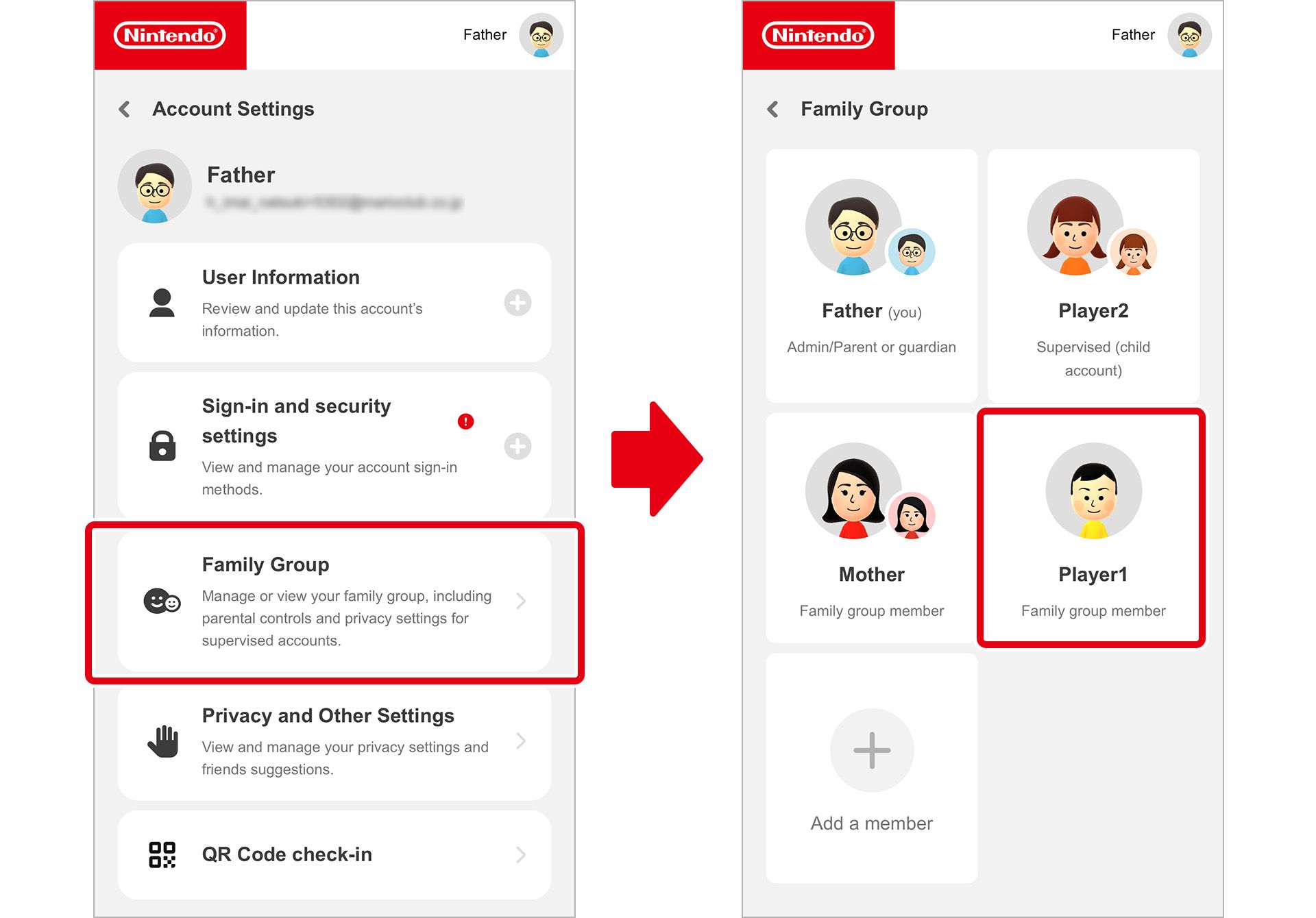
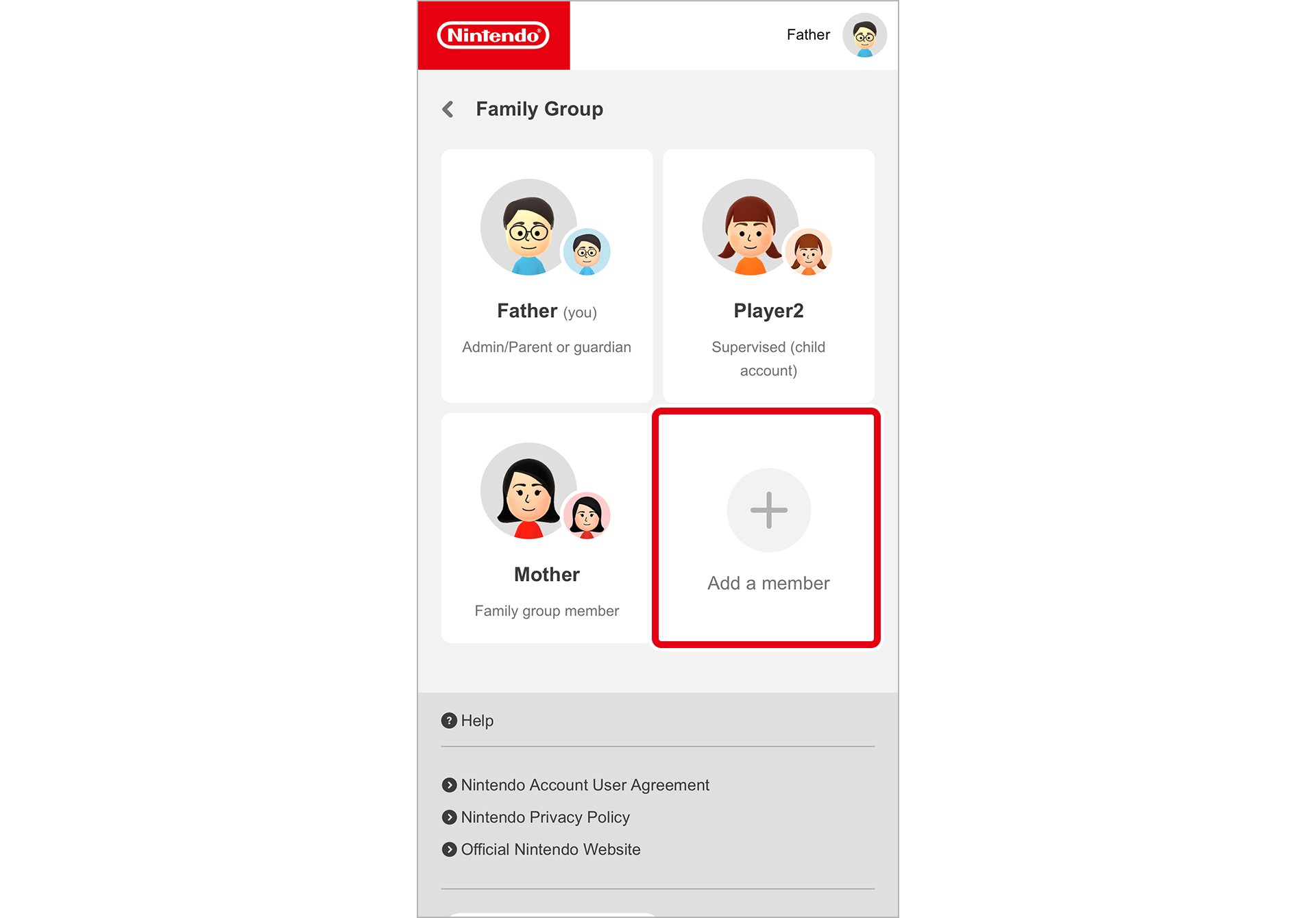
You can organise the accounts in advance. The administrator can invite the person you want to give a game to through the Nintendo Account website:
- Sign into the Nintendo Account website as your family’s group administrator.
- Select Family group, then Add a member. A new group may instead show Create family group.
- For somebody who already has a Nintendo Account, choose Invite someone to your family group and enter their registered email address.
- The invitee opens Nintendo’s verification email, signs in and accepts by selecting Join family group.
- Check the Family group page again to see the new member listed.
Only the administrator can invite or manage group members. If Add a member isn’t displayed, check which account is the admin. Nintendo also restricts how often accounts can change family groups within a year, so don’t repeatedly leave and rejoin as a test.
Children aged 15 and under must be added or created by an administrator aged at least 18. Nintendo has confirmed that supervised accounts cannot send gifts. Its announcement does not say supervised accounts are unable to receive them.
How to send a gift with Nintendo eShop family gifting
Nintendo eShop family gifting isn’t active in the UK as of 12 November. When it launches, Nintendo’s announced process starts from the product page inside Nintendo eShop on your Switch or Switch 2.
Nintendo has described how to send a gift once checkout is enabled. These are instructions for the upcoming service, not steps you can complete in the UK eShop today.
- Open Nintendo eShop on your console and find an eligible game, DLC pack or upgrade pack.
- On the product page, tick Give as a Gift, then continue to purchase.
- Choose a recipient from your Nintendo Account family group and select one of their linked consoles.
- Choose your gift-wrap colour and complete the checkout.
How to receive a Nintendo eShop gift
Nintendo eShop family gifting delivers the purchase immediately, not on a date you schedule. The recipient sees the wrapped gift on their HOME Menu, selects it, accepts it and can then start playing. If you’re planning a birthday surprise, only send it when you’re ready for it to appear.
Nintendo’s announcement also confirms a limit on how many digital gifts a user can buy within a given period, though it doesn’t give a number. Products must be eligible, and supervised accounts cannot send them. Those restrictions apply to Nintendo eShop family gifting even when everyone belongs to the same family group.
Before the launch, Nintendo eShop funds cards or official download codes are alternatives. A funds card adds spending credit to the recipient’s account; a download code unlocks a particular product. Make sure the code or card is valid for the recipient’s region.
Nintendo eShop family gifting versus Virtual Game Card loans
Nintendo already supports temporary digital game lending to eligible members of a family group through Virtual Game Cards. A loan can last up to 14 days. The person lending the virtual card cannot use that card while it is on loan, and the card returns when the loan ends.
Nintendo eShop family gifting is different from a Virtual Game Card loan. Gifting buys an eligible product for another family-group member, whereas lending temporarily shares a virtual card you already own. Choose lending if you only want someone to borrow a game for up to 14 days.
What to check after 17 November
To prepare, check that your Switch or Switch 2 is running version 23.5.0 or later and that the recipient is in your Nintendo Account family group. Once eShop gifting opens, you can check product eligibility on the listing before selecting Give as a Gift. Nintendo also limits the number of digital gift purchases in a given period, although it hasn’t published the number.
Nintendo eShop family gifting is still scheduled for after UK eShop maintenance on 17 November. The Nintendo preview explains what to do when the feature arrives, and gifts will be delivered immediately rather than on a date you pick.
Related Nintendo Guides
- Nintendo Switch 2 Update 23.5.0: Patch Notes
- Lend Nintendo Switch 2 Digital Games to Family
- Nintendo Switch 2 Virtual Game Card Settings
- Move Switch 2 Digital Games Between Consoles
- Play Nintendo Switch 2 Digital Games Offline
- Switch 2 Virtual Game Card Pairing Fixes
- Nintendo Switch 2 Backwards Compatibility
- Tears of the Kingdom Switch 2 Upgrade
Official source: Nintendo’s official gift-checkout preview.