
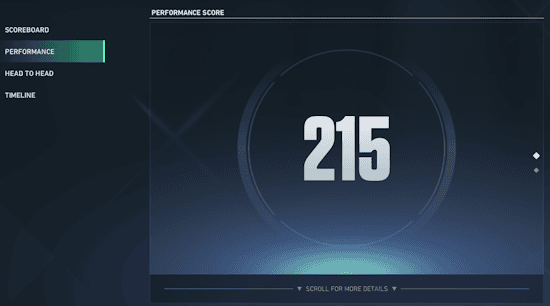
VALORANT Map Rating is a new competitive performance system introduced with Patch 13.08 on October 13, 2026. It gives you a separate rating on every map, combining wins, attacking and defending results, and individual performance. Patch 13.09 later increased the influence of your Act Best Match. Each rating runs from 0 to 500 and is displayed as a letter grade from C to S.
Your previous matches don’t count towards the new ratings, so everyone starts building fresh map-by-map results after the patch. If you want to improve your VALORANT Map Rating, you’ll need to do more than chase kills on your favourite map. Here’s what influences your score, where to find it and which matches Riot counts.
How VALORANT Map Rating works in Patch 13.08
Every map has its own VALORANT Map Rating. That means your results on Bind don’t simply carry across to Corrode, Haven or other locations. Each map receives a numerical rating on the 0–500 scale and a corresponding letter grade. Riot has confirmed grades range from C to S, although it hasn’t published the exact numerical thresholds separating each grade.
| Rating detail | How it works |
|---|---|
| Score range | 0–500 |
| Letter grades | C through S |
| Separate score per map | Yes |
| Qualifying modes | Competitive and Premier |
| Old match history | Does not count |
| Recent results | Weighted more heavily |
| Other players can view yours | No |
The new rating is intended as a map-specific snapshot of competitive ability, not a replacement for your overall Competitive rank. Playing well on one map doesn’t automatically boost the rating on another, and your grade can shift as newer games carry more influence.
VALORANT Map Rating changes in Patch 13.09
Riot adjusted VALORANT Map Rating on October 27, two weeks after the system launched. Your Act Best Match now has a greater influence on your Map Rating each Act, giving your strongest match more weight alongside consistent results. Riot hasn’t shared an exact percentage or point formula for this change.
This doesn’t reset existing map grades or replace the four rating factors. Playing well on both sides, winning eligible games and improving Performance Score still matter. It simply makes an outstanding single performance more meaningful than before. Our Hush abilities guide covers the new Duelist who also arrives in Patch 13.09.
Performance Score and First Blood Accolades in 13.09
Hush is the first new Agent since Performance Score launched, and Riot warns that her early scores may fluctuate while it tunes how her utility counts. The end-of-game screens now offer additional performance explanations; on PC, the scoreboard includes hover text for trades.
The First Blood Accolade has a tougher requirement because Riot found it appeared too often. This changes the threshold for future matches, not previously earned Accolades. No exact numeric threshold was published. Neither the Accolade adjustment nor the new tooltip screen should be mistaken for a guaranteed increase in VALORANT Map Rating points.
The four factors that affect your VALORANT Map Rating
Riot says VALORANT Map Rating uses four main inputs. Each one captures a different part of the match, so looking only at your kill count or total matches played won’t tell you exactly why your rating changed.
- Overall Win Rate: how often your team wins on that map in eligible matches.
- Attacker Win Rate: how often you win rounds while attacking on that map.
- Defender Win Rate: how often you win rounds while defending on that map.
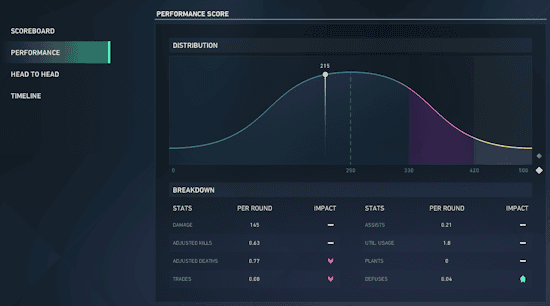
- Performance Score: Riot’s individual performance measure, which gives context beyond the match result.
Riot hasn’t disclosed the precise formula or a percentage weight for each factor. You can use the four categories to understand which parts of your game need improvement, but nobody outside Riot can reliably say that an extra kill will increase the rating by a particular number of points.
How to improve your VALORANT Map Rating
To raise your VALORANT Map Rating, concentrate on consistent eligible matches and strong results on both sides of the map. Recent games are weighted more heavily than older qualifying ones, and since Patch 13.09 your Act Best Match carries extra weight. A strong performance helps without wiping out your other match results.
- Win more matches: the overall Win Rate is one of the four official factors. Playing with a coordinated team and making useful round decisions matters.
- Improve your attacking rounds: practise site entry, trading teammates, using utility to take space and playing post-plant situations.
- Strengthen your defence: work on early information, surviving long enough for rotations, and coordinated retakes rather than taking every early duel.
- Focus on round impact: your Performance Score matters alongside the results, so build reliable habits around utility, positioning and meaningful engagements.
- Play each map: a good Corrode result isn’t a shortcut to a higher Bind score. Every map has its own match record.
If you notice you’re much stronger on attack than defence, changing how you hold space and rotate could help more than another aim drill. The useful part of VALORANT Map Rating is seeing which map and side need the most work, then using new matches to demonstrate improvement.
Where to find Map Rating in VALORANT
There are three places to check your VALORANT Map Rating: Agent Select, End of Game and Career. The grade in Agent Select can help you judge your confidence on the map before a match. The End of Game display shows the result after you’ve played, and Career lets you review ratings across different maps.
- Agent Select: check the map-specific rating while choosing your Agent before a qualifying match.
- End of Game: review the rating after a Competitive or Premier match finishes.
- Career: look through your per-map ratings to see where your results differ.
Your individual rating isn’t publicly visible to other players. You can use the information for your own improvement without everyone in Agent Select seeing your exact grade and 0–500 score.
Do Unrated, Swiftplay or Deathmatch matches count?
No. Riot has confirmed that VALORANT Map Rating only draws from Competitive and Premier. Matches in Unrated, Swiftplay, Deathmatch, and other non-qualifying modes don’t contribute to this specific rating, even if they help you learn the map or warm up your aim.
If you’re trying to build a higher rating, queue for a supported mode and focus on the map you’re given. You can’t increase a map’s rating just by repeating Deathmatch on it, and the rating isn’t calculated from every mode you’ve ever played.
Why did my Map Rating start from scratch?
When VALORANT Map Rating launched on October 13, Riot deliberately excluded previous match history. That means veteran players and newcomers alike begin with a new rating record after Patch 13.08. A long run of wins before the patch won’t establish a high grade automatically.
You aren’t losing your existing Competitive rank simply because the new map grades start fresh. It’s a separate performance feature being introduced into an existing ranked ecosystem, designed to build from new match data.
Can your Map Rating go down?
Yes. As newer eligible results contribute more heavily, VALORANT Map Rating can move as your performance and results change. A run of poor attacker rounds, defensive losses or weak individual scores may bring the rating down, while stronger matches can move it back up. Riot hasn’t published a guaranteed points-gained or points-lost table.
Patch 13.08 also rotated Bind and Corrode into Competitive while removing Ascent and Split. That gives you a reason to learn the latest Corrode routes if you want a strong start on the revised map. Our Corrode map changes guide covers the adjusted sites and Mid positions.
Official sources: VALORANT Patch 13.08 and VALORANT Patch 13.09.





