The Steam November 11 update is Valve’s stable client release from 11 November 2026. It brings Achievement Sets to everyone, puts Steam Deck framerate figures in the Store and Steam client, expands Remote Play HDR and makes the Linux Steam client a 64-bit application. Steam downloads the update automatically, and you don’t need to join the beta for these features.
There are also changes to Big Picture invitations, Steam Input and false Steam Cloud conflict warnings. HDR still needs compatible hardware, and the Deck’s FPS figures only appear for games with enough opted-in measurements. The November 11 Steam client patch is separate from SteamOS.
Steam November 11 update: main patch notes
The Steam November 11 update covers plenty more than achievements. These are the changes most likely to affect how you use Steam.
| Feature | Stable release change | Important detail |
|---|---|---|
| Achievements | Achievement Sets and a redesigned Achievements page | Developers must add sets to their games |
| Steam Deck FPS | Average FPS in the Store and Steam desktop/Deck client | Reports are anonymised and opt-in |
| Big Picture | Game invite widget and group chat navigation fixes | Invite appears above the chat input |
| Steam Input | GameInput v4 and fixes for gyro curves and D-pad binding | Saved gyro curves may need retuning |
| Remote Play | HDR controls, OLED restore and aspect-ratio options | Android HDR needs beta Steam Link app |
| Linux | 64-bit client inside Steam Runtime container | Not a change to every installed game |
| Other fixes | Cloud warnings, voice volume, notifications and stability | Real save conflicts still need checking |
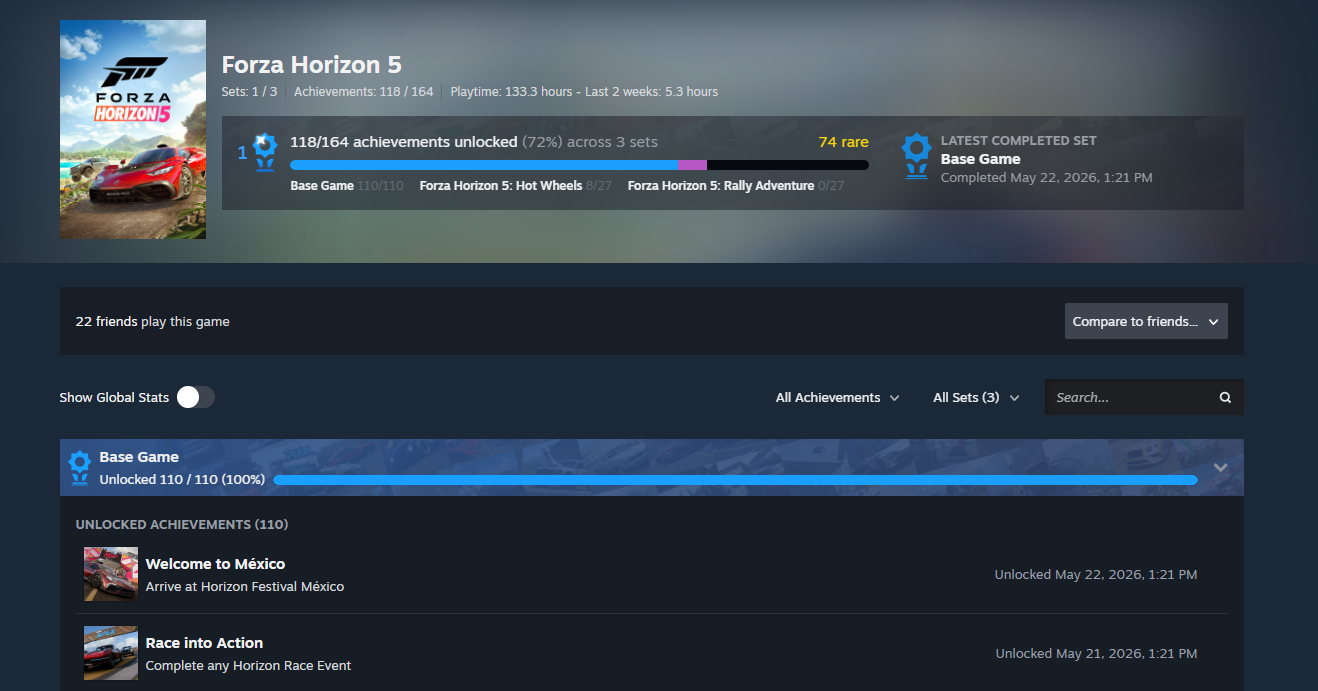
Steam Achievement Sets now work without beta
The Steam November 11 update brings the achievements redesign out of testing. Developers can organise achievements into base-game, DLC or other sets. You can complete the base-game set without having to buy every expansion, and completed sets stay completed if extra achievements are added later.
Developers may also archive retired achievements that can no longer be earned. The achievements page brings together set progress, Global Stats, improved filters and comparisons with up to three friends. This is available to Steam users on the stable client, but it does not mean every game already supports sets. See our Steam Achievement Sets guide for the exact completion rules.
Steam Deck framerate data in Store and Library
Steam November 11 update makes average Steam Deck framerate figures available on qualifying Store pages and in the Steam client on desktop and Deck. On a game page, look for Steam Deck Compatibility, select Learn more and expand the histogram if enough opted-in players have contributed samples.
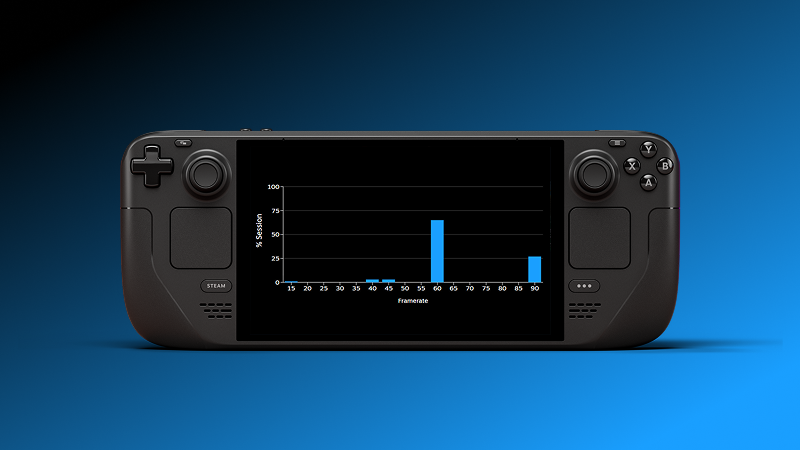
The charts show a collection of players’ measurements, not a controlled benchmark for any one graphics preset. Contributing data is optional, and you do not need to share your own framerate to view an average. The desktop Steam client now presents an opt-in prompt as part of the stable rollout, but Valve has not announced publicly displayed averages for every desktop PC or GPU.
Remote Play HDR and Steam Deck OLED changes
The Steam November 11 update gives Remote Play three HDR choices: Automatic when HDR content is enabled, On to keep HDR on, and Off. A streaming-overlay brightness slider provides another adjustment, while Stretch and Zoom options help when a stream’s aspect ratio differs from the receiving screen.
HDR capture is supported from desktop Linux using PipeWire and when streaming from macOS. HDR is also enabled again on Steam Deck OLED. Android phones need Android 15 or newer and the beta Steam Link app. This last requirement remains even though the PC and Deck client changes are stable. Your host and receiving screen must support the relevant HDR path.
Steam Input, Big Picture game invites and controllers
The Steam November 11 update adds Microsoft GameInput v4 support in Steam Input. Valve also corrected Joystick Power Curve not applying in Gyro to Joystick Camera and Gyro to Joystick Deflection modes. If you adjusted a curve before the fix, you might notice different aiming response now; reset and retune it if necessary. A separate fix stops the D-pad’s Listen for Binding function assigning multiple inputs.
In Big Picture, invitations now appear in a dedicated widget above the chat entry field. An individual invitation sent in a group can appear within the group conversation, so you do not need to open a private chat to find it. Steam Controller firmware also reduces early touch detection and fixes unwanted wake-ups while docked to the controller puck.
Linux Steam client changes to 64-bit
The Linux part of the Steam November 11 update makes Steam itself a 64-bit application running in a Steam Runtime container. Valve says the contained environment helps Steam behave more consistently across Linux distributions. The updater interface has changed, and Valve fixed crashes after resume from suspend and on creating some ISteamNetworking lobbies, including in Sons of the Forest.
This does not mean every Linux game was rebuilt as a 64-bit executable, that 32-bit games suddenly stop working, or that Proton has been replaced. Those are separate issues. Existing users should let the Steam client update normally and check that their games still launch before assuming a reinstall is necessary.
Steam Cloud, notifications and stability fixes
The Steam November 11 update fixes certain incorrect Steam Cloud conflict warnings, with Monster Hunter World named in Valve’s notes. If Steam still presents a conflict, though, you should check whether the local or cloud save contains your latest progress before overwriting anything.
Valve also fixed cases where a friend’s notification settings were ignored, made voice-chat output volumes persist between sessions, sped up startup and addressed rare crashes. Store search suggestions received an update too.
Do you need Steam Beta for the Steam November 11 update?
No. Steam November 11 update is a stable client release. Steam downloads it automatically, although you may need to restart to finish applying it. Older guides that tell you to join Beta for Achievement Sets, Steam Deck framerate data or GameInput v4 are referring to the previous testing period.
Android is the exception for HDR: the phone needs the beta Steam Link app, even though the PC and Deck client updates are stable. This isn’t a SteamOS operating system update either, so don’t confuse the two when following older instructions.
Related Guides
- Steam Achievement Sets: Complete Base Games Without DLC
- Steam Deck Framerate Data: How to Read FPS
- Steam Anonymous Framerate Data: Opt In or Out
- Steam Input GameInput v4
- Steam Input Joystick Power Curve Fix
- Steam Big Picture Game Invites
- Steam Remote Play HDR and Steam Deck OLED
- Monster Hunter World Steam Cloud Conflict Fix
- Steam Client Beta: Join or Leave
Official source: Valve’s Steam Client Update: November 11th.