Epic Games Launcher Preview HDD installs can now be up to three times faster following update 0.114.0, released on 10 November 2026. Epic specifically says installs on a hard disk drive are faster. It hasn’t said your broadband download speed will triple.
If you’ve watched a game download quickly and then take ages to finish installing, this is the change to check. Here’s how to confirm your Preview version, find out whether your game is going onto an HDD or SSD, and see what the launcher is doing without touching your installed files.
Epic Games Launcher Preview HDD installs: what changed in 0.114.0?
Epic’s 10 November patch notes say HDD installations are up to three times faster. That isn’t a fixed result for every game or every PC. Epic hasn’t published the test drives, game-by-game results or the exact stages where it saved time. For Epic Games Launcher Preview HDD installs, the size of the improvement on your own machine will depend on the installation.
Downloading brings data to your computer over the internet. Installing also means reading, unpacking and writing files. Those jobs can take longer on a mechanical hard drive, even when the connection is fine. The 0.114.0 note is about installations; it doesn’t promise more bandwidth from your internet provider.
The patch specifically names HDDs, not SSDs. It also doesn’t explain the result for a setup with the launcher on one drive and the game on another. The sensible place to start is the drive you’re actually installing the game to.
Find the drive used by Epic Games Launcher Preview HDD installs
Open Epic Games logo > Settings > Downloads to see the default install location. You can also open Downloads in the bottom bar and check the Storage section, which lists your drives and free space. A particular game might have a different destination if you chose one during its installation.
- Find the drive letter in the game’s chosen installation folder. It won’t necessarily be C:.
- On Windows, open Start and search for Defragment and Optimize Drives.
- Find that drive and look at its Media type. Windows shows whether it is a hard disk drive or solid-state drive.
- Return to Preview, open Downloads, and watch the installation you want to check.
You don’t need to run a disk optimization. You’re only reading the drive type. If the game is going to an SSD, don’t expect the HDD-specific 3x claim to apply.
How to check download and installation speeds
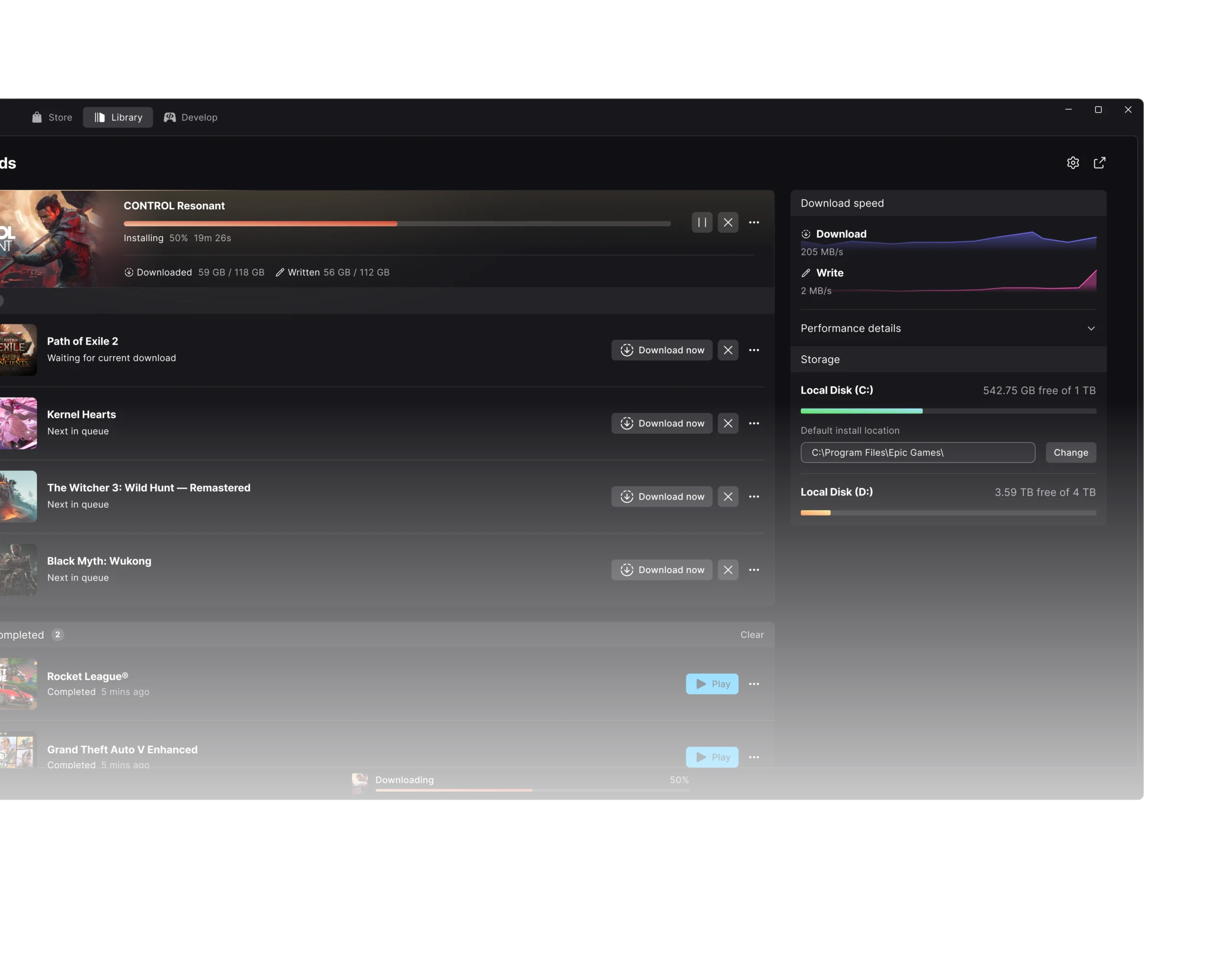
Select Downloads while a game is installing. Preview displays live download, read and write speeds as well as the status of active and queued tasks. A slow download and a slow installation can look similar from the progress bar, but the speed readings help you see where time is going.
If downloads themselves are unusually slow, check Epic Games logo > Settings > Downloads. Epic’s support guidance says Download speed limit and Active download speed limit should be empty when you don’t want a cap. Changing those limits isn’t a shortcut to the promised HDD improvement; it only addresses a separate download restriction.
Try not to judge Epic Games Launcher Preview HDD installs by comparing two unrelated games. Different installation sizes and file layouts, other programs using the disk, and the drive itself can affect the time. Epic hasn’t provided a benchmark that would let you predict an exact finish time.
Check your Preview version
Click the Epic Games logo at the top left, then open Settings > About. Beside Version, click Check now. If an update is available, confirm it when the launcher asks. You can also find your installed version near Give Feedback in the launcher menu.
Version 0.115.0 arrived on 11 November, the day after the HDD change. It keeps pending updates visible while a game is running and fixes several other interface and installation problems. It doesn’t announce a further speed increase. Our November Preview patch notes cover both versions.
What if Epic Games Launcher Preview HDD installs are still slow?
Check the available space in the Downloads > Storage panel first. An installation that stops because a drive is full is a different problem. Version 0.113.0 changed the download queue to pause when storage runs out. If you’re getting a full-drive warning, follow our disk-full guide instead.
Version 0.112.0 also introduced a warning when the drive holding a game reports errors. A drive error is not just another way of saying it is full. Check the drive’s health, back up important files and contact Epic Support if installations keep failing. Don’t delete game folders or switch off security software in the hope of making installs faster.
If you decide to use a different disk, follow our guide to moving installed Preview games. You don’t need to move to an SSD to get the HDD improvement in 0.114.0.
Epic Games Launcher Preview HDD installs: FAQ
Does 3x faster mean three times the download speed?
No. Epic specifically calls out installs on a hard disk drive, not network transfers. The improvement doesn’t guarantee any change to your internet speed.
Do I need to replace my HDD with an SSD?
No. The update is aimed at HDD installations. An SSD is a separate hardware choice, not a requirement for this patch.
Does this apply to the Legacy launcher?
The notes are for the rebuilt Preview launcher. Don’t assume the same fix reached the older Legacy version.
Did 0.115.0 add another install speed boost?
No additional HDD performance improvement appears in the 0.115.0 notes. Epic Games Launcher Preview HDD installs have the 0.114.0 claim, and the next release focuses on different fixes.
Epic Games Launcher Preview HDD installs Related Guides
- Epic Games Launcher Preview November 2026 Updates
- Epic Games Launcher Preview Disk Full
- Move Epic Games Launcher Preview Games To Another Drive
- Epic Games Launcher Preview Migration
- Epic Games Launcher Preview Games Missing From Library
- Uninstall Epic Games Launcher Preview Safely
- Epic Games Launcher Preview 0.108.0 Patch Notes
- Epic Games Launcher Linux Setup
Official source: Epic Games Launcher Preview release notes.