
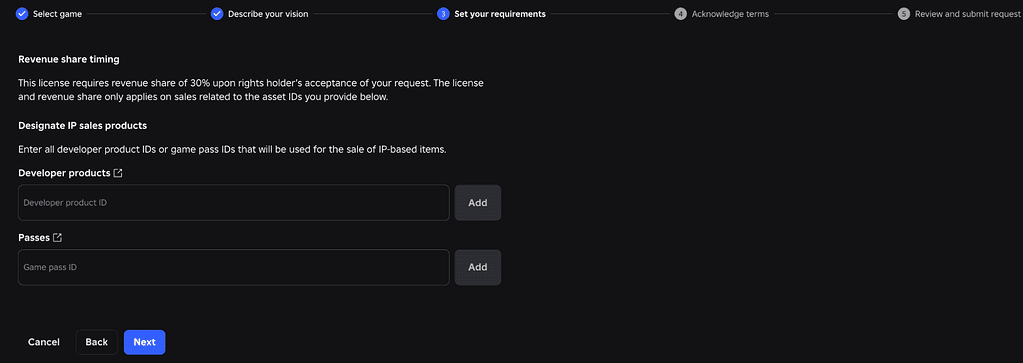
Roblox in-game licensing lets developers sell game passes and developer products built around approved IP without turning the entire experience into a licensed game. The crucial difference is scope: the rights holder shares revenue from the licensed items, while unrelated earnings from the same experience are outside that specific in-game sales licence.
Roblox introduced the system as a second route alongside full-game licensing. For creators who already have a successful experience, that means a collaboration can now be attached to a smaller set of paid products instead of forcing the whole project, its monetisation and its identity under one licensing agreement.
How Roblox in-game licensing works
Roblox in-game licensing applies only to the experience covered by the agreement.
An in-game sales licence is tied to one eligible Roblox experience. After a creator finds a licence in Creator Hub, the licence terms show the rights holder’s revenue-share rate, content standards and eligibility rules before the creator applies. Approval is not automatic: the rights holder reviews the request and can decide whether the proposed use fits the IP.
Once an agreement is active, the creator can put approved IP-based game passes and developer products on sale inside the experience covered by that licence. Roblox handles the revenue split automatically. The system does not give a blanket right to use the property everywhere on Roblox, and it does not turn every existing item in the game into licensed content.
What can be sold with an in-game sales licence
Roblox in-game licensing supports approved game passes and developer products.
Roblox currently describes two supported product types for this licence: game passes and developer products. A pass is normally a one-time purchase that unlocks a permanent privilege, area, item or ability. A developer product is designed for repeat purchases, such as currency, consumables or other benefits a player may buy more than once.
That distinction matters when planning the collaboration. A permanent Fairy Tail-themed transformation could make sense as a pass, while a repeatable licensed consumable would fit the developer-product model better. The final permitted use still depends on the individual licence terms, so approval to use an IP is not permission to create any product you can imagine.
What happens to your other game revenue
Roblox in-game licensing leaves unrelated game revenue outside that specific product scope.
The most useful part of Roblox in-game sales licensing is that the revenue share is limited to the licensed products covered by the agreement. Roblox specifically contrasts this with a full-game licence, where the licensed property is central to the experience and revenue sharing can apply to the game more broadly.
If a licensed pass is sold, Roblox first applies the normal platform economics and then the rights holder receives the percentage set in the licence from the creator-side revenue covered by that sale. Unrelated monetisation in the same experience is not automatically pulled into the in-game sales licence simply because the game also sells a licensed product.
What happens if a licence expires or ends
Roblox in-game licensing requires licensed products to leave sale when the agreement ends.
Creators are responsible for removing licensed items from sale if the agreement expires or is terminated. Roblox says players keep items they already purchased. That makes expiry planning important for anything that affects progression or a loadout: the game should continue handling an existing entitlement cleanly even after new sales stop.
The safest approach is to treat the agreement as a defined content boundary from day one. Keep licensed product IDs, assets and checks organised separately from unrelated monetisation so the licensed layer can be disabled without breaking the rest of the experience.
Where creators apply
Roblox in-game licensing is requested through the live Creator Hub licence catalogue.
Licences are managed through Creator Hub. Browse the Licenses catalogue, open the IP you want to use, read the commercial terms and restrictions, then submit the experience and proposed use requested by the listing. Roblox warns that using somebody else’s IP without permission can lead to content removal or account action, so the catalogue is the route to permission rather than a shortcut around normal IP rules.
Roblox is also working on rights-holder asset sharing for licensed creators, including controlled access to things such as images, models, meshes and music. That should make future licensed collaborations easier to build without relying on unofficial fan assets.
Roblox in-game licensing still requires compliance with ordinary Roblox platform rules.
Roblox in-game licensing should be checked again before a collaboration goes live.
Roblox in-game licensing is not a blanket IP permission. Roblox in-game licensing remains tied to one approved experience.
Official Roblox licensing information
The official Roblox Creator Hub is the live source for licence availability and terms. Check the active listing before putting a licensed product on sale, because scope, eligibility and revenue share belong to the current agreement rather than to an old announcement.
THE CLICK CREATOR GUIDE





