NVIDIA Game Ready vs Studio Driver comes down to what you want NVIDIA to prioritise. Game Ready Drivers target new game releases, patches and DLC with day-one support. Studio Drivers are tested for creative workflows involving applications such as editing, 3D design and graphics. Both are official NVIDIA drivers, and both can run games and creative software.
They aren’t ‘gaming works’ versus ‘gaming doesn’t work’. Pick Game Ready if you regularly play new releases; Studio is generally a better fit if your day-to-day work depends on creative applications. Either branch can handle both types of software.
NVIDIA Game Ready vs Studio Driver: what is the difference?

NVIDIA’s driver page describes Game Ready as the option for players who prioritise launch support for major new games, patches and downloadable content. The driver team works with developers and tests across hardware configurations as a title nears release. That’s why Game Ready releases often arrive around notable game launches.
Studio Drivers are aimed at artists, creators and 3D developers. NVIDIA tests them against major creative apps and combinations of tasks rather than focusing the release schedule around new game content. NVIDIA specifically names uses such as editing, animation, photography, graphic design and livestreaming.
NVIDIA Game Ready vs Studio Driver for gaming
If gaming is the primary purpose of your GeForce PC, select Game Ready. That gives you the branch NVIDIA intends for new launches and timely support for the latest game content. For example, Game Ready 621.24 was released on 12 November 2026 ahead of Warhammer 40,000: Dawn of War IV and other announced DLSS updates.
That does not mean changing from Studio to Game Ready guarantees a fixed percentage more FPS in every title. A particular driver’s release notes may identify a specific game improvement, but broad claims about doubling FPS or eliminating all crashes are not supported by NVIDIA’s general description of the branches.
NVIDIA Game Ready vs Studio Driver for creative work
Studio is intended for users whose work depends on creative application reliability. NVIDIA tests its Studio releases across popular content-creation software and real workflows, including moving projects between applications. If you use your PC daily for editing, rendering or design, that priority may matter more than receiving every game-oriented update as soon as possible.
Creators do not lose the ability to play games by using a Studio Driver. NVIDIA explicitly says both branches support top games and creative applications. Still, if a new game requires a particular driver feature, check that title’s requirements and NVIDIA’s release notes instead of assuming any older Studio release includes every recent addition.
Can you switch NVIDIA Game Ready vs Studio Driver branches?
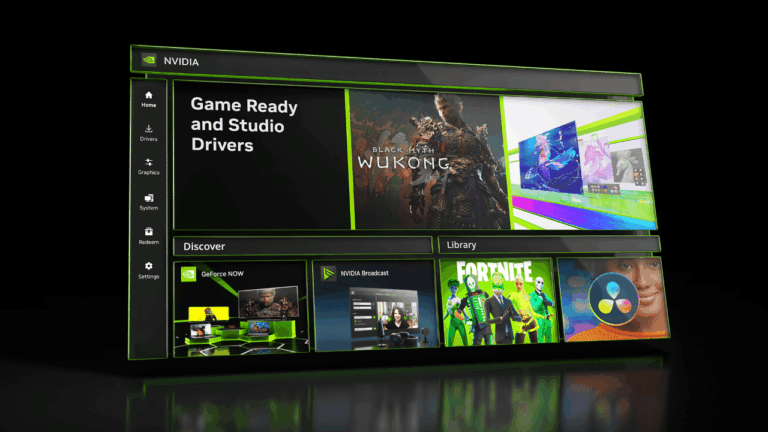
Yes. NVIDIA App supports selecting the preferred driver branch in its Drivers area. If you would rather install manually, NVIDIA’s official driver search lets you select Game Ready or Studio for compatible hardware. Download and install the branch you need, then check the installed version.
Switching branches is a system-wide driver change, so save your work and close games before installing. You do not need to uninstall every creative app or reinstall Windows simply because you are changing which branch you use. If you encounter installation problems, NVIDIA provides a Custom clean installation route through the official package.
If you cannot find the Studio choice, verify that NVIDIA has released a Studio package for your particular GPU and operating system. Not every supported device or historical driver version necessarily has the same branch availability.
NVIDIA Game Ready vs Studio Driver: can version numbers match?
Sometimes the version numbers match, but that is not a reason to ignore the name. As of 12 November 2026, NVIDIA lists both a Game Ready Driver 621.24 and a Studio Driver 621.24. Their release descriptions and intended use can still differ.
Similarly, a guide discussing the earlier Studio Driver 621.14 is not describing the 621.24 Game Ready release. If you are checking whether you installed the package you wanted, inspect the branch label as well as the number in NVIDIA App or your download information.
Read the actual release notes. The Game Ready 621.24 notes list no fixed gaming bugs, while Studio 621.24 has its own application-fix list. Matching version numbers don’t mean identical changelogs.
NVIDIA Game Ready vs Studio Driver: which is more stable?
Studio is tested with creative workflows in mind, which is useful if your work depends on those applications. But that does not prove a Studio package always runs every game more smoothly than Game Ready, nor does it guarantee no creative program will ever crash. Hardware, the specific program version and the driver build all matter.
Related Guides
Comparing NVIDIA Game Ready vs Studio Driver? These guides cover the different branches and how to install them.
Official source: NVIDIA official comparison of Game Ready and Studio Drivers.