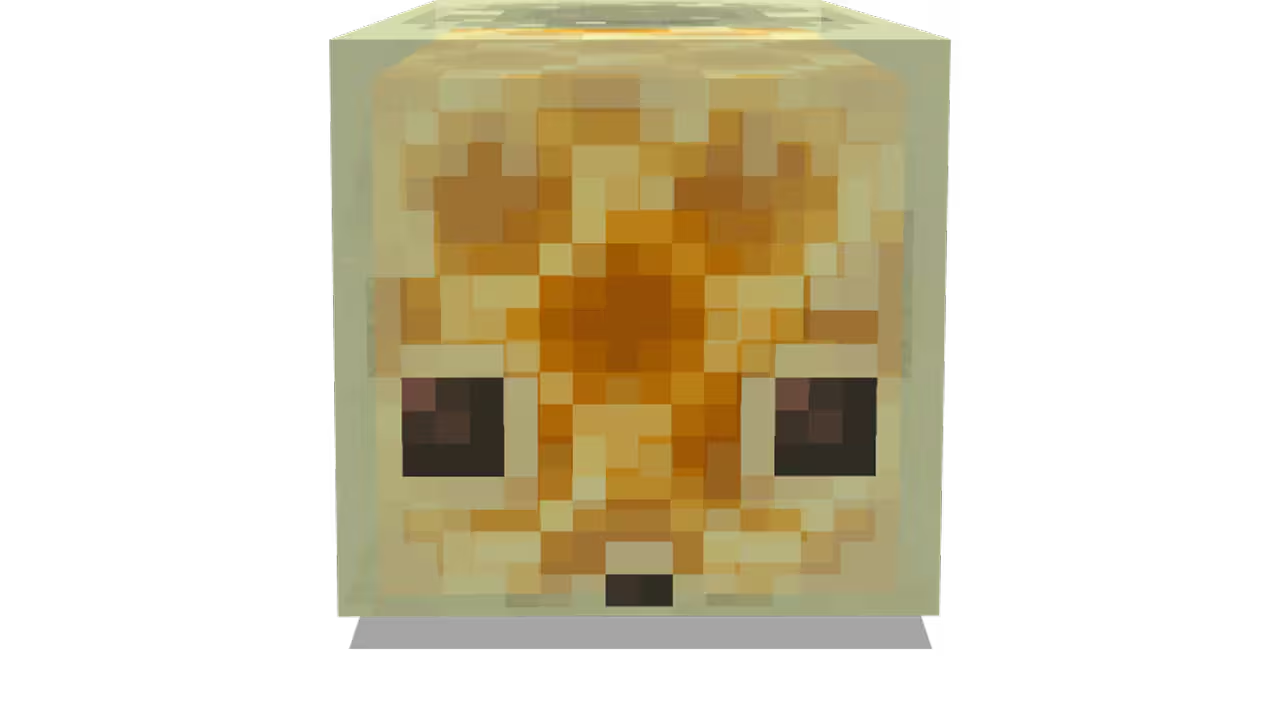
To find a Sulfur Cube in Minecraft, search for a Sulfur Spring on the surface and then explore the Sulfur Cave beneath it. Sulfur Cubes only spawn naturally inside Sulfur Caves, making the new underground biome the essential destination for anyone hoping to collect the Chaos Cubed mob.
Sulfur Caves are filled with bright yellow sulfur blocks, red cinnabar, bubbling sulfur pools, Potent Sulfur and pointed sulfur formations. The unusual colouring makes the biome easy to recognise once you enter it, but locating the cave from the surface can take more effort.
The fastest way to find a Sulfur Cube in Minecraft is to use Sulfur Springs as landmarks instead of mining through ordinary caves at random. These yellow surface formations generate above Sulfur Caves and help players narrow down where they need to dig.
How to Find a Sulfur Cube in Minecraft
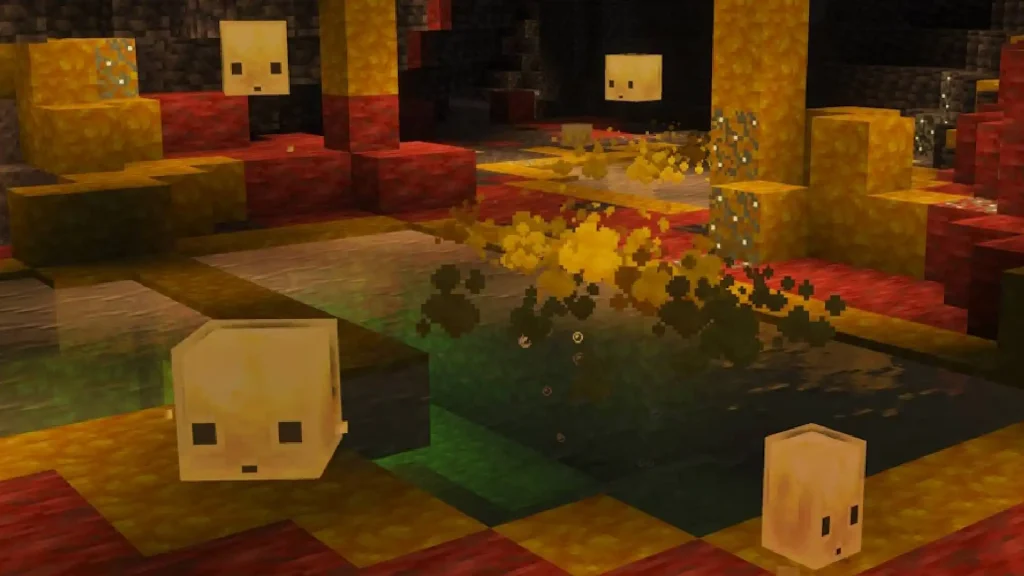
The best method to find a Sulfur Cube in Minecraft is to locate a Sulfur Spring and dig carefully beneath the surrounding area.
Sulfur Springs can generate in several sizes and contain recognisable sulfur-themed blocks. Some are large enough to notice while travelling across the Overworld, while smaller springs may blend into uneven terrain.
Once you locate a Sulfur Spring:
- Mark its coordinates.
- Examine the surrounding ground for additional sulfur.
- Dig down using a staircase.
- Look for yellow sulfur and red cinnabar.
- Enter the full Sulfur Cave biome.
- Explore until Sulfur Cubes spawn.
- Use an empty bucket to transport a large cube.
Do not dig directly down through the centre of the spring. Sulfur Caves can contain drops, hostile mobs, Magma Blocks and dangerous pools. A staircase gives you a safer entrance and an obvious escape route.
Mojang describes Sulfur Springs as surface features that generate above Sulfur Caves, making them the clearest clue for players trying to find a Sulfur Cube in Minecraft.
Where to Find a Sulfur Cube in Minecraft
You can find a Sulfur Cube in Minecraft inside the Sulfur Caves biome.
Sulfur Cubes do not generally spawn across ordinary Overworld biomes. Searching forests, plains, deserts or standard caves will not produce the mob unless the area connects to a Sulfur Cave.
Sulfur Caves can generate:
- Beneath Sulfur Springs
- Deep underground
- Beneath hills and mountains
- Close enough to the surface to become partially exposed
- Alongside ordinary cave networks
The Chaos Cubed update added both the Sulfur Cube mob and the Sulfur Caves biome, with the cube specifically described as being found inside these caves.
Once you enter the biome, search both the cave floor and raised ledges. Small Sulfur Cubes may be less noticeable among the bright formations, especially when several blocks and pools occupy the same chamber.
How to Use Sulfur Springs to Find a Sulfur Cube in Minecraft
Sulfur Springs provide the most reliable surface route to find a Sulfur Cube in Minecraft.
These formations appear in the Overworld and signal that a Sulfur Cave is located below. The cave may be almost directly beneath the spring, although players may need to explore sideways if the first staircase enters an ordinary cave section.
A Sulfur Spring can contain:
| Sulfur Spring feature | What to look for |
|---|---|
| Sulfur blocks | Bright yellow blocks on the surface |
| Potent Sulfur | Reactive sulfur blocks |
| Magma Blocks | Dark blocks with orange cracks |
| Spring formation | A broken or pool-like surface feature |
| Yellow colouring | Terrain that stands out from dirt and stone |
Open terrain can make Sulfur Springs easier to spot. Plains, hills and areas with less dense vegetation provide better visibility than forests, where small yellow formations may be hidden by trees and leaves.
When you see a suspicious yellow formation, approach it carefully and confirm that it contains sulfur-related blocks before beginning your underground search.
What Does a Sulfur Cave Look Like?
Recognising the biome is essential when you want to find a Sulfur Cube in Minecraft.
Sulfur Caves are colourful and watery underground biomes containing yellow sulfur, red cinnabar and bubbling pools. They look very different from standard caves dominated by stone, deepslate, granite or tuff.
| Sulfur Cave feature | Appearance |
|---|---|
| Sulfur blocks | Bright yellow cave surfaces |
| Cinnabar blocks | Deep red mineral formations |
| Sulfur pools | Bubbling pools across the cave floor |
| Potent Sulfur | Reactive blocks used with geysers |
| Sulfur spikes | Pointed formations growing in the cave |
| Sulfur Cubes | Small or large cube-shaped mobs |
| Cave Spiders | Hostile mobs spawning in the biome |
| Distinctive atmosphere | Coloured fog and unusual lighting |
Mojang describes Sulfur Caves as colourful, watery caves and confirms that they are the only biome where Sulfur Cubes naturally spawn.
When you only see a few sulfur blocks surrounded by ordinary stone, continue exploring. You may have found the edge of the biome rather than one of its larger chambers.
How to Find a Sulfur Cube in Minecraft Quickly
The fastest way to find a Sulfur Cube in Minecraft is to search the surface before beginning any serious mining.
Travelling across open terrain gives you a better chance of spotting a large Sulfur Spring. Once you find one, mark the location and build a staircase beneath it.
Use this route:
- Travel through open Overworld terrain.
- Scan for bright yellow surface blocks.
- Confirm that the area is a Sulfur Spring.
- Place a marker or save the coordinates.
- Dig a staircase beneath or beside it.
- Search for a yellow and red cave.
- Explore several connected chambers.
- Wait for Sulfur Cubes to spawn.
A single small cave chamber may not contain a cube immediately. Continue moving through the biome rather than remaining beside the first patch of sulfur you encounter.
Can You Find a Sulfur Cube in Minecraft on Peaceful?
Yes, you can find a Sulfur Cube in Minecraft while playing on Peaceful difficulty.
This gives players a safer way to explore Sulfur Caves because hostile mobs such as Cave Spiders will not remain active. Sulfur Cubes are not hostile mobs, so they can still appear while hostile threats are removed.
Peaceful does not make the environment completely safe. Players still need to watch for:
- Long drops
- Lava
- Magma Blocks
- Sulfur pools
- Falling formations
- Dangerous blocks
- Explosive or Hot Sulfur Cubes created by players
Switching to Peaceful can be helpful when your only goal is to find a Sulfur Cube in Minecraft, collect sulfur materials and leave without fighting through the biome.
How Rare Is It to Find a Sulfur Cube in Minecraft?
How rare it feels to find a Sulfur Cube in Minecraft depends mainly on whether you have located the correct biome.
Sulfur Cubes are biome-specific. This means they may seem extremely rare while you are exploring ordinary terrain, but become much easier to locate after entering a large Sulfur Cave.
When no Sulfur Cubes appear:
- Confirm that you are inside a Sulfur Cave.
- Explore a larger part of the biome.
- Move into a more open cave chamber.
- Check whether natural mob spawning is enabled.
- Leave the immediate area and return.
- Reduce the number of other mobs nearby.
- Search higher ledges and lower cave sections.
- Travel to another Sulfur Cave if necessary.
Players should not assume that every Sulfur Spring guarantees a cube directly below the first block they mine. The spring identifies the biome area, but the underground cave can extend away from the exact surface formation.
How to Find a Large Sulfur Cube in Minecraft
You may find small and large Sulfur Cubes inside the biome.
Large Sulfur Cubes are especially useful because they can be collected using an empty bucket. When you only find a small cube, feed it Slime Balls to make it grow.
Once it becomes large, interact with the Sulfur Cube while holding an empty bucket. This creates a Bucket of Sulfur Cube that can be carried back to your base.
Large cubes can also split into smaller Sulfur Cubes under certain conditions, allowing players to expand their collection after finding the first mob.
This means you do not necessarily need to find a Sulfur Cube in Minecraft every time you want a new archetype. One successful cave trip can provide the beginning of a larger collection.
What to Bring When You Find a Sulfur Cube in Minecraft

Take the correct items before entering the Sulfur Cave. Finding the mob without a suitable way to transport it can leave you trying to drag it through a long underground route.
| Item | Why you need it |
|---|---|
| Pickaxe | Mining through terrain |
| Torches | Lighting cave passages |
| Food | Restoring health |
| Building blocks | Bridging gaps and securing paths |
| Slime Balls | Growing a small Sulfur Cube |
| Empty bucket | Collecting a large Sulfur Cube |
| Lead | Guiding a cube |
| Minecart | Moving it along rails |
| Shears | Removing absorbed blocks |
| Compatible block | Tempting or transforming the cube |
The empty bucket and Slime Balls are the most important items. Together, they allow you to grow a small cube and carry the resulting large cube home.
How to Catch a Sulfur Cube in Minecraft
After you find a Sulfur Cube in Minecraft, the easiest way to catch it is to use an empty bucket on a large cube.
When the cube is small, feed it Slime Balls until it grows. You can then place it inside the bucket and transport it without worrying about its movement archetype.
Other transport options include:
- Attaching a lead
- Holding a compatible block to attract it
- Dropping a compatible block nearby
- Placing it inside a minecart
- Pushing it after it absorbs a block
A cube carrying a block behaves like a physics-driven object. This can make manual transport unpredictable, particularly when it has absorbed wood, ice or another material that increases its movement.
Buckets provide much more control for long journeys.
Can You Tame a Sulfur Cube in Minecraft?
You cannot tame a Sulfur Cube like a wolf, cat or parrot.
There is no collar, ownership system or permanent follow command. However, you can still collect a Sulfur Cube and keep it safely at your base.
To keep one:
- Find a Sulfur Cube in Minecraft.
- Feed a small cube Slime Balls when necessary.
- Collect the large cube in a bucket.
- Carry it back to your base.
- Build a secure enclosure.
- Release the cube inside.
- Use shears to remove unwanted blocks.
- Keep dangerous archetypes away from pets and villagers.
Bouncy and Sliding Sulfur Cubes require taller walls and more space. Explosive cubes containing TNT and Hot cubes containing Magma Blocks should be managed carefully.
Why Can’t I Find a Sulfur Cube in Minecraft?
When you cannot find a Sulfur Cube in Minecraft, check the game version, world terrain and mob-spawning settings.
| Problem | Solution |
|---|---|
| Minecraft is outdated | Install the Chaos Cubed release |
| You are searching old terrain | Travel into unexplored chunks |
| You are in an ordinary cave | Search for sulfur and cinnabar |
| Mob spawning is disabled | Enable natural mob spawning |
| The cave chamber is too small | Explore a larger part of the biome |
| Other mobs occupy the area | Move away or clear surrounding mobs |
| Realm is outdated | Ask the Realm owner to update |
| You only searched the surface | Dig below Sulfur Springs |
Chaos Cubed launched on June 16, 2026, adding Sulfur Cubes, Sulfur Caves, sulfur and cinnabar blocks and new physics-based interactions.
When playing in an older world, travel into chunks that were not generated before the update. Existing explored terrain will not necessarily contain the new cave biome.
How to Find a Sulfur Cube in Minecraft Java Edition
To find a Sulfur Cube in Minecraft Java Edition, update the game to Java Edition 26.2 or later.
Open the Minecraft Launcher and make sure you are using the latest release rather than an older installation.
You can use an existing world, but you may need to travel beyond previously explored terrain. New world-generation features are normally added to newly generated chunks rather than replacing areas you have already visited.
The recommended method is:
- Back up the world.
- Update to Java Edition 26.2 or later.
- Travel into unexplored chunks.
- Search for a Sulfur Spring.
- Dig beneath the formation.
- Explore the Sulfur Cave.
- Collect a large cube in a bucket.
Minecraft Java Edition 26.2 officially added the Sulfur Cube, Sulfur Caves, Sulfur blocks, cinnabar and the other Chaos Cubed features.
How to Find a Sulfur Cube in Minecraft Bedrock Edition
To find a Sulfur Cube in Minecraft Bedrock Edition, install the Chaos Cubed update and explore new terrain.
The search process is largely the same as it is on Java Edition:
- Check for a Minecraft update.
- Enter a new world or travel into unexplored chunks.
- Search the surface for Sulfur Springs.
- Dig down safely.
- Locate the Sulfur Cave.
- Search for small or large cubes.
- Grow and collect the cube.
The Bedrock Chaos Cubed changelog confirms that Sulfur Cubes are found inside Sulfur Caves and transform depending on the blocks players feed them.
Realm players should check that the Realm itself has updated and that everyone joining it is using a compatible game version.
Best Way to Find a Sulfur Cube in Minecraft
The best way to find a Sulfur Cube in Minecraft is to search for Sulfur Springs rather than blindly exploring underground.
A Sulfur Spring provides a visible clue that the correct cave biome lies below. Once you enter the cave, the bright yellow sulfur and red cinnabar make it clear that you have reached the right place.
Bring Slime Balls, an empty bucket and shears before beginning the search. Those items allow you to grow, collect and manage the first cube you discover.
After you find a Sulfur Cube in Minecraft, take it home before testing different blocks. The biome can be dangerous, while a secure enclosure gives you far more control over Bouncy, Sliding, Sticky, Hot and Explosive Sulfur Cube archetypes.