
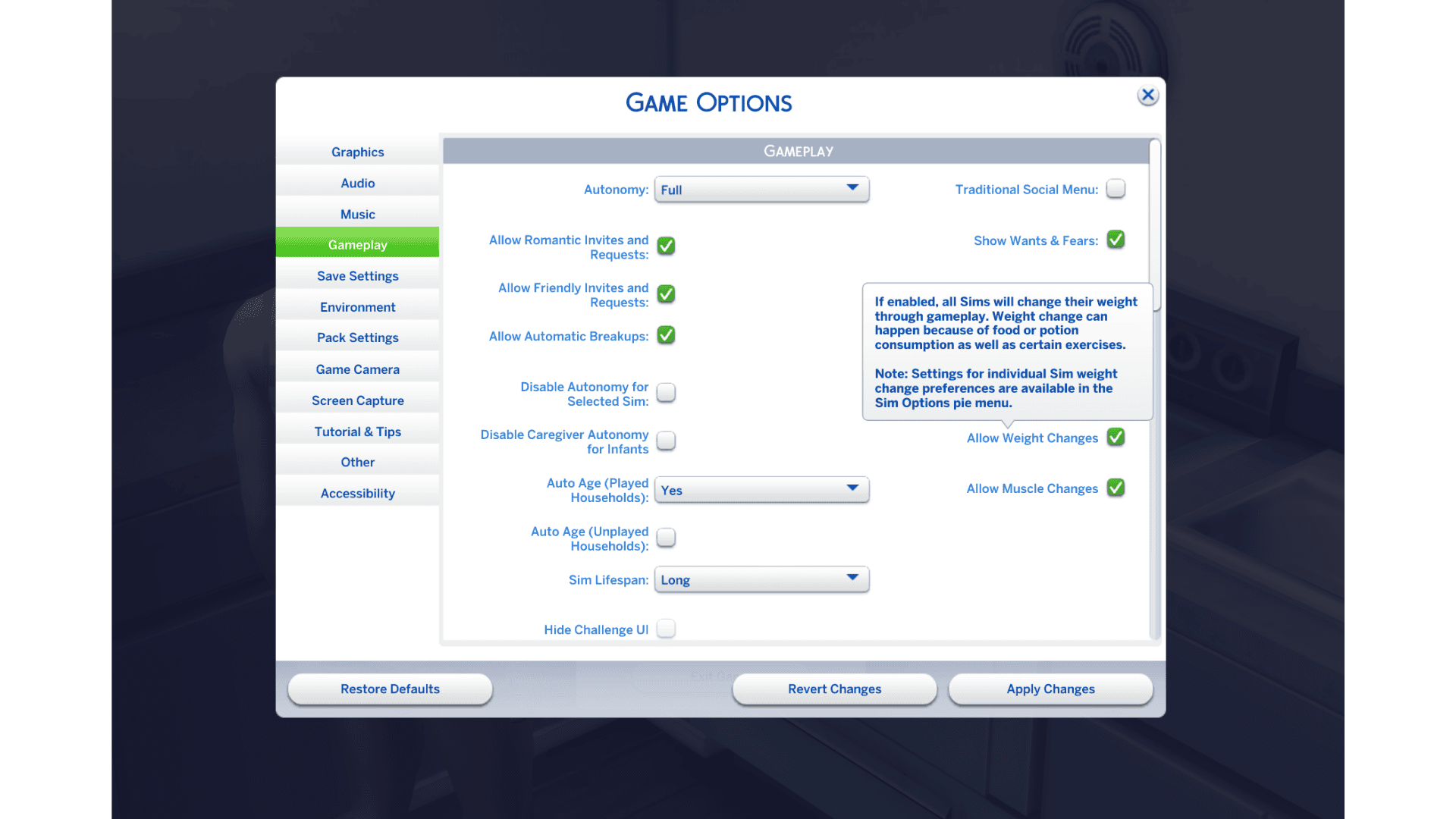
Sims 4 muscle weight toggles arrived in the October 27, 2026 base-game patch. They let you stop future muscle changes, weight changes or both, either throughout a save or for an individual Sim. You won’t need a mod to use them.
The Sims 4 muscle weight toggles work independently. You can stop weight changes while still letting muscle grow, or freeze both. You’ll find save-wide controls in Game Options and individual choices when you select a Sim.
Where to find Sims 4 muscle weight toggles
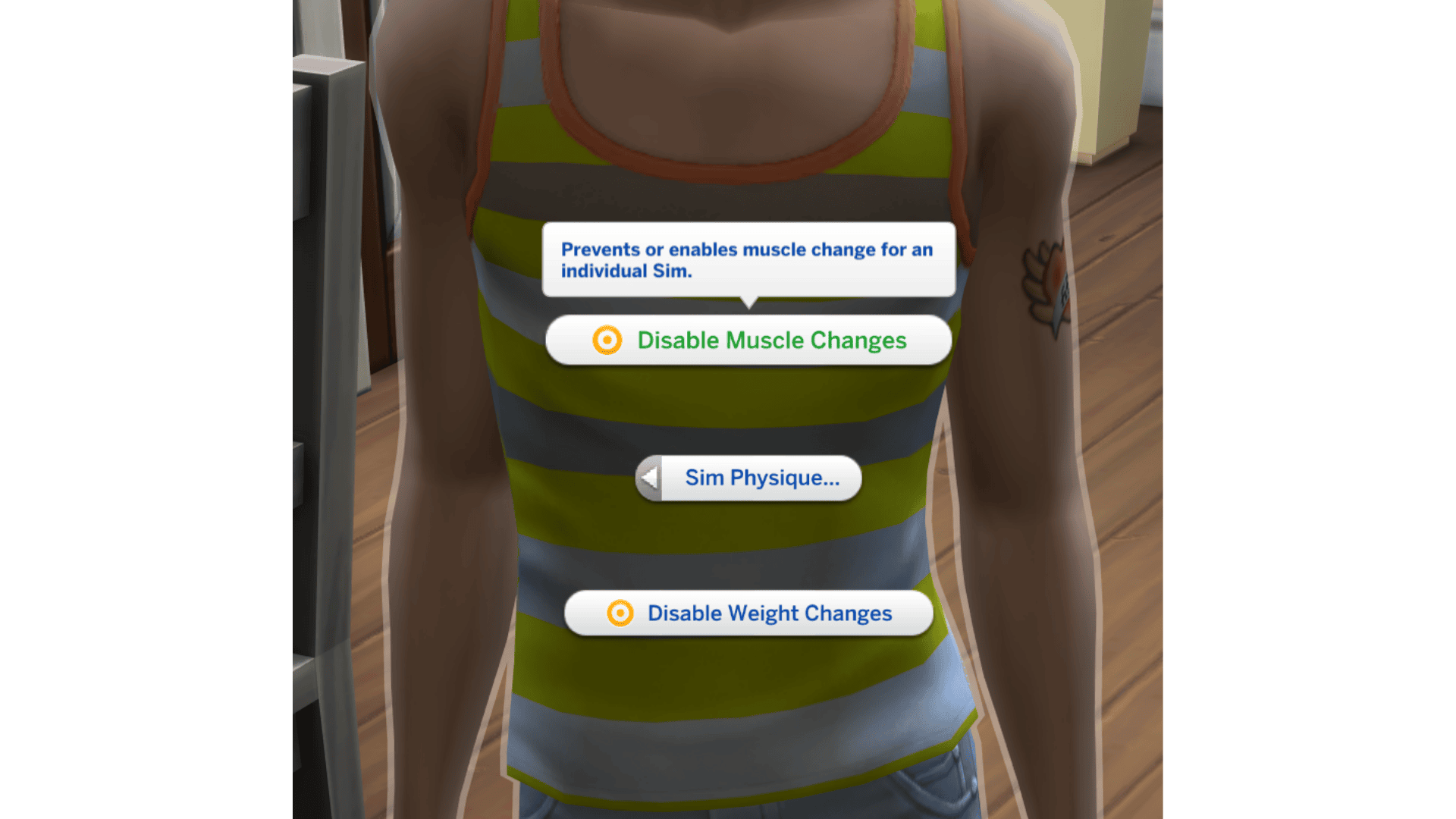
To control the save as a whole, open Game Options and find Allow Weight Changes and Allow Muscle Changes. Turn either option off to stop that kind of change across the save. For one Sim, click the actively selected Sim → Sim Options… → Sim Physique, then use Disable Muscle Changes or Disable Weight Changes. EA moved this self-interaction into the new Sim Options… category with the October 27 patch.
The Game Options switches apply save-wide; Sim Physique gives you individual controls on the selected character. Muscle and weight are separate choices, so turning one off does not automatically switch off the other. EA has not fully explained how conflicting save-wide and individual settings are prioritised, so test the combination you want on a spare save if you use both.
How to turn off muscle changes
To stop muscle changes, turn off Allow Muscle Changes in Game Options or use Disable Muscle Changes on the Sim you want to adjust. If you want every Sim covered, use the Game Options setting; if you only want to preserve one character’s build, use their individual option.
The setting controls body-shape changes, not whether the Sim can exercise, use equipment or gain Fitness skill levels. You can continue playing your usual routine while keeping the body shape you prefer.
How to stop weight changes
Weight gets its own independent control. Switch off weight changes while leaving muscle changes active, or turn both off for that Sim. That lets you preserve one Sim’s appearance while everyone else can still change normally.
EA has also adjusted food and drink calories in the October patch. The Sims 4 muscle weight toggles decide whether those activities may change body shape; eating and exercise remain available.
Can you set different rules for individual Sims?
Yes. Use the Game Options switches to set a save-wide rule, or click an individual Sim and open Sim Options… → Sim Physique to manage that Sim’s muscle and weight. EA confirms both levels of control, but has not spelled out every interaction between a globally disabled setting and an individual toggle.
Muscle and weight don’t have to share a setting. For example, a Sim can keep the same weight while still gaining muscle, and a different Sim can be prevented from gaining muscle while their weight continues changing.
Do Sims 4 muscle weight toggles work on pets?
No. The Sims 4 muscle weight toggles apply to Sims, not pets such as cats, dogs or horses. They’re Sims physique controls, not a new pet system. The switches are included with the October 27 base-game update and aren’t a separate paid pack.
Why can’t you find the Sims 4 muscle weight toggles?
The options require the October 27 game update, listed as PC 1.129.39.1030, Mac 1.129.39.1230 or console 2.40. If you cannot find them, open Game Options for the save-wide switches or click the actively selected Sim and choose Sim Options… → Sim Physique. The controls are not on the CAS body sliders. If the menu still looks wrong, check whether a UI mod is outdated.
If options behave incorrectly after updating, test without outdated mods or custom content and check the creators’ compatibility notes. Our October 27 patch guide explains the other confirmed fixes.
Will the options reverse existing body changes?
The Sims 4 muscle weight toggles are controls for changes from this point onwards, not an undo button for a body shape you changed previously. If you’ve already made changes you want to undo, use your existing character-editing or backup options instead of expecting the switches to rewind a save.
If your Sim has the appearance you want, you can keep it without changing their routine or applying the same restrictions to the rest of the household.
Related Guides
Official source: EA’s final October 27 update and Sim Physique controls.





