Fortnite chest arrows are the up and down marks described for chest icons in the v43.10 Visualize Sound Effects update. An up arrow means the chest is on a higher level than you; a down arrow means it is below. The marker helps you find a chest in a building with several floors. It does not tell you what’s inside.
These changes appear in a detailed v43.10 patch summary, although Epic’s public update announcement only mentions audio improvements without breaking down the new icons. If you’re wondering whether you need to listen for a different chest noise, you don’t. The arrows belong to the on-screen sound indicator, not the audio coming out of your headphones.
Fortnite chest arrows: Up and down explained
Picture a chest humming somewhere inside a three-storey house. Before this change, the visual indicator could point you in the right horizontal direction without making it obvious whether you should go upstairs. The reported Fortnite chest arrows add that missing bit of information.
- Up arrow: look above your current floor, such as an upstairs room, loft or roof space.
- Down arrow: check below you, such as a basement, tunnel or lower walkway.
- No visible vertical arrow: follow the usual sound direction and look around your current level, but don’t assume a missing arrow guarantees the chest is on the same floor.
If the arrow points up while you’re standing outside, get into the building and find stairs or a way onto the roof. If it points down near a hill or raised walkway, look for an entrance beneath you. The direction can help cut down the search, but it isn’t a map pin showing the exact chest position.
How to turn on Fortnite chest arrows
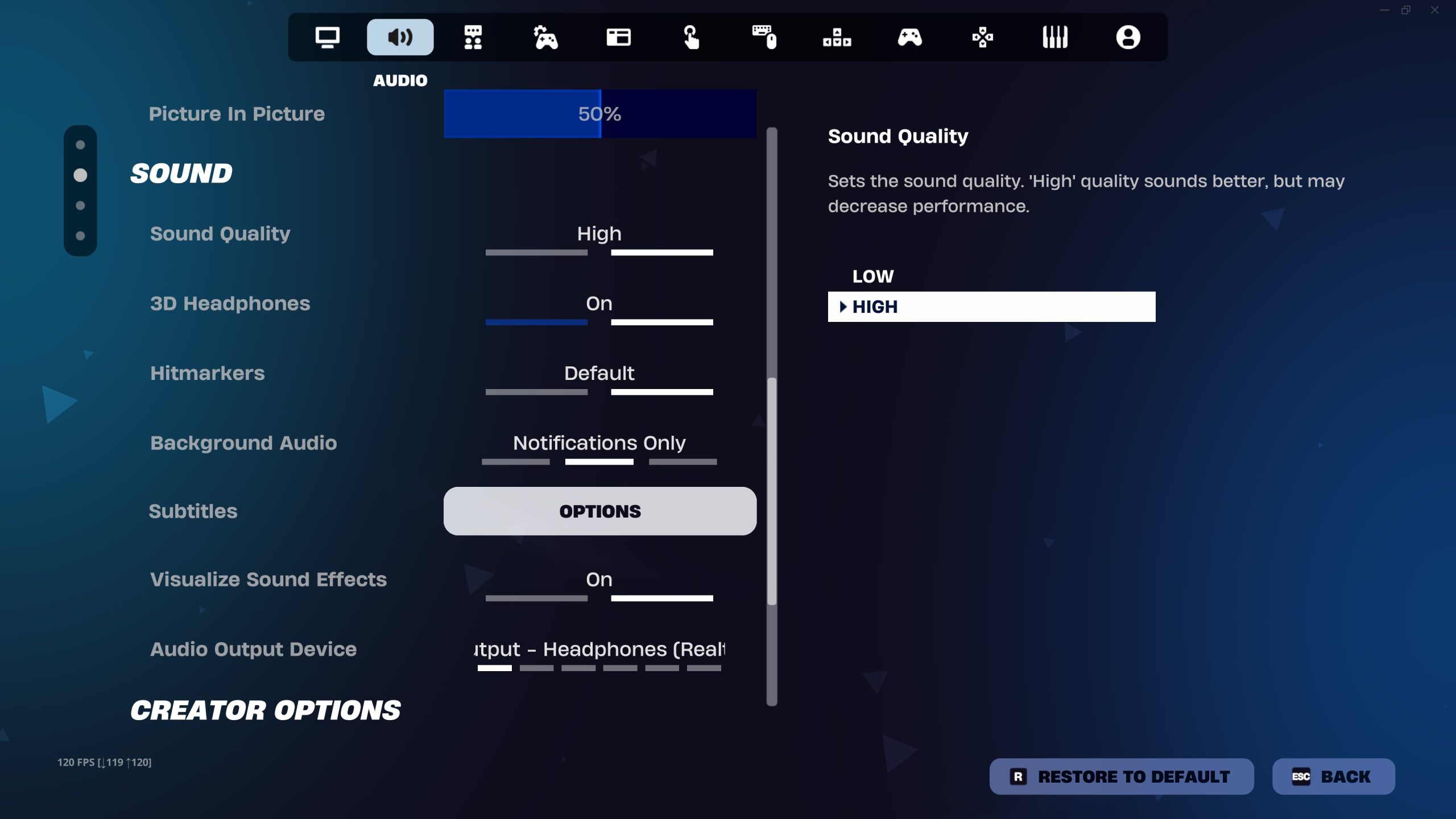
You don’t need a separate chest-tracking option. Epic’s official help instructions explain how to enable the Visualize Sound Effects feature that displays sound icons around your character:
- Launch Fortnite and stay in the lobby.
- Open your display-name menu and choose Settings.
- Choose the Audio tab.
- Set Visualize Sound Effects to On.
- Select Apply to save your choice.
Once it’s enabled, watch the radial indicator when you’re near a chest. Epic describes visual cues for some nearby sounds, not every noise across the map. The detailed v43.10 summary also lists a minimum indicator opacity of 30%, which would make the icons easier to pick out against busy scenery.
For a walkthrough of all the available audio cues, including footsteps and gunfire, our Visual Sound Effects guide covers the full setting.
How to use the arrows to find hidden chests

The easiest way to use Fortnite chest arrows is to follow the normal direction cue first, then use the arrow to choose a floor. That should save you from breaking through the ground floor when the chest is in an attic, or spending ages on a rooftop when the sound is coming from underneath.
Keep moving towards the chest rather than treating the marker as a permanent waypoint. If it drops out of view, move back towards the last place you saw it. The visualiser only displays supported sounds when they’re close enough for the game to register.
Not every chest is sitting in the open. Some are behind walls, above ceiling panels or inside tucked-away rooms. Check the structure around you before smashing everything. If you’re hunting lots of chests for Treasure Hunters rewards, following the arrows can make those awkward multi-level buildings less annoying.
Do chest arrows mean better loot or Pirate Shop Access?
No. The Fortnite chest arrows show where a sound is coming from, not the rarity of the contents. An arrow pointing up isn’t a special Gold Outfit signal, and one pointing down doesn’t mean you’ve found Pirate Shop Access. Those rare rewards are rolled when you open an eligible chest.
Epic’s published odds for a normal chest opening are 1 in 1,562,500 for a Weekly Gold Outfit and 1 in 137,500 for Pirate Shop Access. Epic only lists rate increases during Treasure Hours. It hasn’t said that climbing an extra floor or opening a chest with an arrow improves those chances.
The reported v43.10 change to the Gold Outfit reward animation is different again. That’s about the reveal after you find the reward, not a sound icon guiding you towards the chest.
Why are my Fortnite chest arrows not showing?
First, check Settings > Audio and make sure Visualize Sound Effects is still switched on. If you’ve just changed it, select Apply. Then try standing near a chest you can hear, rather than testing from halfway across a POI.
If footsteps and other icons appear but you can’t see an up or down arrow, keep in mind that the vertical chest markers are documented in third-party v43.10 notes, not in Epic’s current settings help page. The update might also display differently across situations. Don’t confuse the absence of an arrow with the absence of a chest.
If none of the sound icons appears, close and reopen Fortnite after checking that the setting was saved. You can still follow the chest hum while you troubleshoot. Fortnite chest arrows are a handy extra clue, not the only way to find loot.
Official setup instructions: Epic Games: How to Visualize Sound Effects in Fortnite.