
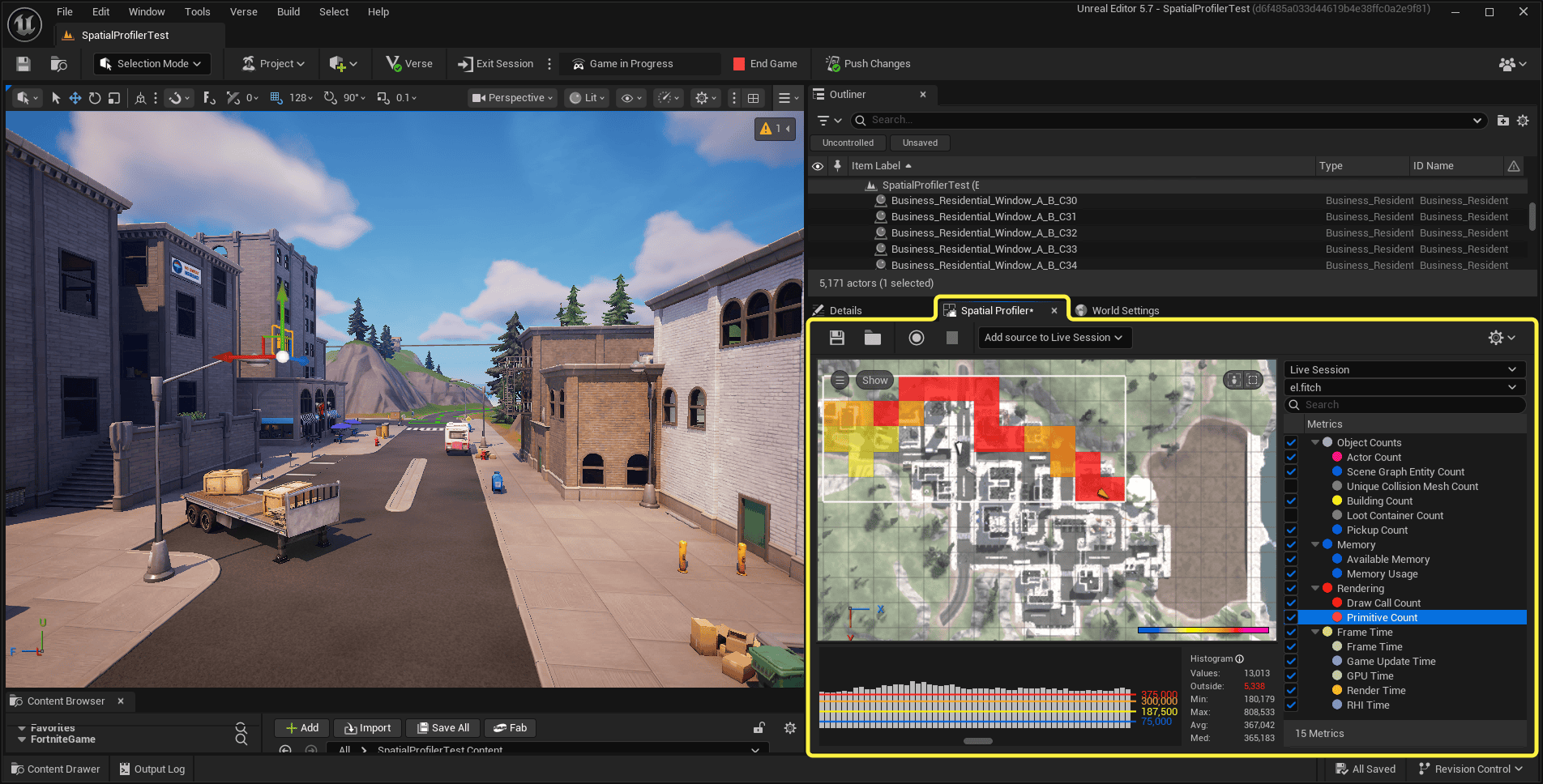
UEFN MCP profiling lets you ask a connected AI agent to investigate stutters, slow frames and excessive memory use in your Fortnite island. Instead of opening every profiler yourself, you can describe the problem, review the evidence it finds and decide what to change.
The v43.00 tools are particularly useful when you know an island feels sluggish but can’t tell which asset or script is responsible. You need a running play session for the investigation, and you’ll still need to test the result yourself.
What do you need for UEFN MCP profiling?
Start with an AI client already connected to your UEFN project and a running island play session. Launch the session yourself or ask the connected agent to do it. An open editor without a play session won’t provide the live measurements required for these examples.
If your client isn’t connected yet, use our UEFN MCP setup guide first. If it can connect but can’t run the tools, the MCP troubleshooting guide covers the server and configuration checks.
UEFN MCP profiling works alongside Epic Games’ profiling tools. Official Epic UEFN Verse tooling illustration, not an image of a live AI conversation.
How to find frame drops with an AI agent
Launch a session and go to the area where the slowdown occurs. Try a simple request such as “My island has frame drops. Can you take a look?” Give the agent a specific location or action if the stutter only happens when players enter a room or trigger an event.
UEFN MCP profiling gives the agent access to tools including Spatial Profiler, which helps locate costly areas, and Timing Insights, which shows where frame time is being spent. The v43.00 notes also list Verse Insights for investigating performance linked to Verse.
Ask what was happening during the slow frame and which measurement supports the conclusion. A spike during a wave of enemy spawns suggests a different investigation from a gradual slowdown while players explore a dense environment. You want the cause supported by a capture, not a generic list of things to delete.
How to use UEFN MCP profiling for memory problems
For memory problems, try “Take a memory snapshot and tell me which assets use the most memory.” The agent can examine Memory Snapshot data and point out the largest contributors, giving you specific assets to inspect.
In v43.00, Memory Snapshot also supports filters for Persistent Level Objects and Scene Graph Objects. Use those when you’re trying to distinguish memory consumed by objects placed in a level from entities and components in Scene Graph.
UEFN MCP profiling is especially useful after adding a large prefab or expanding a detailed environment. Compare snapshots before deciding to remove anything: a large asset might be essential, while several smaller, repeated assets or effects could provide an easier improvement.
Review the recommended edits before applying them
Before accepting a fix, ask the agent to show what it plans to edit and why. It might suggest simplifying expensive effects, reducing objects active at once or changing a Verse routine. Check that the proposal won’t break gameplay, quests or interactions.
Once you’ve approved a change, the agent can make edits in UEFN, capture new measurements and compare them with the original results. Reproduce the same action or area, with similar player activity where possible, so a lower number reflects a useful improvement rather than a quieter test.
Then play the island yourself. Check that the slowdown is better without losing effects, functionality or visual clarity. An agent’s approach varies with the model, prompt and project, and captures themselves can add some overhead.
Which performance tool should you use?
| Tool | Best for |
|---|---|
| Spatial Profiler | Where performance or memory pressure occurs on the island |
| Timing Insights | Which operations took the most time in a frame |
| Verse Insights | Expensive Verse activity in relevant captures |
| Memory Snapshot | Assets contributing the most to memory use |
The Creator Portal Technical Dashboard guide explains how to spot crashes or a server slowdown after you publish an island. UEFN MCP profiling helps you investigate those problems inside a running test session, before deciding what to change.
The aim is a repeatable process: reproduce the issue, capture measurements, understand the expensive operation, approve a targeted fix and capture again. That gives you something more reliable than guessing why a map feels laggy.
Official source: Epic Games UEFN MCP profiling documentation.





