How to install WoW Forever starts in Battle.net on Windows or Mac. Open World of Warcraft, choose WoW: Forever from the Game Version menu, select the right WoW account and click Install. Blizzard has confirmed those steps ahead of the launch.
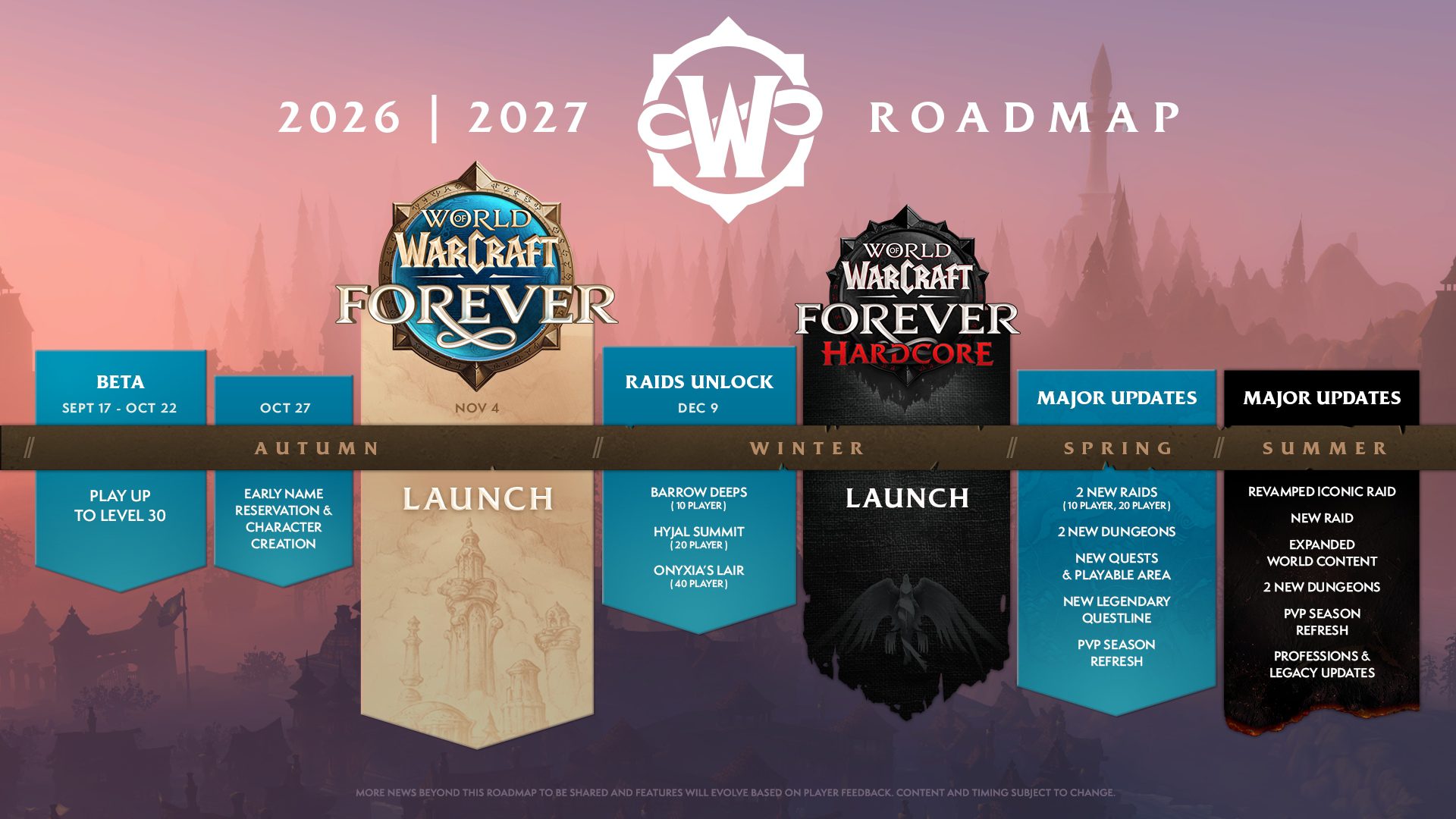
World of Warcraft: Forever opens globally on 4 November 2026 at 11 PM GMT in the UK. Make sure you’re installing the full release, not the separate Forever Beta or October Stress Test client.
How to install WoW Forever in Battle.net
The process is the same on Windows and Mac. Follow these official Battle.net steps:
- Download the Battle.net desktop app for Windows or Mac if you haven’t already.
- Launch Battle.net, log in and allow any launcher updates to finish.
- Choose World of Warcraft from your games list.
- Open the Game Version dropdown above Install or Play and select World of Warcraft: Forever.
- If you have more than one WoW account, use the second dropdown to select the account you want to play.
- Press Install and follow the download progress bar.
- When installation finishes and access is available, press Play.
The first thing to check after the download is the game version. When learning how to install WoW Forever, make sure the selector still says WoW: Forever rather than Retail or Classic.
How to install WoW Forever on Windows and Mac
Use Blizzard’s own Battle.net installer for either operating system. Blizzard advises checking the official system requirements, updating Windows or macOS as appropriate, and installing current graphics drivers before starting.
The account selector also matters. A single Battle.net login can hold multiple WoW accounts. Make sure the active licence in the second dropdown is the one with the subscription or Game Time you intend to use.
Which World of Warcraft game version is correct?
Pick WoW: Forever. Do not select the old Forever Beta entry, October’s Forever Stress Test, Retail or Classic. The Stress Test was temporary and its characters were wiped when testing ended.
If you searched how to install WoW Forever and found an older beta walkthrough, ignore its In Development instructions. The full launch uses the regular WoW: Forever entry.
Do you need a subscription?
An active World of Warcraft subscription or Game Time includes access to Forever. A separate base-game purchase is not required. Optional editions offer extra benefits, but they aren’t required to enter the standard game.
The Skyborne Heroic Pack or higher unlocks the Skyborne playable race and Zephras Isle. The Epic Pack and Warcraft Forever Collection also provide 30 days of Game Time from 4 November. The Heroic Pack alone doesn’t replace an active subscription.
When can you play WoW Forever?
Blizzard’s global launch is Wednesday, 4 November at 11 PM GMT, equivalent to 23:00 UTC and 3 PM PST. Installing ahead of time doesn’t make the live realms open early. Check our WoW Forever launch time guide for the other regions.
If you’re searching how to install WoW Forever before launch, you can follow the steps above, but you won’t be able to enter the live realms before Blizzard opens them. Once they’re available, choose your ruleset and create your character.
How to install WoW Forever if it doesn’t appear
Open Battle.net, select World of Warcraft and check the Game Version dropdown carefully. If you’re using the wrong account, change it in the second menu. Blizzard also offers account recovery if you’ve forgotten your login details or no longer have access to the email address.
If the download is unfinished, let Battle.net complete the installation and any launcher updates. If an error appears, follow its actual message instead of trying an unrelated beta-era workaround.
How to install WoW Forever: FAQs
Can I download it before 4 November?
Blizzard has published installation steps for players preparing ahead of launch. You can select the Forever client and use Install; access to the live game follows the launch schedule.
Do I need the Skyborne Heroic Pack?
No, not for standard access. You do need the Heroic Pack or higher to play the Skyborne race and start on Zephras Isle.
What if Play is greyed out?
Check that the download is finished, your chosen account has access, your Game Version reads Forever and the live launch time has arrived. Don’t mistake an expired test entry for the main game.
Before launch, check three things: the correct Battle.net account, the WoW: Forever game version and the 11 PM GMT opening time. You don’t need another base-game purchase for standard access.
Related Guides
Official instructions: Blizzard’s Return to Azeroth in World of Warcraft: Forever guide.