
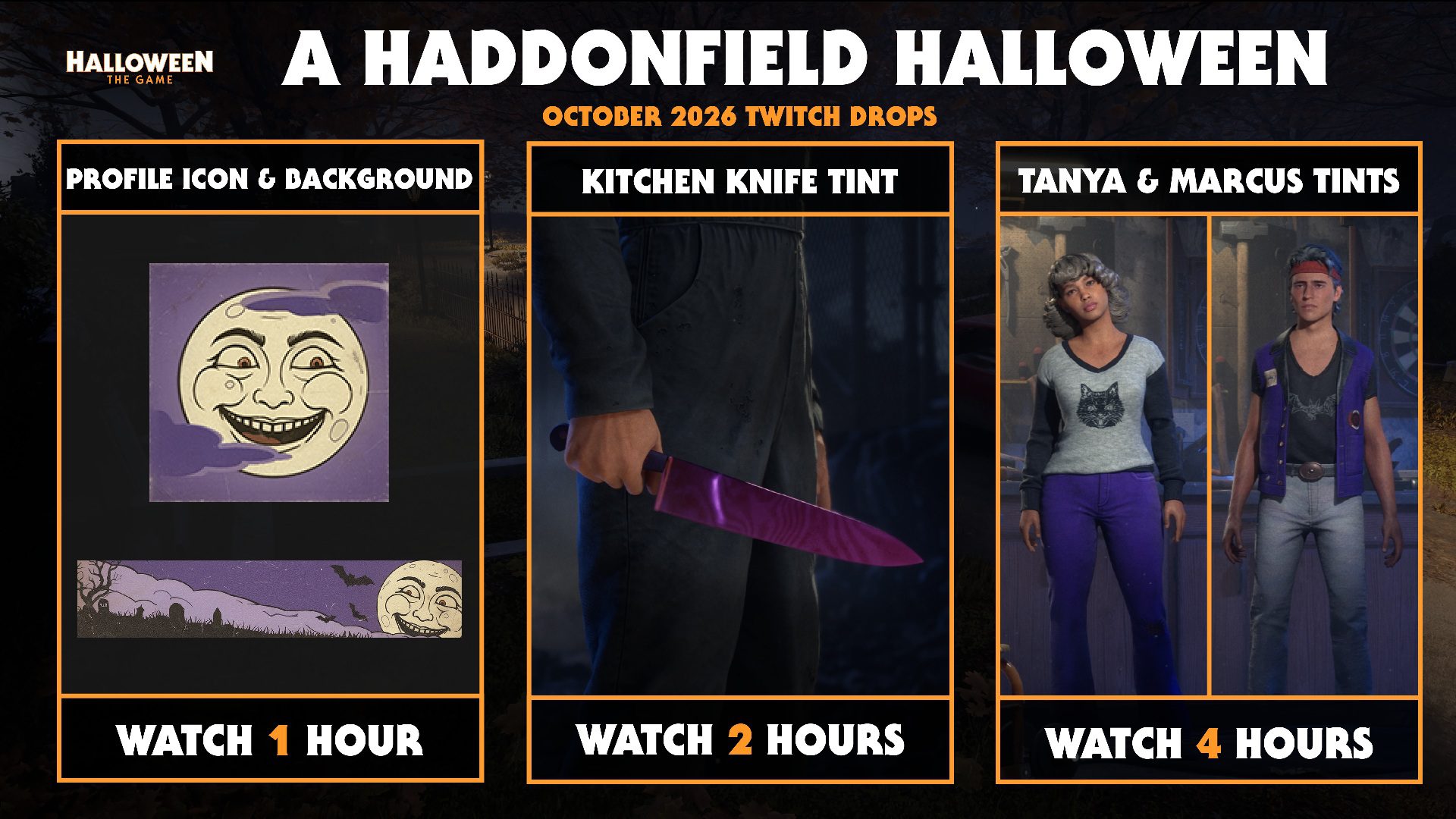
Halloween The Game Twitch Drops give you five free cosmetic items across three reward tiers between October 26 and November 3, 2026. You can get a Moon Smile profile icon, Moon Light background, a purple Kitchen Knife tint for Michael Myers, and outfit tints for Tanya and Marcus by watching participating Twitch streams. None of these requires buying the new Halloween DLC.
The rewards won’t appear in your game just because you’ve watched a stream. You need to claim each one on Twitch, redeem it through your linked IllFonic account, then restart Halloween: The Game. Crucially, you must claim the first reward before watch progress for the second can begin.
Halloween The Game Twitch Drops: All rewards and watch times
The campaign is called A Haddonfield Halloween. There are three milestones, at one, two and four hours. That’s four hours of eligible viewing in total, provided you claim each drop as it becomes available. You don’t need another four hours after unlocking the knife. Use Twitch Drops Inventory to check your progress.
| Watch milestone | Reward |
|---|---|
| 1 hour | Moon Smile profile icon and Moon Light background |
| 2 hours | Purple Kitchen Knife tint for Michael Myers |
| 4 hours | Outfit 1 tint for Tanya and Outfit 1 tint for Marcus |
Although the Halloween The Game Twitch Drops campaign includes five cosmetics, they’re grouped into just three claims. The first gives two profile items, while the final claim gives one tint each for Tanya and Marcus. None of them unlocks Eugene or Michelle; those two new Civilians are sold separately.
How to claim Halloween The Game Twitch Drops
Start at accounts.illfonic.com. Sign in, connect the Twitch account you’ll be watching on, and link your Halloween: The Game platform account (Steam, Epic, PlayStation or Xbox). If you play on more than one platform, double-check which account you’ve linked before you begin. The cosmetics need to be redeemed against the account you actually use.
Open Twitch and find a live Halloween: The Game stream participating in Drops. Keep it running and check your progress on Twitch’s Drops Inventory page. A saved video, clip or stream without the active Drops campaign isn’t a substitute for eligible live viewing.
After an hour, open Twitch Drops Inventory and claim the Moon Smile and Moon Light reward. Only then carry on watching for the knife tint at two hours. Claim that too before earning the four-hour Tanya and Marcus reward. A completed drop sitting unclaimed in your inventory can hold up the next one.
Once you’ve claimed the Halloween The Game Twitch Drops on Twitch, return to your IllFonic account and redeem them there. Close the game completely and launch it again. If Twitch says ‘Claimed’ but your cosmetics are missing, this is the first step to revisit.
Where are the Halloween The Game Twitch Drops cosmetics in-game?
Moon Smile and Moon Light go in your profile card customisation. Michael’s purple reward is a Kitchen Knife tint, not a new Michael skin or weapon. Tanya and Marcus each receive an Outfit 1 tint. Look at those Civilians’ outfit options rather than the menu for unlocking entirely new characters.
IllFonic also has a code redemption screen at Graveyard → Extras → Redeem Code. That’s for players who have been given a code; it isn’t an extra code you need to find for ordinary Twitch Drops. Follow the account-linked redemption process unless IllFonic supplies you with one.
When do Halloween The Game Twitch Drops end in the UK?
The Halloween The Game Twitch Drops campaign began on Monday October 26 at 10 AM Pacific and ends on Tuesday November 3 at 10 AM Pacific. Because the US clocks change on November 1, the closing time is 6 PM GMT in the UK on November 3. You’ll want to finish and claim your drops before then, rather than waiting until the final hour.
You don’t need to play the free Tower Farm map to earn the viewing rewards. You do need a valid linked platform account to receive them. If your game hasn’t been updated since the October 27 content drop, install the latest update before checking whether a redeemed item appears.
Halloween The Game Twitch Drops not working or missing?
Progress stays at zero: Make sure the stream is live, participating in the correct campaign and being watched while you are signed into the Twitch account connected with IllFonic. Check Twitch Drops Inventory rather than estimating from your browser’s clock.
The second or third drop won’t progress: Go back to Twitch and claim the previous tier. This is a specific rule of this Halloween campaign. The next viewing period may not begin until the previous reward has been claimed.
Claimed on Twitch but nothing in the game: Check the IllFonic redemption step and verify which platform account was linked. Restart the game afterwards. If the reward still fails, keep the claim details and contact the developer’s support with the item name and platform.
You don’t need to buy the Halloween 5 Michael skin or Civilian Costumes Pack 1 to get these Halloween The Game Twitch Drops. Watch an eligible stream, claim each milestone, redeem through IllFonic and reopen the game. That final redemption step is easy to miss.
Related Guides
Official source: IllFonic: A Haddonfield Halloween.





