Forza Horizon 6 cloud save restore lets Xbox players go back to an earlier synced save if their progress has been lost or damaged. Microsoft introduced the restore option to Xbox Insiders in August 2026 and said it was rolling out to more players soon afterwards. Forza Horizon 6 was the first confirmed game to support it.
Before you restore anything, check the problem you’re dealing with. If the game is asking you to choose between a Console save and a Cloud save, that’s a sync conflict, not the same as restoring an older version. Picking the wrong option could leave you with less progress than you started with.
Forza Horizon 6 cloud save restore: Xbox menu steps
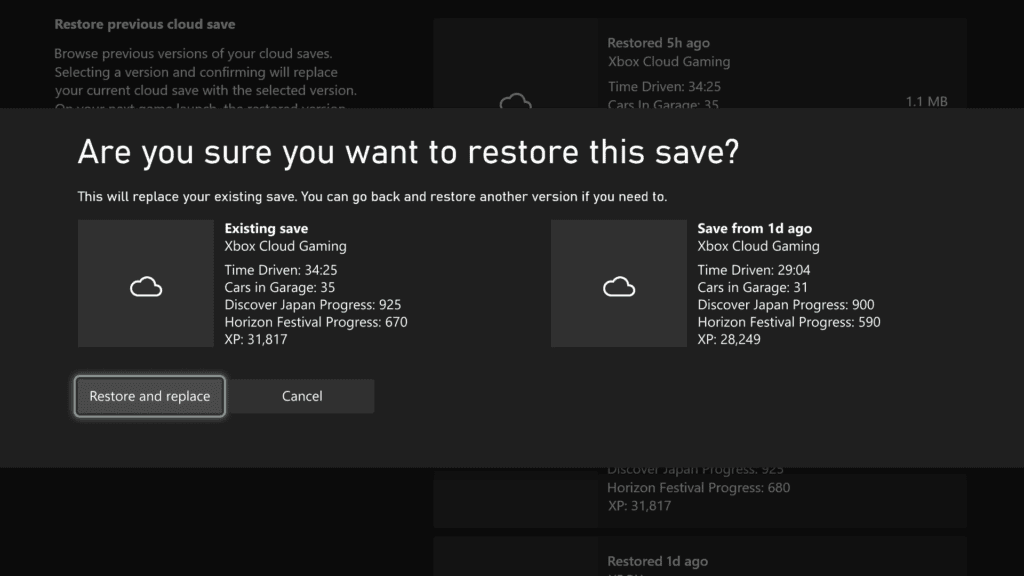
Forza Horizon 6 cloud save restore is found in the game’s Xbox management screen. Microsoft and Forza Support both give the path as Manage game & add-ons > Saved data > Restore saved data. You should see previously synced versions if the option is available on your console and there are backups to choose from.
- Find Forza Horizon 6 on your Xbox Series X|S and open Manage game & add-ons.
- Choose Saved data, then Restore saved data if the option is shown.
- Look through the available cloud save versions. Pay attention to their dates or times so you can identify a version from before the progress went missing.
- Only choose the older version if you’re prepared to lose any changes made after it was saved. Check the confirmation before proceeding.
- If none of the versions looks right, leave the saves alone and contact Forza Support before starting a new play session.
The restore option started in the Insider programme, but Microsoft explicitly said on 5 August that it would reach more players the following week. It should not be described as permanently Insider-only. Whether you can use it depends on your current console software, the game and the available save history.
Will an earlier Forza Horizon 6 cloud save restore overwrite progress?
Yes. Forza Horizon 6 cloud save restore replaces the current state with an earlier synced version. If you’ve earned cars, completed races or spent credits since that backup, those later changes may not be in the restored save. Don’t pick an old version simply because it appears in the list.
Choose the most recent version that you know still had the right progress. If you’re unsure which one is safe, stop and ask Forza Support for help. Their lost-save advice specifically warns affected players not to keep starting new sessions while a recovery case is being investigated.
Forza Horizon 6 Console save vs Cloud save: which one to choose
If Forza Horizon 6 shows a Console save versus Cloud save prompt after you’ve played on another device, Forza Support says to choose Cloud save to recover the latest synced progress. The studio has also documented a lost-progress recovery prompt where choosing Cloud save restores the most recent saved version.
This is separate from Forza Horizon 6 cloud save restore. The sync prompt compares available current saves; Restore saved data lets you browse older synced versions deliberately. Read the screen in front of you before making a choice, particularly if you’ve switched between Xbox and PC.
Why the Forza Horizon 6 cloud save restore option is missing
If Restore saved data isn’t in the menu, confirm that your console is updated and that the feature has reached your build. Microsoft’s announcement covered a staged rollout, not a promise that all Xbox consoles and games received older-save restoration at the same moment. The absence of the menu doesn’t mean your existing cloud saves have been deleted.
Don’t try to force an older backup to appear by choosing Delete everywhere. That option can remove saved data from the console and the cloud. Forza Support’s separate troubleshooting guidance makes clear that deleting cloud data is not the same as restoring an earlier version.
Does the restore option work on PC or other Xbox games?
The documented Forza Horizon 6 cloud save restore menu is a console feature. Microsoft has not published the same older-version browser for Windows PC through this announcement, nor does ordinary cloud sync guarantee a version history for every Xbox game. The original rollout named Forza Horizon 6 first, with more supported games planned.
Forza Horizon 6 cloud save restore is worth checking if your progress has genuinely gone backwards, but it isn’t something to use casually. Compare the available backups, decide whether you’re facing a sync conflict or a rollback, and contact Forza Support if you’re unsure. You can also check our Xbox October 2026 update guide for the broader console changes.
Official source: Forza Support: Notice Regarding Lost Save Issues in Forza Horizon 6.