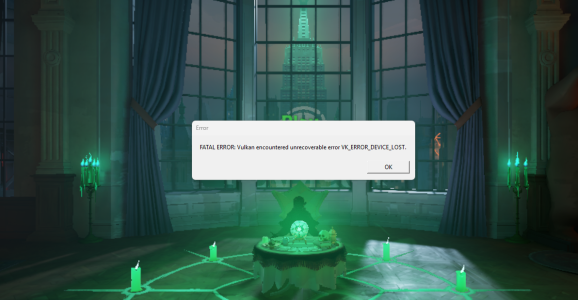
The Deadlock Intel Arc Vulkan crash can stop the game before it reaches the menu, showing VK_ERROR_DEVICE_LOST on Intel Arc A-series or B-series graphics. Intel has acknowledged reports following Deadlock’s 29 September 2026 update.
Intel is investigating the issue, with no confirmed driver fix published in its support notice. Before changing drivers or following a forum workaround, here’s how to check whether your crash matches Intel’s report.
What causes the Deadlock Intel Arc Vulkan crash?
Intel’s report covers Windows 11 systems with Arc A-series or B-series graphics, Deadlock’s 29 September update and a crash on launch in Vulkan mode. The error is VK_ERROR_DEVICE_LOST. Intel hasn’t established a public root cause or named a fixed driver.
The Vulkan error means the graphics device was reported lost during an operation. That doesn’t establish why it happened or mean the card is physically defective. Intel’s article doesn’t identify one faulty Arc model.
Can DirectX 11 avoid the Deadlock Intel Arc Vulkan crash?
Players on Deadlock’s developer forum have reported getting into the game using DirectX 11 instead of Vulkan. Some also report worse frame rates. That’s anecdotal, not an Intel-confirmed workaround, and it won’t necessarily work for everyone.
If your current Deadlock build offers a graphics API setting, or Valve documents an alternative launch option, you can test it and change back afterwards. Don’t paste an unverified command from another game and assume Deadlock understands it.
Vulkan and DirectX 11 are different paths for sending rendering work to the GPU. A game can behave differently under each API. If switching lets the game start, check stability and performance before deciding whether to stay with it.
Safe checks for the Deadlock Intel Arc Vulkan crash
- Open Windows Device Manager > Display adapters and note your exact Intel Arc GPU model.
- Open Properties > Driver to record the installed graphics driver version.
- Use winver to check your Windows release.
- Confirm the crash says
VK_ERROR_DEVICE_LOST, rather than showing a different game error or freezing the whole computer. - Use Steam’s file verification as a general integrity check if needed. Intel does not describe this as a proven fix.
- If available and officially supported by your current Deadlock build, test another renderer and record what happens.
None of those checks is a proven repair. They’re useful because they show whether you have the reported Vulkan failure or a different issue, and they give Intel Support the details it needs.
Which Intel driver fixes the Deadlock Intel Arc Vulkan crash?
Intel has not named one. The Deadlock advisory does not say that driver 32.0.101.9150 resolves the Vulkan failure. It also does not instruct players to revert to 32.0.101.8993. Those numbers appear in different support cases.
The Intel Arc driver 9150 guide explains that release, but it isn’t evidence of a Deadlock fix. Intel also has separate reports involving Dragon Quest on driver 9030 and mouse cursor behaviour on 9033. Their advice shouldn’t be copied into this Vulkan troubleshooting guide.
There is also a distinct Intel Arc B580/B570 Windows lock-screen freeze report. That happens before you can sign in to Windows, rather than while Deadlock tries to launch.
What should you report to Intel?
Intel’s stated next step is to contact support. Include the graphics card model, Windows version, driver number, Deadlock update or build and exact error text. Say whether the Deadlock Intel Arc Vulkan crash happens at launch or while loading a particular area.
Attach a screenshot of the error if you have one and explain the steps needed to reproduce it. You don’t need to post your Steam password or account recovery information.
Is there a confirmed Deadlock Intel Arc Vulkan crash fix?
Intel still lists the issue as under investigation. Don’t treat registry timeout changes, unofficial Vulkan wrappers or driver-cleaning tools as a verified fix. Record your setup, try only supported reversible settings and check Intel or Valve’s updates for an actual resolution.
Related Guides
Official source: Intel Support: VK_ERROR_DEVICE_LOST when launching Deadlock on Arc A and B graphics.