
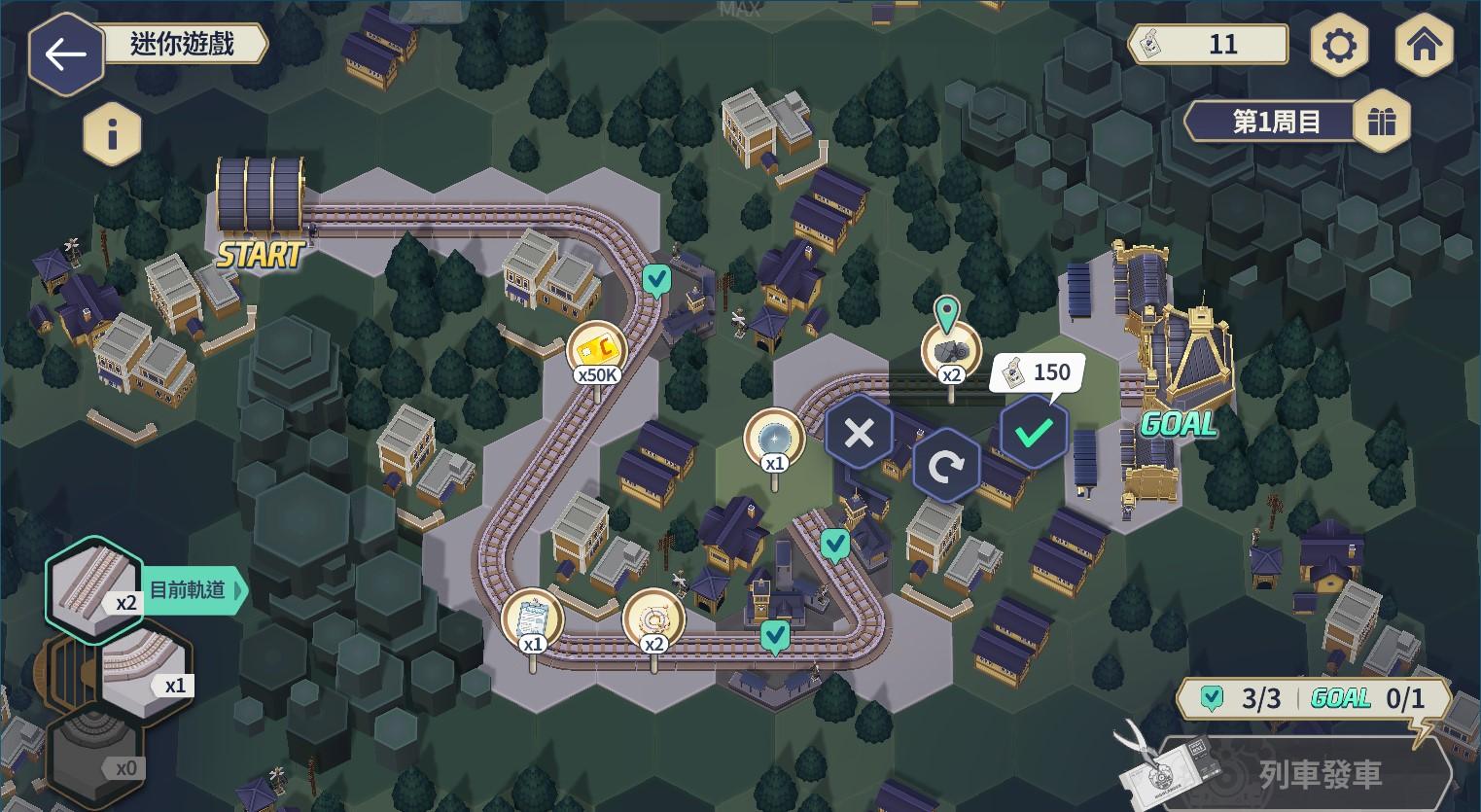
The Blue Archive Highlander Railroad minigame asks you to build a track between three stations, then send a train along it to collect rewards. Each new track placement costs 150 Highlander Stickers, but you can rotate or reposition an already placed piece for free.
The aim is to connect Departure, Layover and Arrival. You don’t always need to fill every empty tile, and taking the shortest route isn’t necessarily the best choice if it misses bonus rewards. Here’s how to place tracks, fix a route and get the train moving.
How to start the Blue Archive Highlander Railroad minigame
Clear Normal Mission 2-3 and enter the Highlander Railroad Runaway event. Open its minigame menu to see the board and your available Current Tracks. Nexon says the pieces offered for a round are randomly determined and can’t be rerolled.
The three stations are fixed in place, so plan around them. Look at the ends of each track piece before choosing its tile. You want one connected railway that passes through all three stations.
How to place tracks in the Blue Archive Highlander Railroad minigame
Select a Current Track, put it on an empty space and tap Rotate until it faces the right direction. Press Check to confirm that placement for 150 Highlander Stickers. The cost is charged when you place a new track, not every time you change your mind about its direction.
Already placed tracks can be moved, swapped and rotated for free. That’s particularly useful if the Blue Archive Highlander Railroad minigame gives you an awkward set of curved and straight pieces. You can rearrange the tracks until they form a working route.
How to connect Departure, Layover and Arrival
Follow the track from Departure through Layover to Arrival. The ends must line up to make one continuous path. Once all three stations connect, the Start Train button will become available.
Some boards allow the train to leave before you’ve filled every space. Look for any bonus rewards you want to collect and check whether the planned route crosses their tiles. A route that reaches Arrival is enough to complete the round, but a different route may pick up more bonuses.
Blue Archive Highlander Railroad minigame train rewards and speed
Tap Start Train when you’re satisfied with the track. The speed lever appears in the lower-right corner; use it to change the train’s speed while it travels. Reaching Arrival completes the round and makes its rewards available.
Only bonus rewards on the route the train actually travels count. If a reward is on a different branch or an unused tile, the train won’t pick it up. The Blue Archive Highlander Railroad minigame therefore rewards a little planning beyond simply connecting the stations.

How Skip works in the Blue Archive Highlander Railroad minigame
From round seven onwards, the Skip button lets you skip the remaining manual track placements. Nexon’s notes say it consumes the Highlander Stickers needed for those remaining empty tiles and grants the available round rewards.
Skip saves you time, not currency. Before using it, check how many spaces remain and whether you’ve already arranged the bonus route you wanted. If you’d rather control where the train travels, keep laying and adjusting the tracks yourself.
Where to get more Highlander Stickers and when it ends
Highlander Stickers are the currency used to place tracks, so keep an eye on your balance in the minigame menu. For the other event currencies, bonus students and Quest farming, our Highlander Railroad Runaway guide explains the wider event.
The main event Story, Quests and Challenges close on November 10 at 01:59 GMT. The Blue Archive Highlander Railroad minigame and its reward-claim period remain open until November 17 at 01:59 GMT. Use those extra days to finish any remaining rounds and claim what you’ve earned.
Official publisher source: Nexon October 27 Blue Archive patch notes.





