ROG Xbox Ally FSR 4 1 refers to AMD’s newer machine-learning upscaling feature being delivered through an ASUS handheld graphics driver. ASUS announced a preview dated 23 October 2026 for the ROG Xbox Ally X and X20. That means those two models have a documented preview route rather than a proven universal stable release. The manufacturer also says the feature should improve image reconstruction in compatible games, but it does not publish performance measurements for every title and device combination. Treat claims of automatic FPS improvements as conditional on the game and settings.
One detail requires special care before downloading anything. The same ASUS article says in its introduction that the base ROG Xbox Ally driver is coming soon, yet the highlighted summary says the base model is already supported in preview. These statements conflict. Owners of the base handheld should check what their own Update Center actually offers instead of relying on a headline that implies every model has the identical driver today. Preview availability can differ from stable updates, and no unsupported manual installer should be recommended as a shortcut.
How to install and enable FSR 4.1
To install ROG Xbox Ally FSR 4 1, begin in Armoury Crate SE on the handheld itself. Open Update Center, choose Preview Updates and look for the applicable graphics driver. Confirm that the update is intended for the precise device before installing it. ASUS notes that preview software may contain bugs or stability problems, so users who favour reliability over experimentation can stay on the official stable channel. The company says the feature will arrive through Official Updates when the preview stage ends. That is the safer choice if the handheld is used daily and an unexpected graphics regression would be disruptive.
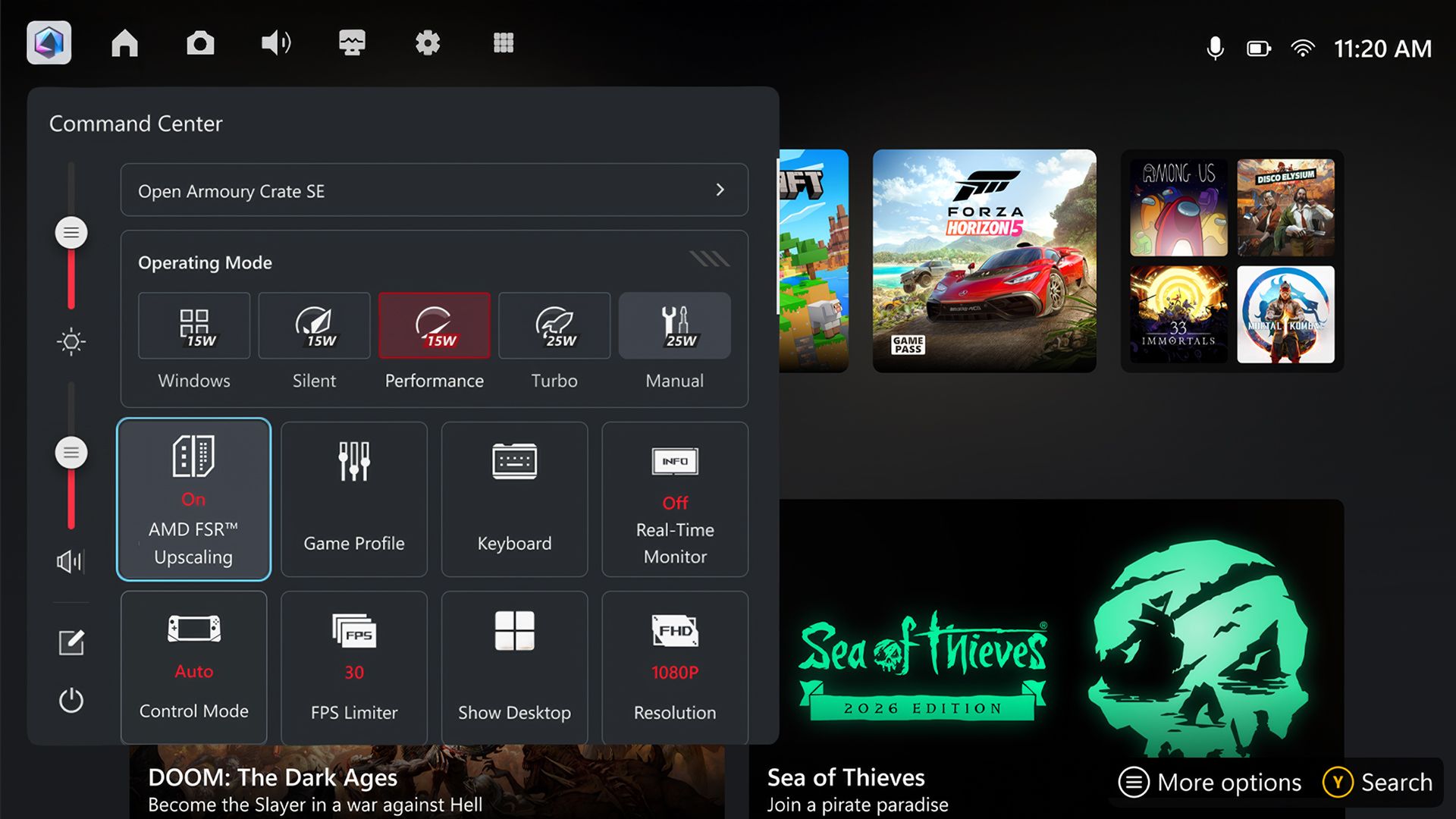
After the ROG Xbox Ally FSR 4 1 preview driver installs, open Command Center and press Y to customise its layout. Add the FSR Upscaling tile, then enable that tile. Launch a supported game and select an appropriate FSR mode inside the game’s own graphics settings. The two steps matter because ASUS describes the device-level tile and game-level FSR control working together. If the tile appears but the game has no compatible option, that alone does not establish that the driver failed. First identify what version of FSR the game actually implements.
Which games are compatible?
For ROG Xbox Ally FSR 4 1, ASUS specifically points to games supporting FSR 3.1 or newer as candidates for the newer model. It references a large supported-game catalogue, but a list of games associated with FSR does not prove that every available title or rendering path will behave identically on this handheld. Game patches may alter available graphics options, and some settings depend on the current build or hardware. Check the in-game upscaling selection instead of assuming the Command Center switch upgrades every possible game, including titles without any suitable implementation.
Players can use related guides such as Modern Warfare 4 Upscaling to understand the difference between FSR, DLSS and XeSS. Our Cyberpunk FSR 3 Missing guide covers a game’s version-specific settings changes, while the Cyberpunk AMD FSR Crash article shows why a feature being supported does not mean every possible combination is stable. Those are useful comparisons, not claims that the current ASUS preview produces the same fault. Keep a note of the original display resolution, mode and frame-rate behaviour for any genuine before-and-after comparison.
Why FSR and RSR should not be combined
Understanding ROG Xbox Ally FSR 4 1 also means distinguishing game-integrated FSR upscaling, whereas Radeon Super Resolution operates at the driver level for compatible circumstances. ASUS expressly advises against combining FSR with RSR. Applying two reconstruction methods at once is not a free extra performance trick and can make it harder to interpret the resulting picture. If your game offers an appropriate FSR option, begin with that and leave RSR off while checking stability. If FSR is unavailable, investigate RSR separately rather than mislabeling it as a substitute driver update.
When comparing ROG Xbox Ally FSR 4 1 results, look beyond a large FPS number. Fine text, moving foliage, HUD clarity and motion during combat can reveal visual issues that an average frame rate does not capture. A machine-learning feature may reconstruct some scenes well and others less convincingly. Also note whether a change improves actual frame pacing, because smoother reported averages do not guarantee freedom from short interruptions. A controlled ROG Xbox Ally FSR 4 1 comparison using the same scene and settings is more valuable than changing resolution, game presets and driver controls all at once.
What if the option is missing or unstable?
If the ROG Xbox Ally FSR 4 1 tile is missing, confirm the hardware model, the Armoury Crate SE version, whether the correct preview driver is installed and whether Command Center has been customised. The base-model inconsistency in ASUS’s own release information makes this particularly important. If there is no device-specific driver offer, do not use a third-party download claiming to unlock the feature. Waiting for ASUS to clarify availability or to release the stable package is preferable to introducing unknown graphics software.
If ROG Xbox Ally FSR 4 1 appears but a game becomes unstable, return to a known working configuration and document the driver version, game build and exact settings. Avoid assuming the new preview is the cause without repeating the symptom, but do not ignore ASUS’s warning that unfinished drivers may have defects. The official ASUS setup announcement should be the reference for supported model information and instructions. ROG Xbox Ally FSR 4 1 is useful to explore, provided players recognise the difference between an announced preview and a fully validated update. Further detail is available in the ASUS ROG official announcement.