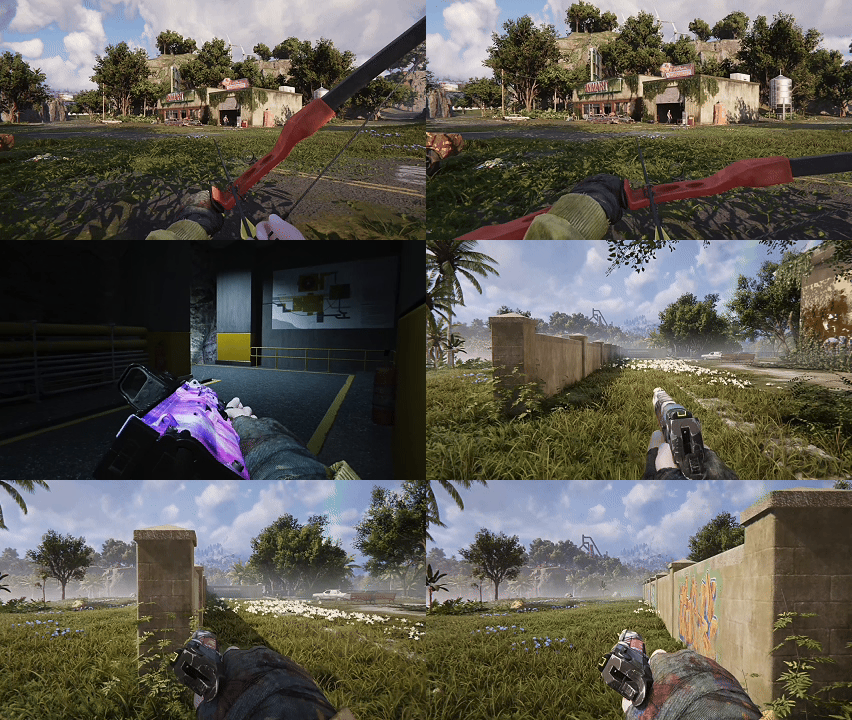
Once Human First Person OTS is a new aiming option added in version 3.1.1. It gives players a wider view than traditional aiming down sights, making it useful for close and medium-range encounters. There is a trade-off: bullet spread is greater in OTS than in ADS, so accuracy is less consistent at longer distances.
Open Settings and find the consolidated Aim controls. First Person OTS shares core inputs and sensitivity settings with Third Person OTS; switch to ADS when you need the tighter spread for longer shots.
How to enable and use Once Human First Person OTS
Update the game to version 3.1.1, then open Settings and locate the Aim controls. First Person Aim settings were moved into that category, so older instructions directing you to a separate First Person Aim panel may now be outdated. Check the current button or key shown there for your platform.
The developer states that Once Human First Person OTS uses the existing Third Person OTS key input and sensitivity setup. If you’ve rebound OTS in the past, keep that custom binding in mind rather than relying on somebody else’s default controller layout. Enter a safe combat area and test the view before changing the sensitivity.
First Person OTS versus ADS: what’s the difference?
| Mode | View and handling | Best use |
|---|---|---|
| First Person OTS | Wider field of view with greater bullet spread | Mid- to close-range fighting and awareness |
| ADS | Narrower view and comparatively tighter spread | More precise shooting and distant weak spots |
| Third Person OTS | Existing OTS aiming perspective; shares binding behaviour | Players who prefer seeing their character while fighting |
Once Human First Person OTS gives you a wider view of nearby enemies, but carries a spread penalty compared with ADS. You can track approaching enemies without covering as much of the screen with the sight picture. ADS remains the better choice when you need precision at a distance, particularly when an enemy presents a small weak spot.
Which aiming mode should you use?
In a fast encounter with nearby enemies, start with OTS to keep more of the scene visible. If an opponent moves farther away or exposes a weak point, move to ADS for the tighter spread. The patch explicitly encourages changing between the two based on the situation.
Once Human First Person OTS does not make every weapon more accurate. It changes the perspective and carries a bullet-spread penalty compared with ADS. If your shots feel less reliable from far away, that’s consistent with the feature’s design rather than necessarily a bug.
For the new SOCR Cosmic Visitor weapon, remember that its Frost Vortex triggers on hits, with a guaranteed trigger after reloading. Aim style can influence whether your rounds connect, but Check the relevant item or activity screen for its current requirements.
Once Human First Person OTS: where Aim settings moved
For this activity, the October 21 update consolidates the previous First Person Aim controls under Aim. If your keybinds seem missing after updating, check this reorganised settings section before resetting everything. The new First Person OTS controls and Third Person OTS controls share the same basic behaviour and sensitivity configuration.
Controller users can also find a newly added Sensitivity Presets option in the controller settings, plus collapsible groups for camera sensitivity and vibration. These are broader control improvements, not a requirement to activate OTS. Test your existing sensitivity first, then adjust if the camera feels too quick or too slow.
Troubleshooting Once Human First Person OTS not showing
Start with the installed game version. The feature arrived with version 3.1.1, so a client waiting for the October update will not show the new control. Next, open Aim rather than the retired separate First Person Aim section. Review the OTS input that is already assigned in your current control scheme.
If you’re playing on console or with a PC controller, the patch also reorganised controller menus. Expand the relevant categories to see the detailed options. Don’t assume an old screenshot matches the current settings layout after the update.
A wider view does not equal better accuracy. If you see more misses in Once Human First Person OTS, compare the result against ADS at the same range. Greater bullet spread is an intended drawback, while a setting that doesn’t appear at all is a different issue to investigate.
Does the new aiming feature only work in Isles of Abyss?
The patch lists First Person OTS as a general combat feature, separate from the new ocean scenario. It therefore should not be confused with an unlock earned from ocean Tech progression. The Isles of Abyss entry guide is for the scenario itself, not for obtaining a basic aiming control.
The update also adjusts first-person movement and weapon-swap animations, including reduced speed loss when strafing and moving backwards. Those tweaks support the broader first-person combat changes but don’t remove the OTS-versus-ADS accuracy trade-off.
Once Human First Person OTS shares the Third Person OTS binding. Look under Aim, and switch to ADS when accuracy matters more than peripheral awareness. That is the clearest way to benefit from the new option without overcomplicating the controls.
Related Guides
Official source: Once Human 3.1.1 patch notes: First Person OTS.