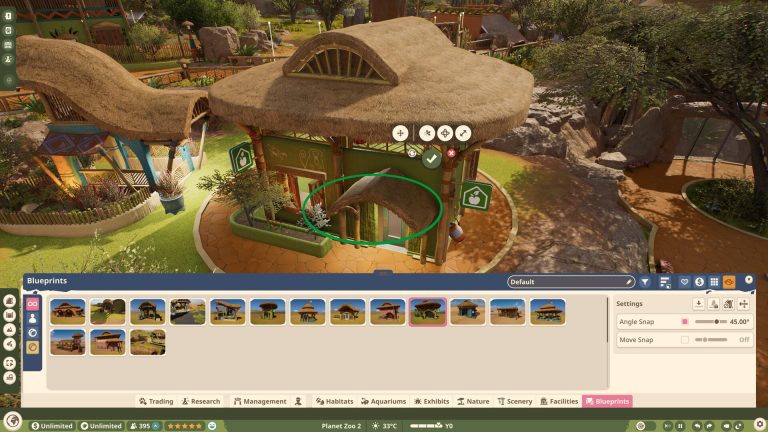
Planet Zoo 2 Paths is part of the October 2026 update. Planet Zoo 2 adds Line and Curve Builder, Draw, Stamp and Border Edit tools for constructing guest and staff routes. The four options solve different problems: precise straight and curved paths, larger hand-drawn areas, stamped shapes and adjustment of borders.
Use Line and Curve Builder for measured routes, Draw for larger open areas, Stamp for predefined shapes and Border Edit to tidy the edges. Plan the entrance and staff access first, then fill in plazas and decorative routes.
Planet Zoo 2 Paths: four path-building tools
The four tools can be used on the same path network. Set the main route with Line or Curve Builder, add a plaza with Draw or Stamp, and finish the edges with Border Edit. Check the connection to gates and buildings before adding scenery.
Planet Zoo 2 Paths: build straight and curved paths
Use Line and Curve Builder to lay out planned routes with controlled direction. Straight paths work well for entrances and staff areas, while curves help connect habitats without harsh corners. Start with the route between the zoo entrance and your first enclosure before decorating, because access is essential for guests and employees.
Planet Zoo 2 Paths: create plazas with Draw
The Draw approach lets you shape broader walkable areas and connect larger open spaces. Use it for plazas near busy exhibits, shops or viewing areas, then check that it connects to your existing network. A decorative patch that isn’t connected properly may not solve movement problems even if it looks like a path.
Planet Zoo 2 Paths: place repeated layouts with Stamp
The Stamp tool is designed for placing predefined shapes and repeating useful layouts. It can be more efficient than individually drawing each segment when building consistent plazas or matching areas. After stamping, inspect whether the new shape connects to adjoining paths and avoids blocking staff access or habitat gates.
Planet Zoo 2 Paths: adjust Border Edit details
Border Edit helps change path edges, including associated border elements. Use it after the main route works so you can refine how the path meets terrain, railings or adjacent scenery. Styling the edges is best done after confirming that keepers, guests and maintenance workers can reach the areas they need.
Build a working zoo entrance with the four path tools
- Start with Line Builder and draw the main route from the entrance towards your first habitat.
- Use Curve Builder where the route bends around an enclosure or follows the landscape.
- Choose Draw to open up a larger area in front of shops or a popular viewing point.
- Use Stamp for a repeated plaza shape or another predefined layout that fits the space.
- Finish with Border Edit to refine the path edges, then check that the new sections connect to the surrounding paths.
Staff need usable routes too. Place the keeper access path before you finish decorating an enclosure, and make sure guests can reach the intended viewing area without obstructing the habitat gate. A wide plaza looks useful, but a disconnected patch of path won’t fix a route problem.
When a path refuses to connect, try adjusting the section nearest the join instead of rebuilding the entire entrance. Check whether the border, nearby terrain or an existing piece of scenery is interfering with the intended route. Keeping the main path simple first makes those connection problems easier to locate.
Planet Zoo 2 Paths: avoid common layout problems
Build your main circulation loop and branch routes before stocking a zoo with animals. Test enclosure entrances and staff buildings, especially where wide plazas meet narrow paths. If staff can’t reach an area, check continuity and access instead of assuming the animal’s welfare warning is unrelated to your path network.
Related Guides
Official source: Frontier Developments official announcement.