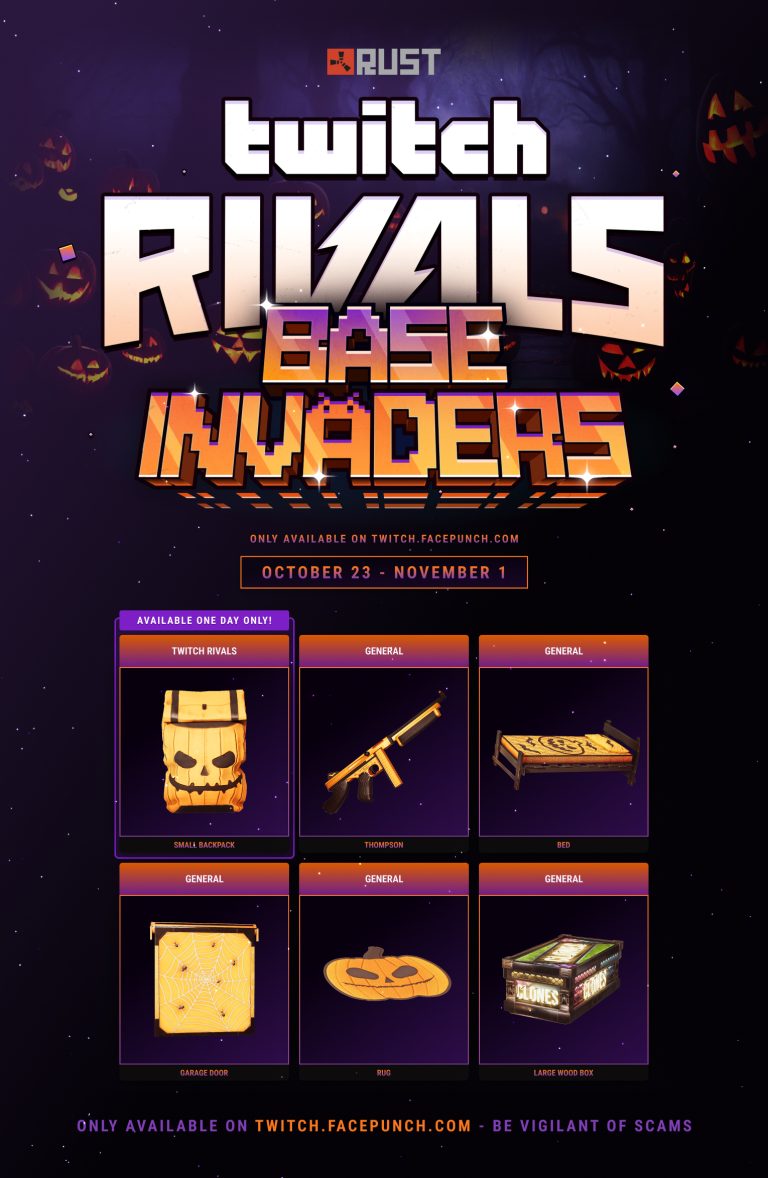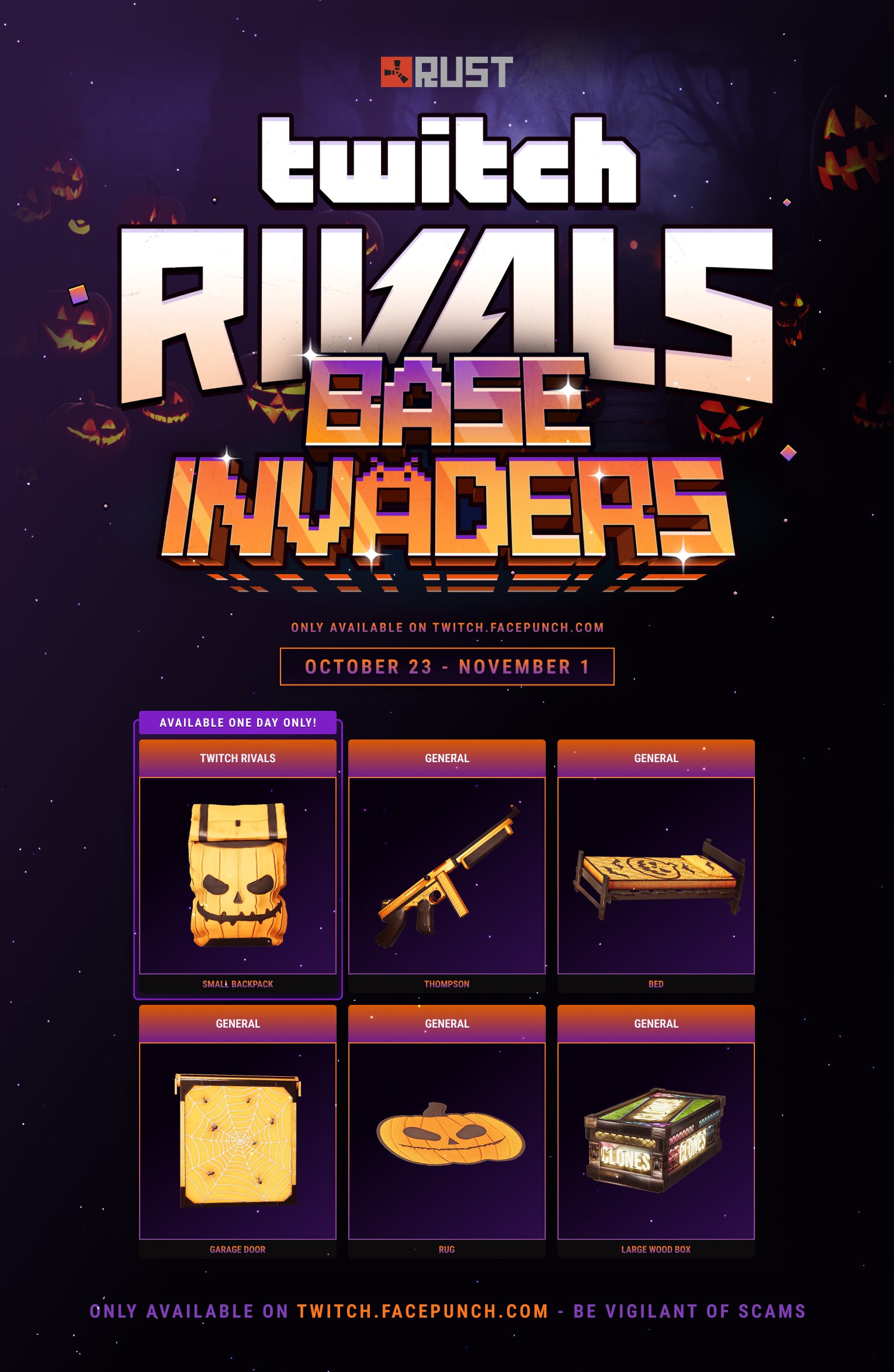
Rust Spooky Backpack Twitch Drop is the special reward for the October 23, 2026, Base Invaders broadcast. Unlike the five general Round 54 skins, the backpack only counts viewing time on twitch.tv/twitchrivals and is advertised as a one-day exclusive. You need 30 minutes of eligible watching to earn it.
The round begins at 6 PM UTC, which is 7 PM BST in the UK. If you have limited viewing time, make the backpack your first target and then switch to normal Drops Enabled Rust streams for the rug, bed, garage door, Thompson and box. The claim steps are straightforward, but missing the one-day window may mean losing this particular skin.
When is the Rust Spooky Backpack Twitch Drop available?
Facepunch says the Rust Spooky Backpack Twitch Drop is active for one day only, beginning with the main October 23 Base Invaders Twitch Rivals broadcast at 6 PM UTC. It has not published an exact closing minute in its Halloween article. Treat October 23’s broadcast as the safe opportunity, rather than assuming a full 24 hours from your first viewing.
The five normal Rust Twitch Drops Round 54 rewards remain live until November 1 at 11:59 PM UTC. Those later dates do not apply to the special backpack, which is tied to the Twitch Rivals channel. If you join late, verify in your Twitch Drops Inventory that its campaign is still active.
How to earn the Rust Spooky Backpack Twitch Drop
To claim the Rust Spooky Backpack Twitch Drop, link the right Steam and Twitch accounts, watch the designated channel and claim the reward on Twitch after thirty eligible minutes. Use the direct official links, since an impostor stream or unrelated Roblox/Rust category won’t qualify.
| Step | What to do |
|---|---|
| 1 | Link Steam and Twitch at twitch.facepunch.com/connect |
| 2 | Open twitch.tv/twitchrivals when Base Invaders begins |
| 3 | Watch 30 minutes with the exclusive campaign active |
| 4 | Open twitch.tv/drops/inventory and press Claim |
| 5 | Check your Steam inventory once the claim is delivered |
Why watching another Rust streamer won’t unlock it
The Rust Spooky Backpack Twitch Drop is not a general skin. Facepunch distinguishes streamer-specific drops from the five general rewards, which can progress on any Rust channel carrying the Drops Enabled tag. Your other favourite streamer’s channel may earn you the rug or Thompson, but not the exclusive backpack unless the Twitch campaign itself says otherwise.
You can still earn general viewing progress after the backpack has been claimed. Opening more than one stream at once does not improve the speed: Facepunch states that Twitch counts only one active channel at a time for rewards.
Do you need to own Rust or subscribe to Twitch?
You do not need Twitch Prime or a paid subscription for the Rust Spooky Backpack Twitch Drop. A Twitch account and a Steam account are required, and they should be linked through Facepunch. You can watch and claim before buying Rust, although you need the game in your Steam library to receive the cosmetic item.
Facepunch allows already-claimed drops to be retrieved when Rust is purchased within 180 days, with a manual Check for Missing Drops request. This does not extend the one-day period to earn the backpack in the first place.
Rust Spooky Backpack Twitch Drop not progressing or missing
If the Rust Spooky Backpack Twitch Drop progress bar remains empty, make sure you are on the Twitch Rivals channel during its qualifying broadcast. Check Twitch Drops Inventory for the active campaign and ensure your browser is not simply playing a recorded VOD. The public instructions describe eligible Twitch streams; they do not guarantee replay viewing will count.
If your bar reaches 100%, click Claim in Twitch Drops Inventory. Facepunch says items can take ten minutes to appear on Steam. If the backpack is still missing after thirty minutes, use the Facepunch account-link page and Check for Missing Drops. If your Steam account is linked to the wrong Twitch account, unlink and relink the correct one.
Can you claim the backpack after October 23?
Once the exclusive Twitch Rivals eligibility window closes, a new viewer cannot start earning the Rust Spooky Backpack Twitch Drop through ordinary Rust streams. Already completed and claimed rewards are a different matter: Facepunch’s normal inventory linking instructions can recover eligible claims, subject to its 180-day limit.
If you missed the one-day skin, the Round 54 rug, bed, garage door, Thompson and Large Wood Box remain available on general Drops Enabled streams through November 1. Those are separate rewards rather than an alternate route to the backpack.
Related Guides
Official source: Facepunch Rust Halloween 2026 and Twitch Rivals announcement.