How to Use Roblox Build begins with describing the game you want to create in an ordinary text prompt. The new AI creation tool will interpret the request, generate a playable starting point and allow the project to be refined without leaving the main Roblox app.
Roblox Build is not publicly available worldwide yet. The first public alpha is scheduled to begin in New Zealand on July 28, 2026, with access initially offered to eligible age-checked users. The instructions below explain the creation process confirmed by Roblox, but some individual buttons and menu names may change when the alpha becomes available.
How to Use Roblox Build
To understand How to Use Roblox Build, it helps to divide the creation process into four main stages:
- Describe the game with a prompt.
- Refine the generated project.
- Playtest the result.
- Share the game or prepare it for publishing.
Roblox Build will appear as a mobile-first creation tab inside the Roblox app. This means creators will not need to begin every project on a desktop computer through Roblox Studio.
The Build system will use a collection of AI models to generate different parts of the game. These may include the environment, characters, mechanics, sound and overall visual style.
Check Whether Roblox Build Is Available
The first step in How to Use Roblox Build is checking whether your account and region have received access.
The initial public alpha will launch in New Zealand on July 28, 2026. Roblox intends to introduce the feature to more creators and regions over the following months, but a complete global release schedule has not been announced.
| Access requirement | Current information |
|---|---|
| First available region | New Zealand |
| Public alpha date | July 28, 2026 |
| Testing requirement | Age-checked account |
| Initial testing age | Nine years old or above |
| Other countries | Coming during a later rollout |
| Full release date | Not yet confirmed |
Ages and availability may vary by region. Updating Roblox will not necessarily unlock Build if the account is outside an active test area.
Open the Build Tab in the Roblox App
Once an account has been given access, open the main Roblox app and look for the new Build creation area.
Roblox describes Build as a mobile-first tab inside the app rather than a completely separate program. The final placement may change during testing, but eligible users should be able to enter the creation flow without opening Roblox Studio.
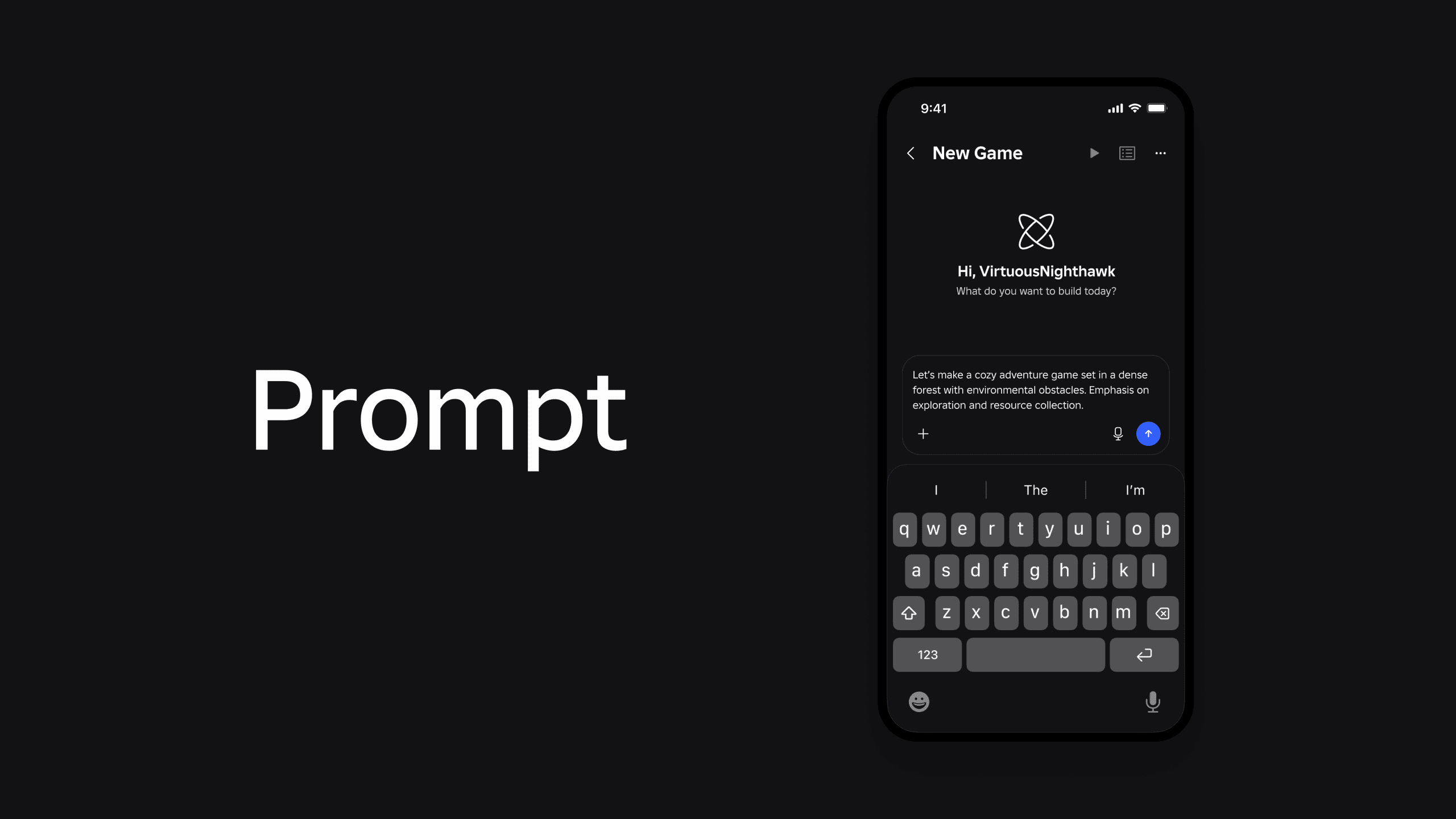
After opening Build, begin a new project and locate the prompt field. This is where the game idea will be explained to the AI.
Because the first release is a public alpha, the interface may be adjusted regularly. Roblox may move buttons, introduce new controls or temporarily limit certain generation features while testing the system.
Write a Clear Roblox Build Prompt
The most important part of How to Use Roblox Build is writing a useful prompt. A vague instruction gives the AI very little information, while a focused description provides a clearer direction for the environment and gameplay.
Try to include:
- The type of game
- The setting
- The main activity
- The visual atmosphere
- An obstacle or challenge
- The intended mood
Instead of entering “make a fun game,” describe what the player will actually do.
A stronger prompt could be:
“Create a colourful multiplayer treasure hunt on a tropical island. Players must explore caves, avoid traps and collect ten hidden gems before the timer ends.”
This explains the setting, objective, challenge and basic structure without attempting to specify every object individually.
| Weak Roblox Build prompt | Stronger Roblox Build prompt |
|---|---|
| Make an obby | Create a beginner obstacle course across floating islands with checkpoints and moving platforms |
| Make a horror game | Create a dark survival game inside an abandoned hotel where players restore power while avoiding a creature |
| Make a racing game | Create a three-lap kart race through a bright city with shortcuts, speed boosts and hazards |
| Make a simulator | Create a bakery simulator where players make cakes, serve customers and upgrade their kitchen |
| Make an adventure | Create a cooperative forest adventure with puzzles, environmental obstacles and a hidden temple |
Roblox’s own example describes a cosy adventure set in a dense forest with environmental obstacles. The system would use that description to create a playable starting point that could then be changed and expanded.
Let Roblox Build Generate the Starting Game
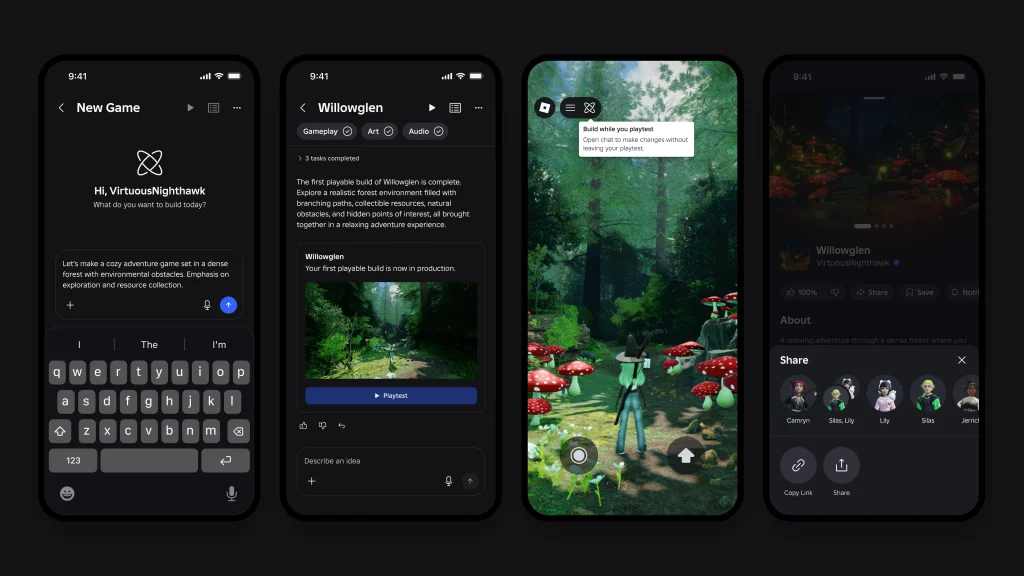
After submitting the prompt, Roblox Build will process the description and generate the first version of the project.
Roblox says Build can handle gameplay mechanics, environments, characters, visual style and sound. The exact result will depend on the prompt and the capabilities included in the current alpha version.
Do not treat the first result as a completed game. Start by checking whether the generated project understands the central idea.
Consider the following:
| Area to inspect | Question to ask |
|---|---|
| Objective | Is it obvious what the player must do? |
| Controls | Can the game be played comfortably? |
| Environment | Does the world match the requested setting? |
| Difficulty | Is the challenge suitable for the intended audience? |
| Progression | Does the player have a reason to continue? |
| Performance | Does the game run without obvious problems? |
| Style | Do the visuals and sound work together? |
If the generated project has misunderstood the idea, revise the instructions rather than immediately attempting to repair every part manually.
Refine the Game With Follow-Up Instructions
The next stage of How to Use Roblox Build is refining the generated result.
Roblox Build is intended to support iteration, allowing the creator to continue developing the starting project. Instead of writing one extremely long prompt, it may be easier to begin with the core concept and then request changes individually.
Useful follow-up instructions could include:
- Add a checkpoint after each obstacle section.
- Make the forest brighter and less frightening.
- Add a two-minute countdown timer.
- Create an easy tutorial area near the spawn point.
- Increase the distance between the racing checkpoints.
- Add three collectible keys that open the final door.
- Give each player a visible score counter.
- Replace the daytime lighting with a stormy night.
Focused requests make it easier to understand what changed. Asking the AI to alter the map, mechanics, sound, characters and difficulty simultaneously could make it harder to identify which instruction caused a problem.
Playtest the Roblox Build Game
Playtesting is an essential part of How to Use Roblox Build. Roblox lists playtesting as one of the central stages between generating a project and sharing it.
Enter the game as a player and attempt to complete the full objective. Do not only check whether the map looks impressive.
Look for:
- Areas where players can become trapped
- Objectives that cannot be completed
- Missing instructions
- Objects that fail to work
- Checkpoints that do not save progress
- Excessively difficult opening sections
- Long periods with nothing to do
- Visual effects that obstruct the screen
- Problems on smaller mobile displays
Roblox is also developing an AI playtesting agent intended to identify bugs before ordinary players encounter them. The agent is expected to become available across Build and Roblox Studio in the coming months, although Roblox has not confirmed that it will be included in the first alpha release.
Automated testing should not completely replace human testing. An AI system may identify a broken object, but real players are better placed to explain whether the game feels repetitive, confusing or unfair.
Continue the Project in Roblox Studio
Learning How to Use Roblox Build does not mean abandoning Roblox Studio.
Build and Studio will share a back end, models and chat history. A creator can begin a game through the simpler mobile creation process before moving into Roblox Studio for more detailed development.
Studio may be required when a creator wants greater control over:
- Lua scripting
- User interface design
- Detailed terrain changes
- Custom animation
- Advanced monetisation
- Data saving
- Complicated multiplayer systems
- Precise performance optimisation
Roblox Build should therefore be viewed as both an accessible creation tool and a possible starting point for a larger Studio project.
A beginner may use Build for the majority of the early work before gradually learning Studio. An experienced developer could use it to prototype an idea and decide whether the concept is worth developing fully.
Share or Publish the Finished Game
The last stage of How to Use Roblox Build is sharing the game with friends or preparing it for publication.
Roblox has confirmed that Build projects can be iterated on, playtested, shared and potentially published. Games will still need to satisfy the platform’s safety and review requirements.
Build-created games will not receive automatic priority within Roblox discovery. They will enter the same candidate pool and use the same retention-based ranking system as other eligible games.
Projects intended for the Roblox Kids or Roblox Select catalogues must also complete the extended review process used for other games. This means quickly generating a project does not guarantee that it will be widely distributed or immediately visible to younger users.
Before publishing, test the following:
| Publishing check | What to confirm |
|---|---|
| Game objective | New players understand what to do |
| Spawn area | Players begin safely and cannot become stuck |
| Completion | The main objective can be finished |
| Mobile controls | Buttons and interfaces fit smaller screens |
| Safety | Content follows Roblox rules |
| Performance | The project loads and runs reliably |
| Replay value | Players have a reason to return |
| Originality | The game has an identity beyond its initial AI prompt |
Do You Need Coding Experience to Use Roblox Build?
Roblox Build is being created for users at different experience levels, including people who have never developed a game before.
The basic prompt-based process should not require someone to write code before producing a playable starting point. The AI is expected to create several of the necessary mechanics and assets from the written description.
Coding knowledge may still become useful when a project grows beyond the options provided inside Build. Advanced creators can move the game into Roblox Studio and work directly with its systems.
This makes Roblox Build an entry point rather than a complete replacement for learning game development. A person can begin creating without coding and then choose how deeply they want to customise the project.
Getting Ready for Roblox Build
Players outside the first test region cannot access Roblox Build yet, but they can prepare game ideas before the wider rollout begins.
Write down the central objective, setting, player actions and progression system for each idea. Turning those notes into a clear prompt will make it easier to begin once Build reaches the account.
The best way to approach How to Use Roblox Build is to start with one manageable concept. Generate the core game, test whether it works and make focused changes instead of expecting the AI to produce a complete hit from a single sentence.
Roblox Build can provide the map, mechanics, characters, style and sound needed for a starting project. The creator’s decisions will still determine whether that starting point becomes a game people genuinely want to play.