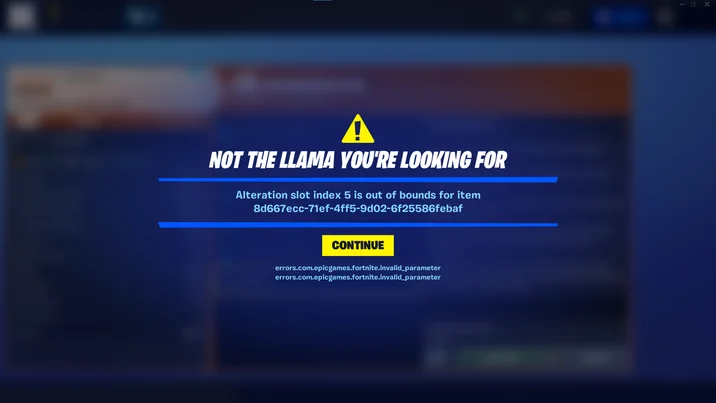
The Fortnite matchmaking error is currently affecting players (17th April 2026), with many unable to queue into matches, join lobbies, or connect to servers. If you are seeing a Fortnite matchmaking error right now, you are not alone, and in most cases, this is linked to server-side issues rather than anything on your end.
This guide explains why the matchmaking error is happening, how long it might last, and what you can do to fix or work around it.
Why the Fortnite Matchmaking Error Is Happening
The most common cause of a Fortnite matchmaking error is server instability. When player traffic spikes, updates roll out, or backend systems struggle, matchmaking is often the first thing to break.
If the problem isn’t just matchmaking, you can also check our Fortnite not working guide for a full list of possible fixes.
Right now, the Fortnite matchmaking error appears to be linked to:
- High player demand or server overload
- Backend matchmaking service issues
- Ongoing updates or hotfixes
- Regional server instability
If the issue has appeared suddenly, it is very likely a live server problem rather than anything wrong with your account or device.
For real-time updates, check our Fortnite server status article to see if servers are currently down or experiencing issues.
If you’re seeing a specific error message, check out our Fortnite error code guide for a full breakdown of common errors and how to fix them.
How to Fix Matchmaking Error
If the Fortnite matchmaking error is not fully server-related, there are a few things you can try to get back into games.
If you’re unsure whether this issue is server-related, check our Fortnite servers down guide for the latest status and updates.
Restart Fortnite and Your Platform
A simple restart can sometimes fix temporary matchmaking errors, especially if your session has bugged out.
Change Matchmaking Region
Switching your matchmaking region in settings can help bypass overloaded servers.
Check Your Internet Connection
Unstable connections can trigger a Fortnite matchmaking error, so make sure your connection is stable and not dropping packets.
Party and Lobby Fix
Leave your current party and rejoin, or create a new lobby. This can reset matchmaking and fix queue issues.
Wait for Server Fixes
If the Fortnite matchmaking error is widespread, the only real fix is waiting for Epic Games to resolve it.
Enjoying the new Fortnite content? Check out Fortnite Golden Fishing Spots: New Special Loot Fishing Explained
Is Fortnite Down Right Now
If you are still seeing the Fortnite matchmaking error, there is a strong chance Fortnite servers are either down or struggling.
You can confirm this by checking our server status guide, which tracks downtime, outages, and recovery updates.
Does This Affect Save the World and V-Bucks
The Fortnite matchmaking error can also impact Save the World, especially when it comes to missions and rewards.
If you are trying to farm currency, this may prevent you from earning V-Bucks in Save the World, as missions may fail to load or complete properly.
If that is your goal, it is worth checking your V-Bucks guide to understand the best methods once servers stabilise again.
Fortnite Chapter 7 Impact
With Fortnite Chapter 7 content ongoing, server pressure is higher than usual. New updates, events, and returning players often lead to spikes that can trigger matchmaking issues.
If you are trying to jump into new content, it is worth checking our Chapter 7 hub for updates, changes, and what is currently happening in-game while servers stabilise.
How Long Will Fortnite Matchmaking Error Last
Most Fortnite matchmaking error issues are resolved fairly quickly, especially if they are server-related.
Typical downtime can range from:
- A few minutes for minor issues
- Up to an hour during heavy load
- Longer if tied to updates or maintenance
Epic Games usually resolves matchmaking issues fast once they are identified.
More Fortnite Updates and Fixes
The Fortnite matchmaking error is one of the most common issues during busy periods, but it is usually temporary. Keeping an eye on server status and updates will give you the best idea of when things are back to normal.
For ongoing updates, server fixes, and gameplay changes, make sure to check your related Fortnite guides and hubs to stay ahead of any issues.
For more Fortnite guides like this, including events, modes, and tips, head over to our full Fortnite Guides Hub.