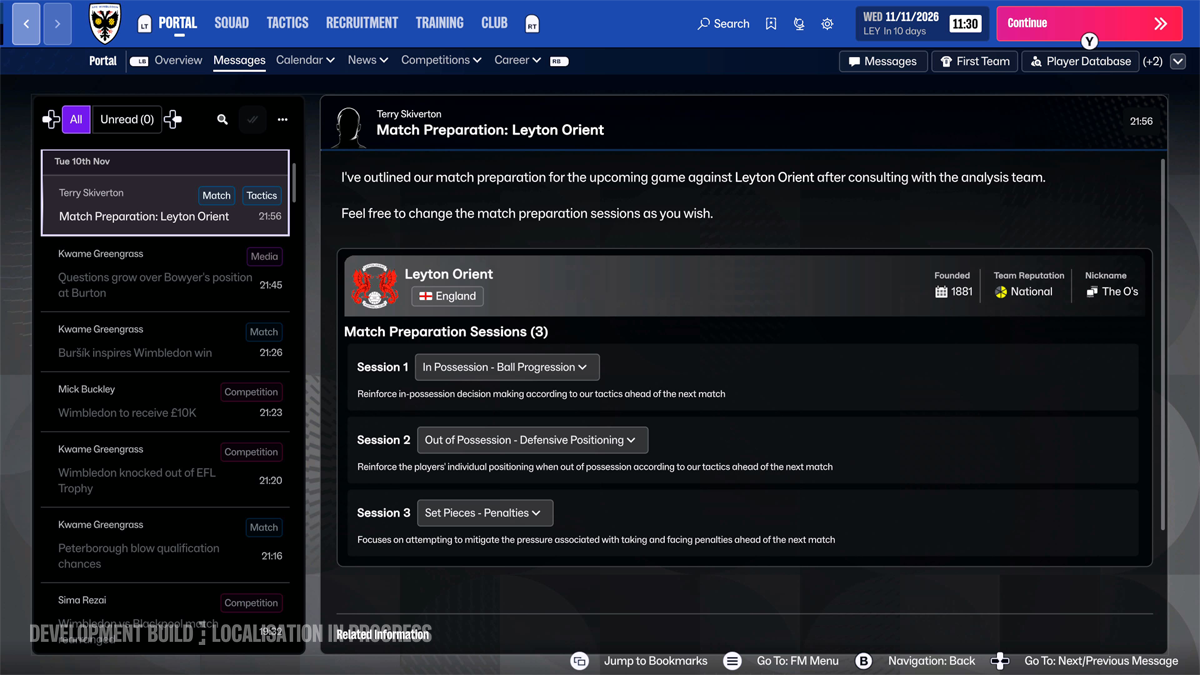
Football Manager 27 Console Match Preparation lets you focus training on your next opponent before kick-off. It is part of the full Xbox Series X|S and PS5 game, which launched digitally on 10 November 2026. You don’t need an add-on or a separate mode to use it.
Match Preparation arrives through messages in your Inbox. You can plan up to three sessions, covering what your team does with the ball, without it and at set pieces. Here’s how to use that choice sensibly, which parts are confirmed and how it fits alongside the other FM27 Console changes.
How does Football Manager 27 Console Match Preparation work?
With Football Manager 27 Console Match Preparation, a message appears in your Inbox before a fixture. It gives you a chance to focus your preparations on the opposition. You still choose your tactic and manage the match as normal; this is what your players work on beforehand.
You can set up to three unique sessions in total. The three themes are In Possession, Out of Possession and Set Pieces. That doesn’t mean three of each type. The aim is to choose training that suits the upcoming game instead of treating every opponent exactly the same.
What are the three Football Manager 27 Console Match Preparation sessions?
In Possession is the area to look at when you want to work on how your team plays with the ball. If you’re expecting to have plenty of possession, it makes sense to consider this part of your game plan.
Out of Possession deals with the shape and decisions your team makes when the opposition has the ball. It is a natural area to focus on before facing a side likely to push you back or force you to defend for long spells.
Set Pieces lets you devote preparation time to dead-ball situations. It’s a distinct option rather than something tucked away inside attacking or defensive preparation. If you’ve been vulnerable from corners or want to target an opponent’s set-piece weakness, that’s the sort of choice this category is intended to support.
Think about the opponent before choosing your focus. Football Manager 27 Console Match Preparation gives you the categories to plan around, but Sports Interactive hasn’t published a fixed percentage bonus or guaranteed result for any session.
Where do you find Football Manager 27 Console Match Preparation?
Start with the Inbox when a Match Preparation message appears ahead of your next fixture. Open the message and review the preparation options it presents. Sports Interactive hasn’t published one exact button sequence for every setup, and controller mapping is customisable, so follow the prompts on your screen.
Don’t confuse pre-match sessions with live Tactical Tweaks. A tweak changes your approach during a match; Match Preparation is about the work your squad does before the whistle.
Does Football Manager 27 Console Match Preparation make your team stronger?
It helps you prepare for the kind of match you’re expecting. The developer does not publish a guaranteed goal, passing or defending bonus for each session. Choose the focus because it fits your plan, not because you’ve seen an unverified number in another guide.
If you’re going away to a team that dominates the ball, Out of Possession is an obvious place to start. Against a weaker side sitting deep, you might be more interested in how you build attacks. Those are examples of how to think about Football Manager 27 Console Match Preparation, not secret combinations that always win.
What other FM27 Console recruitment changes are there?
FM27 Console also makes scouting and transfers easier to handle with a controller. Player Database, Recruitment Focuses, Transfers and Contract Negotiations have redesigned screens. The Find Similar Players search is especially handy when you need a replacement for someone who’s just left your club.
Your staff now offer live advice during negotiations, so you can judge whether an offer makes sense before committing. Our Staff Responsibilities guide covers how to divide the other jobs at your club.
Can you change the Console interface and controls?
Yes. Open Preferences > Information Display for the Larger and Smaller choices. Larger is intended for a television viewed from the sofa; Smaller is better suited to a closer monitor. These settings change how information is presented, not your training options.
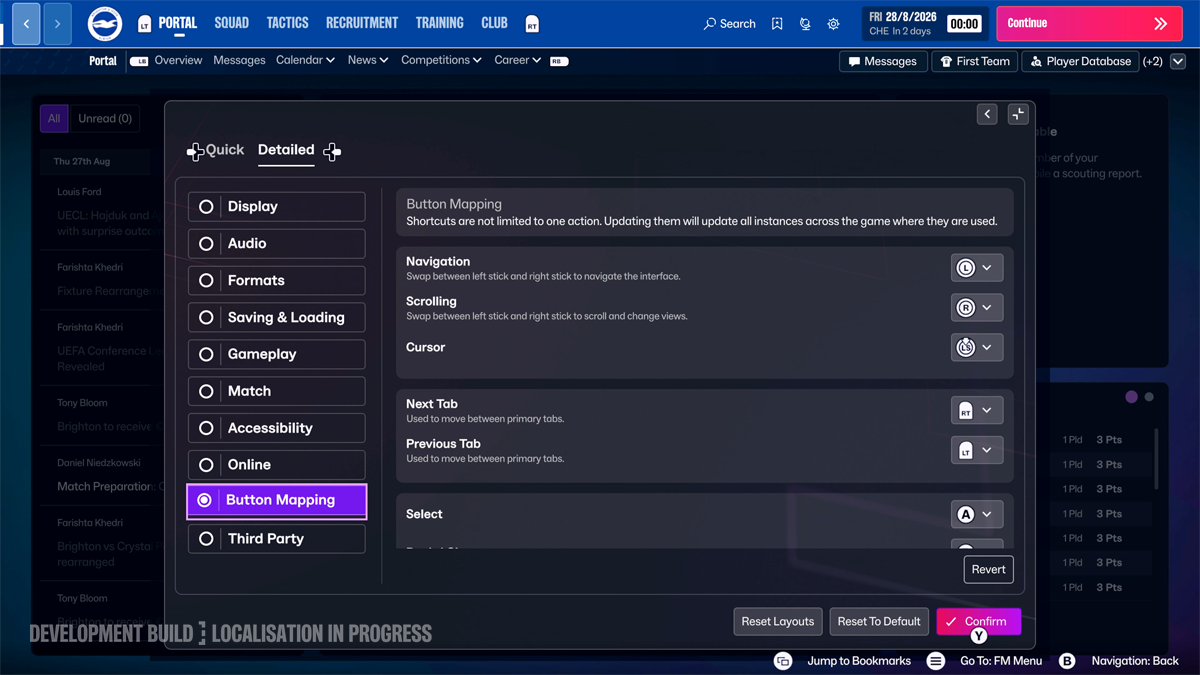
Button Mapping also lets you swap which stick handles navigation and scrolling and change action buttons. The updated layout and lower input latency make it quicker to work through Football Manager 27 Console Match Preparation, recruitment and the rest of the game.
What else is new alongside Football Manager 27 Console Match Preparation?
Pass Maps and Heat Maps are back for reviewing matches. Console also has Tactical Tweaks, updated Shouts, Cup Draws and Shuffle Draft. The digital game has been live on Xbox Series X|S and PS5 since 10 November; the boxed PS5 edition is due on 20 November.
Our FM27 PC vs Console comparison goes through the differences between editions. In Football Manager 27 Console Match Preparation, the essentials are the Inbox prompt and up to three sessions covering possession, defending and set pieces.
Official source: Sports Interactive’s official FM27 Console features guide.