
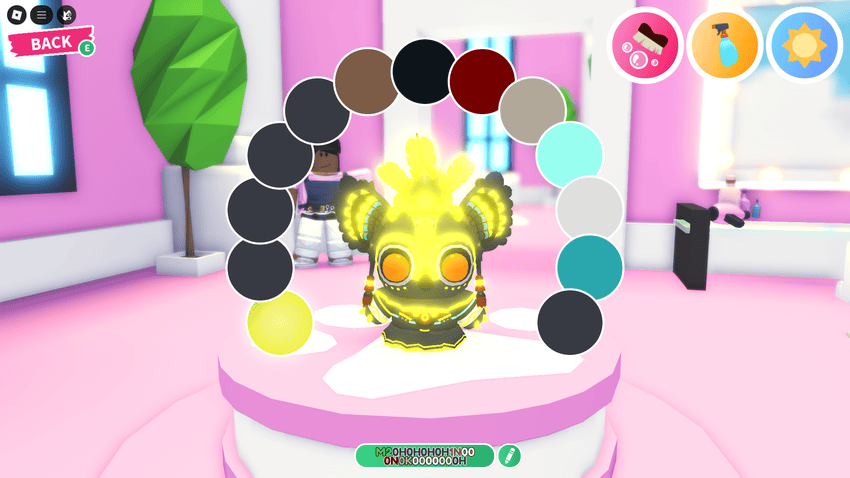
Adopt Me Paint Sealer is used to keep a purchased or traded paint colour on a pet. Uplift Games confirms that if you apply the colour and seal it, the pet keeps that appearance even if you later trade away the Paint item. The Sealer is therefore important when you want a lasting makeover without keeping the paint in your inventory forever.
Paints are separate from pet wear and movement potions. You can recolour a pet through the Salon’s colour editor, and some colours are purchased with Bucks or Robux. Here’s what the Sealer protects, how it interacts with trading and what paint codes do instead.
How to use Adopt Me Paint Sealer
Visit the Salon with the pet you want to recolour and use an unlocked or traded Paint. Select the colour area on the pet, apply your chosen shade and seal the makeover with a Paint Sealer. The official September 2025 update says the sealed colour stays applied even if the corresponding purchased or traded Paint is later traded away.
An Adopt Me Paint Sealer protects the applied appearance. It doesn’t give your pet an extra ability, change its rarity or make a regular pet Mega Neon. If you’re trying to change a Mega Neon glow, you need an eligible Mega Neon pet and a corresponding glow colour.
What happens when you trade a purchased Paint?
Without sealing, the developer’s update doesn’t promise that your customised appearance will remain if the Paint item changes owners. With a Paint Sealer, the purchased or traded colour stays on the pet. That’s the feature’s specific purpose and why it matters for collectors who want to trade unused Paint items.
An Adopt Me Paint Sealer doesn’t make an otherwise Untradeable pet tradeable. It preserves the applied colour; the normal pet trading rules still decide whether you can offer the pet or an item to another player.
| Action | What happens |
|---|---|
| Unlock a Paint | Use that colour repeatedly on eligible pets |
| Apply a purchased/traded Paint | Change the selected part of your pet |
| Use a Paint Sealer | Keep the applied colour if Paint is traded away |
| Copy a Paint code | Apply another player’s colour arrangement |
| Buy Mega Neon Paint | Change glow on an eligible Mega Neon pet |
Do unlocked Paint colours run out?
For Adopt Me Paint Sealer users, Uplift Games confirms unlocked Paints have unlimited uses, so you can apply an unlocked colour to eligible pets without paying each time. That is different from using an item that disappears with one feed, such as a Fly-A-Pet Potion.
The Adopt Me Paint Sealer becomes relevant when the ownership of a purchased or traded Paint changes. For colours you’re simply reusing from your own unlocked selection, you don’t need to assume the colour item is being consumed with every new makeover.
How do Paint codes work?
The Salon shows a code representing your pet’s chosen colours. Share that code with another player, and they can paste it into their own Salon editor to copy your colour arrangement. The code reproduces a colour scheme; it isn’t a pet trade or an item purchase by itself.
If you use a design that includes a purchased shade, you’ll still need access to the necessary paint to use it. The Adopt Me Paint Sealer deals with keeping the colour after application, whereas codes deal with reproducing a colour design.
Can you use Paint Sealer on Mega Neons?
The Salon supports changing the glowing areas of Mega Neon pets with specific Mega Neon Paints. A February 2026 patch confirmed that the Mega Neon Cryptid could be recoloured and use Paint Sealers, fixing an earlier issue with that animal.
For an Adopt Me Paint Sealer to help, you must already have a colour applied to the eligible pet. It doesn’t add Mega Neon status and doesn’t replace the need to combine sixteen matching ordinary pets to create a Mega Neon.
Can another player paint your pet?
Uplift Games removed the ability for strangers working at the Salon to recolour any customer’s pet. Friends and family can still paint one another’s pets. This means you shouldn’t trade away an animal just to let an unknown player show you a particular colour design.
Instead, use a shared Paint code when possible, then apply your own available colours. If you need a purchased colour to remain after trading away its Paint, that’s when the Adopt Me Paint Sealer becomes useful.
Related Guides
Official sources: Uplift Games, Pet Paints Notes; Uplift Games, Paint Sealer Fixes.





