
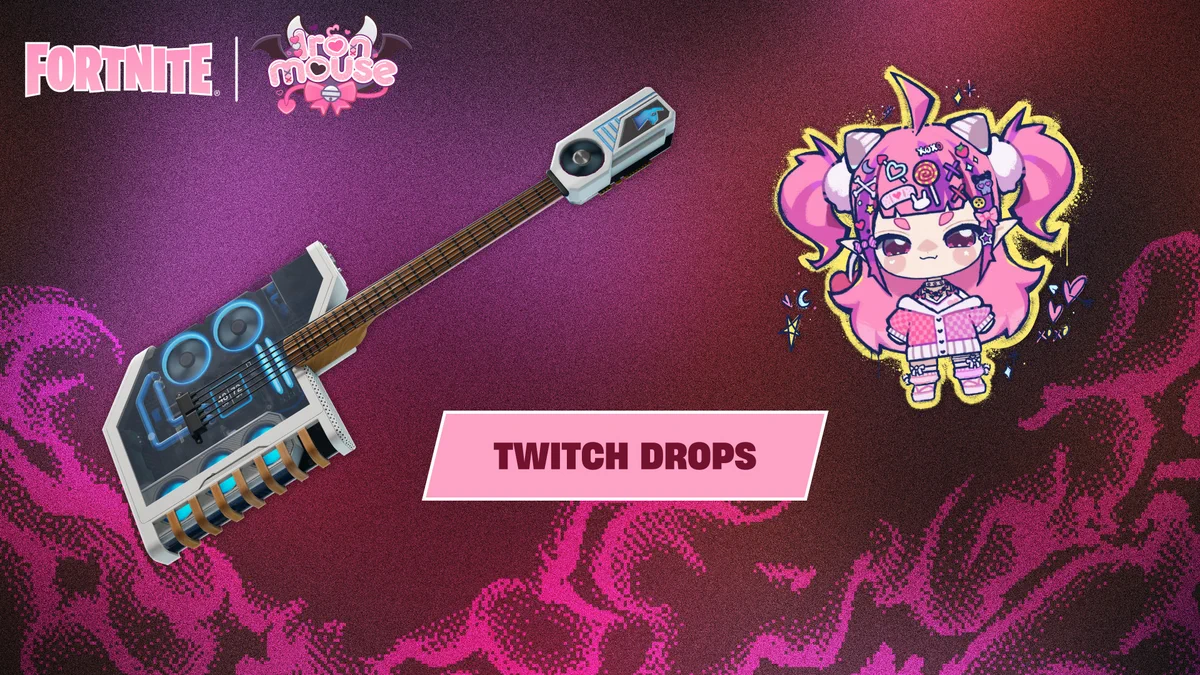
How to Get Chibi Ironmouse Spray in Fortnite is one of the easiest free rewards in the current Ironmouse collaboration. Fortnite says the Chibi Ironmouse Spray unlocks after watching Ironmouse for 30 minutes through the active Twitch Drops campaign.
The promotion is available now, with September 30, 2026 listed as the last day to get the drops. You need a connected Twitch and Epic Games account, and after the 30 minute milestone is completed you still need to claim the reward through Twitch before it can reach your Fortnite Locker.
How to Get Chibi Ironmouse Spray in Fortnite
The quickest answer to How to Get Chibi Ironmouse Spray in Fortnite is to link Twitch to the Epic Games account you play Fortnite on, then watch Ironmouse for 30 minutes while the Fortnite Twitch Drops campaign is active. Once Twitch marks the milestone complete, open your Drops inventory and claim the spray.
- Sign in to the correct Epic Games account.
- Connect your Twitch account through Epic’s Connections settings.
- Watch Ironmouse on Twitch while the Fortnite drop campaign is active.
- Wait for the Chibi Ironmouse Spray progress to reach 30 minutes.
- Open Twitch Drops inventory and press Claim.
- Open Fortnite and check your Locker for the spray.
The 30 minute threshold makes How to Get Chibi Ironmouse Spray in Fortnite the first reward in the campaign. If you continue watching until 60 minutes, you can also earn the Guitar Processing Unit reward without starting a second watch session from zero.
Do you need to buy the Ironmouse skin?
No. The Chibi Ironmouse Spray is a Twitch Drop, not an Item Shop purchase. You do not need to own either Ironmouse Outfit, the bundle or any other paid Ironmouse cosmetic before working on How to Get Chibi Ironmouse Spray in Fortnite.
That makes the spray a separate free collectible for players who like the collaboration but do not want to spend V-Bucks. It also means players who already bought the Ironmouse set still need to complete the Twitch watch requirement if they want this specific spray.
How do you connect Twitch to Fortnite?
Epic’s official support instructions say your Twitch account needs to be connected to your Epic Games account before the event and before you claim the drop. Sign in to Epic Games, open the account Connections settings and make sure the Twitch profile shown there is the one you are using to watch Ironmouse.
This check matters if you have multiple console profiles or older Epic accounts. Finishing How to Get Chibi Ironmouse Spray in Fortnite on the wrong linked account can leave you looking at the correct Twitch claim while the cosmetic fails to appear on the Fortnite profile you expected.
Why is the Chibi Ironmouse Spray not showing up?
If the reward is missing, check Twitch Drops inventory first. Twitch progress and claiming are separate steps, so reaching 30 minutes does not automatically mean the spray has been claimed. Epic also recommends confirming that Twitch is connected to the correct Epic account when Fortnite Twitch Drops do not appear.
If your 30 minute progress bar is not moving at all, confirm that the Fortnite campaign is active on the Ironmouse stream you are watching. The safest way to track How to Get Chibi Ironmouse Spray in Fortnite is through the actual Twitch Drops progress display rather than simply counting half an hour yourself.
When does the Chibi Ironmouse Spray offer end?
Fortnite’s announcement gives September 30 as the last day to get the Ironmouse Twitch Drops. Because no separate regional cutoff was stated in that announcement, it is better to finish How to Get Chibi Ironmouse Spray in Fortnite before the final day rather than depend on an assumed local midnight deadline.
The campaign only asks for 30 minutes for the spray, so there is little reason to leave it late. If you want both rewards, stay for a full 60 minutes and claim the Guitar Processing Unit after the spray milestone is complete.
More Ironmouse Fortnite guides
If you are collecting the rest of the collaboration, our How to Get the Ironmouse Skin in Fortnite guide covers the Outfit, while our Fortnite Ironmouse Bundle guide covers the larger cosmetic set. The older Ironmouse Sprite Fortnite guide covers her gameplay appearance, and the Ironmouse skin price and release time page covers the Shop release.
For players checking How to Get Chibi Ironmouse Spray in Fortnite before opening Twitch, the most useful step is to confirm the campaign progress bar is visible first. That gives you a live indication that the eligible viewing time is being recorded.
For players checking How to Get Chibi Ironmouse Spray in Fortnite before opening Twitch, the most useful step is to confirm the campaign progress bar is visible first. That gives you a live indication that the eligible viewing time is being recorded.
For players checking How to Get Chibi Ironmouse Spray in Fortnite before opening Twitch, the most useful step is to confirm the campaign progress bar is visible first. That gives you a live indication that the eligible viewing time is being recorded.
Epic’s official Fortnite Twitch Drops support page has the account-link and claim instructions. For How to Get Chibi Ironmouse Spray in Fortnite, connect the right account first, watch Ironmouse until Twitch records 30 minutes, claim the spray, then open Fortnite and check the Locker.
More from The Click
- How to Get Guitar Processing Unit in Fortnite for Free
- How to Get the Ironmouse Skin in Fortnite
- Fortnite Ironmouse Bundle: All Skins, Emotes and Cosmetics
- Fortnite Ironmouse Skin Price and Release Time
- Ironmouse Sprite Fortnite: How to Get It and What It Does
- Fortnite Guides, Events, News and Updates





