
Fortnite island gameplay video requirements are straightforward: show a real, unedited stretch of your island being played, with the game interface visible. A trailer is a different upload. You can edit a trailer into a polished promotion, but gameplay footage needs to show what players actually experience.
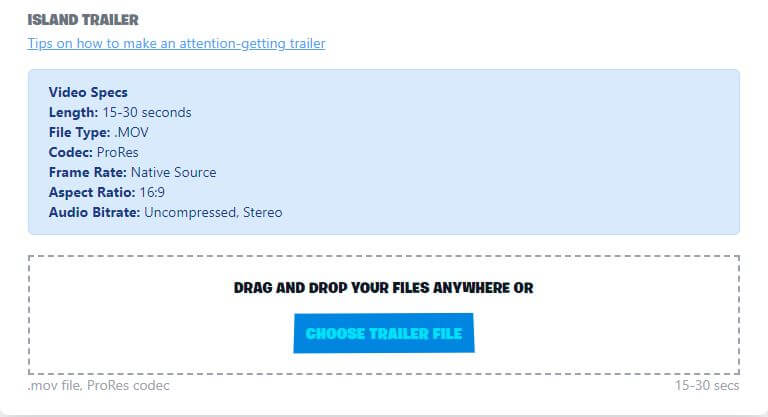
Epic recommends 15 to 30 seconds for both video types, using a MOV file with ProRes, the source frame rate, a 16:9 picture and uncompressed stereo audio. Neither video is compulsory just to publish an island, but a General Audience-friendly trailer is required if you’re aiming for the Hero carousel or Epic’s Picks.
Fortnite island gameplay video requirements: gameplay vs trailer
The Fortnite island gameplay video requirements exist because these two uploads answer different questions. A trailer catches someone’s eye in Discover; gameplay shows what happens once they press Play.
| Video | Footage | Purpose |
|---|---|---|
| Trailer | Polished, engaging scenes | Island details; General Audience trailer needed for Hero carousel or Epic’s Picks eligibility |
| Gameplay | Continuous actual play, normal UI, no cuts | Island details; demonstrates the real playing experience |
You can use a dramatic camera move in your trailer, but don’t submit that same edited montage as gameplay footage. A player watching the gameplay clip should recognise the island when they join it.
What should an island gameplay video show?
Record from the player’s perspective. Show the lobby or first few moments of the match, then follow a normal route through the island. Keep the interface on screen so people can see the objectives, controls or other on-screen information they would have during play.
For parkour, show a few jumps, including the first obstacle and how players move past it. For a team game, show the route between objectives and what an ordinary fight or round looks like. Choose a section that explains the game without a voiceover or a string of jump cuts.
The Fortnite island gameplay video requirements rule out edits, text overlays and licensed music in the gameplay upload. If you use music, Epic points to its approved Licensed Music Box. A trailer can be edited for presentation; the gameplay clip should stay faithful to the actual experience.
Fortnite island gameplay video requirements: file specifications
Use Epic’s recommended export settings for gameplay and trailers. These are the published Fortnite island gameplay video requirements to work from:
- Duration: 15–30 seconds.
- File: MOV.
- Codec: ProRes.
- Frame rate: native source rate, without conversion.
- Aspect ratio: 16:9.
- Audio: uncompressed stereo.
These are recommended export specifications, not a promise that any file will pass the portal’s validation. Check the actual upload feedback before trying to fix a format error by guessing.
Trailer rules for the Hero carousel and Epic’s Picks
A gameplay clip can reflect your island’s own content rating. The General Audience rule applies specifically to trailers used for prominent promotions such as the Hero carousel or Epic’s Picks. It affects what scenes you can use in that trailer, not whether the gameplay of a more mature-rated island exists.
Keep the promotional trailer free from jump scares, gore, sexualised images and realistic scenes of characters being injured or killed. A trailer that isn’t suitable for those placements can still appear on the island details page, but it won’t qualify for the Hero or Epic’s Picks placement.
For the trailer, show one strong idea that makes your island worth trying. A clear view of the course, arena or main mechanic is more compelling than a busy montage of unrelated shots. Keep the scenes honest to what players can actually do.
Do you need a gameplay video to publish an island?
No. Epic’s 22 October publishing change makes landscape thumbnails, portrait thumbnails and an island name logo mandatory. Trailers and gameplay videos remain optional for ordinary island publishing, although a suitable trailer is needed for Hero carousel or Epic’s Picks eligibility.
If you’re submitting a release and haven’t prepared the images yet, start with our Fortnite island thumbnail requirements 2026 guide. It has the five asset slots, exact pixel sizes and transparent logo requirements. A gameplay video doesn’t replace any of them.
How to record footage that shows your island properly
The easiest way to meet the Fortnite island gameplay video requirements is to play your island normally and record a single representative take. Start where new players begin, keep the UI on and follow a route that introduces the main mechanic without cuts.
Make the trailer separately. You can plan more cinematic camera movement with Fortnite’s Replay tools, highlight a standout feature and build a stronger sense of the island’s atmosphere. Just don’t advertise anything players won’t find when they load in.
Which video is worth making first?
If your island’s gameplay is unfamiliar, record the honest gameplay clip first. For a campaign aimed at Epic’s Picks, make a second, polished General Audience trailer. The two uploads support each other, but they aren’t interchangeable.
With the Fortnite island gameplay video requirements covered, you’ll have a clip that shows visitors what they’re signing up for. Keep it short, let the gameplay speak for itself and check the upload against Creator Portal’s current validation.
Related Guides
- Fortnite Island Thumbnail Requirements 2026: Sizes and Logo
- UEFN Template Abilities: Build and Publish Custom Powers
- Epic AI MegaJam UEFN Submission: Version Code and Deadline
- UEFN Text Chat Channels: Team and Faction Chats
- Fortnite Creator Tools Update
- Fortnite UEFN Source Assets on Fab
- How to Use Conversations in Fortnite UEFN
- Fortnite UEFN Verse UI Kit
Official source: Epic Games, Making Thumbnails and Videos in Fortnite Creative.





