
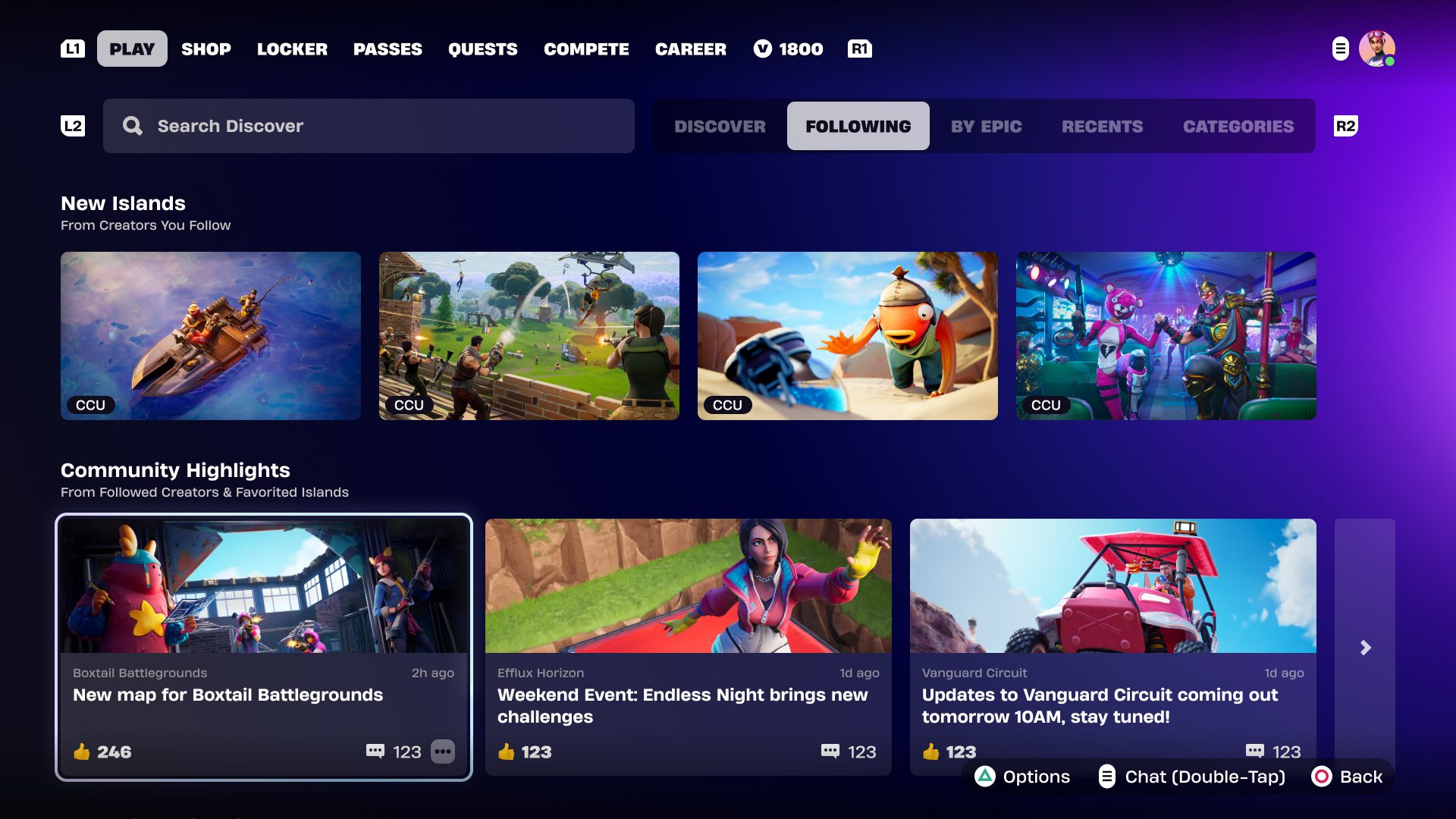
Fortnite Discover notifications not showing is a known bug with the redesigned menu. The yellow dot on the Library tab can disappear, and some new or updated islands won’t show their usual alerts. That doesn’t mean the island has been deleted. Epic is aiming to repair the notifications in v43.10 on November 12, 2026.
Epic began rolling out the new Discover on October 15, so two players can still see different menus. There are also separate problems with videos and navigation. Here’s what has been fixed, what’s still on Epic’s list and how to find an island without relying on the little yellow dot.
Fortnite Discover notifications not showing: what’s happening?
According to Epic’s October 29 issue update, a newly published or updated island might not trigger the usual message or yellow Library notification dot. In-game toast alerts can still appear. It’s the notification display that’s unreliable, not necessarily the island itself.
When Fortnite Discover notifications not showing leaves you wondering where an update went, try searching for the island by code or creator. You can open its details without ever seeing the Library badge.
When is the Fortnite Discover notification fix coming?
Epic has set November 12 as the target for the missing new-island messages and tab notification in v43.10. That’s a planned fix, not a completed one. As of October 31, the problem remains on the official known-issues list.
Keep an eye on Epic’s issue thread when v43.10 arrives. There’s no announced switch in Settings that restores the dot, and reinstalling Fortnite isn’t an official fix for this recognised Discover problem.
Other Discover problems planned for the same update
The same update is meant to tackle five other problems players can run into while browsing:
- Trailers: island-details videos may fail when manually moving between clips.
- Like percentages: the value associated with islands in Continue Playing can be missing elsewhere in Discover.
- First-launch prompt: the message encouraging players to explore more experiences may not appear.
- Touch navigation: two touch inputs can trap focus on a Hero carousel video tile.
- Hero videos: switching quickly between videos can leave a mismatched island name or description.
Those problems can make Discover annoying to use, but they don’t mean a creator’s game has disappeared. If a trailer won’t start, try opening the island normally instead.
Which Discover bugs have already been fixed?
Epic has already sorted out some of the redesign’s rough edges. Favorites now save from the Hero carousel, and Like percentages on island detail pages display correctly. Switching from the Creators tab no longer leaves search results blank, while right-clicking View all no longer locks scrolling.
The green friend-playing dot is back as well. Epic also fixed controller navigation in the Hero carousel, rows failing to reset and Discover appearing before the login prompts. Those repairs are complete; the Fortnite Discover notifications not showing issue is not.
Is the Community Events row still missing?
Epic hid the Community Events row while adjusting the new interface. On October 20, it moved the return target to v43.00 on November 1. The October 29 update doesn’t explicitly say it has returned, so that date should not be presented as a confirmed fix.
Check Discover after the November 1 update if you’re looking for Community Events. Our Fortnite v43.00 downtime guide covers that release. The missing Library alert is a separate problem targeted for November 12.
How to find islands without the yellow notification dot
With Fortnite Discover notifications not showing, the simplest workaround is to look for the island directly:
- Search for the island by its exact code, if you have it.
- Search by creator or open their profile to browse available islands.
- Check the Library and watch for regular in-game toast announcements.
- If you published the island, verify its actual status in Creator Portal rather than judging it by the notification icon.
For creators, Fortnite Discover notifications not showing after a release can look like a publication failure. Check the island’s actual moderation and publication status in Creator Portal first. An UEFN versioning error during Launch Session is a different fault that happens before an island can be properly tested.
Why does another player’s Discover look different?
The new Discover has been rolling out in stages since October 15. That explains why a friend’s menu may have different tiles or navigation. It doesn’t automatically mean your installation is broken.
If you’re still seeing Fortnite Discover notifications not showing, focus on finding the island rather than fixing the badge yourself. Use its code, check its creator page and watch for Epic’s November 12 update. The notification is the issue; the island may be right where it should be.
Related Guides
- UEFN Versioning Stage Failed: Launch Session Fix
- Fortnite Island Thumbnail Requirements 2026
- Fortnite Island Gameplay Video Requirements
- Fortnite v43.00 Downtime: November 1 Update
- Fortnite Creator Tools Update
- Fortnite UEFN Source Assets on Fab
- Fortnite Ballistic Removal: Why It Disappeared
- Fortnite Creative XP Cap
Official source: Epic Games: Discover Redesign Known Issues, updated October 29, 2026.





