EA FC 27 PC Stuttering can show up as tiny micro-stutters, sudden frametime spikes, short freezes, slow-motion gameplay or input that feels delayed even when the average FPS counter looks normal. EA has published dedicated FC 27 PC performance guidance because these symptoms can come from graphics settings, background load, drivers, power settings, hardware or the way system memory is configured.
There is not one guaranteed launch fix for every PC. The useful approach is to separate a local performance problem from an online connection problem, then test changes one at a time. The steps below follow EA’s own FC 27 troubleshooting priorities and avoid risky registry edits or random launch options that are circulating without consistent evidence.
EA FC 27 PC Stuttering fixes to try first
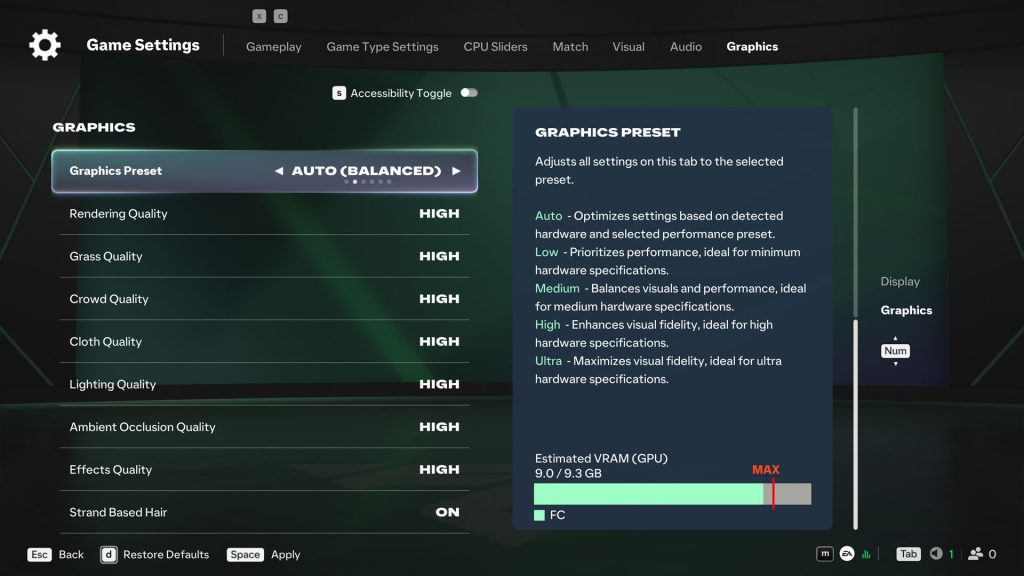
Image credit: EA SPORTS
For EA FC 27 PC Stuttering, EA recommends working through performance changes in order and testing the game after each one. That matters because changing six settings at once can hide the actual cause and makes it difficult to know which adjustment helped.
- Lower the target frame rate. EA specifically suggests testing a lower cap, such as 60 FPS to 30 FPS, to see whether frametime becomes stable.
- Reduce demanding graphics settings and, if needed, lower the display resolution.
- Close browsers, overlays, recording tools, launchers and other background applications using CPU, GPU or memory resources.
- Check whether system RAM is running in dual-channel mode rather than single-channel mode.
- Update the GPU driver from NVIDIA, AMD or Intel as appropriate for the system.
- Check Windows power mode, laptop performance mode and GPU control-panel settings so the game is not being restricted by a low-power profile.
Why dual-channel RAM matters for EA FC 27 PC Stuttering
EA FC 27 PC Stuttering can be affected by memory configuration, which EA specifically calls out in its FC 27 performance guidance. A PC can have enough total RAM and still run in single-channel mode, which provides less memory bandwidth than a supported dual-channel setup. On some systems, moving to the correct dual-channel configuration may improve performance and reduce stuttering.
Do not move or add RAM without checking the motherboard or PC manufacturer documentation first. The correct module type and slot arrangement depend on the hardware. If you have two sticks installed, verify that they are in the recommended paired slots rather than assuming two modules automatically mean dual-channel mode is active.
Use the FC 27 Performance preset and VRAM indicator
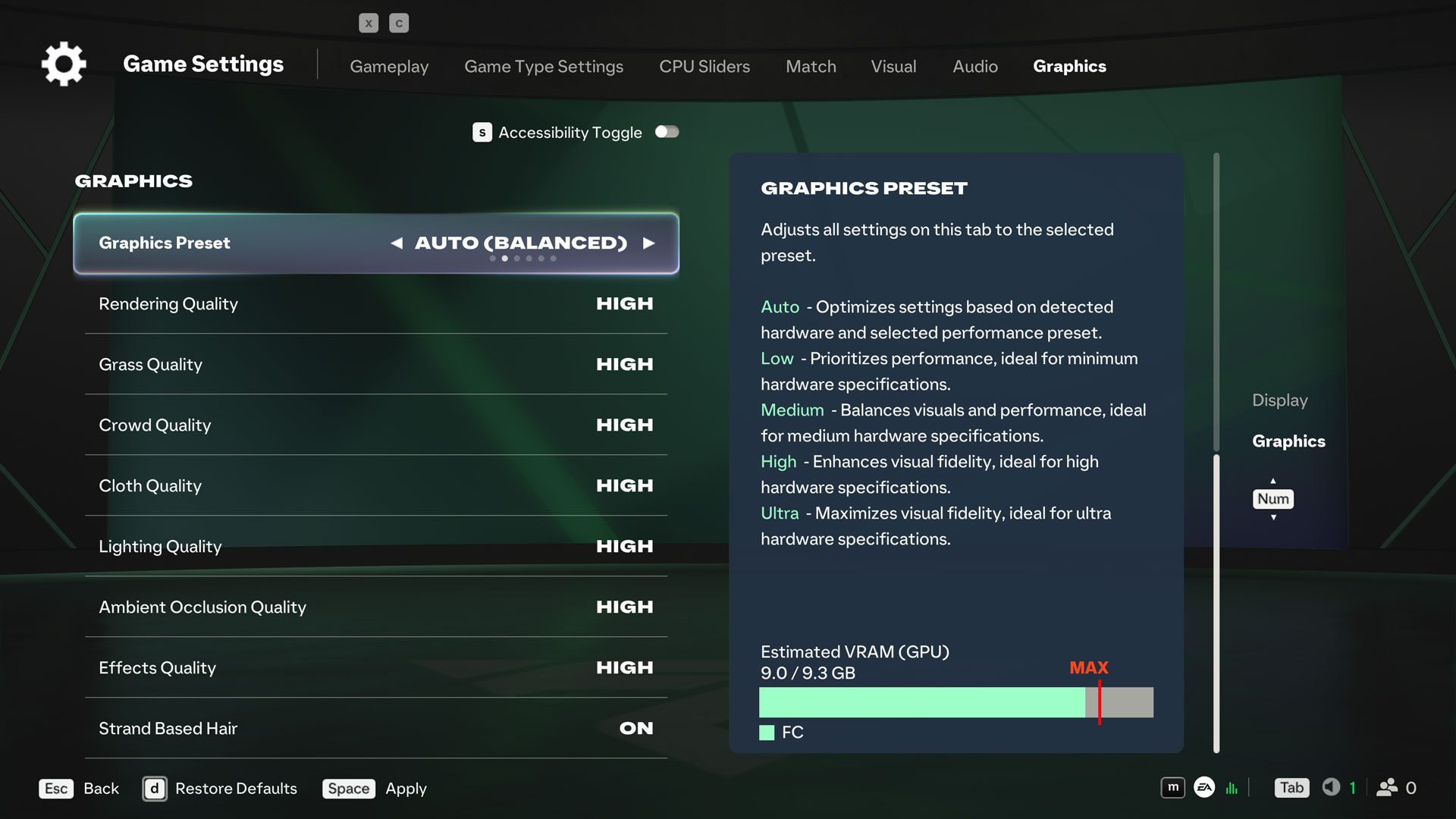
EA FC 27 PC Stuttering is also worth testing against FC 27’s broader graphics presets, including Performance and Balanced options, plus the VRAM indicator in the graphics settings. If EA FC 27 PC Stuttering begins with a high-quality preset, testing Performance or Balanced gives you a quick baseline before you start tuning individual options.
The VRAM indicator is also useful when graphics settings are close to the GPU memory limit. It estimates expected maximum in-game video memory usage as settings change. Staying comfortably within available VRAM does not guarantee perfect frametimes, but it can help identify a configuration that is simply too aggressive for the card.
How to tell PC stuttering from connection lag
With EA FC 27 PC Stuttering, a local performance problem can happen offline, in menus or during low-latency play. A network problem is more likely when the issue appears only online alongside high ping, jitter, packet loss, rubber-banding or connection indicators. EA notes that network instability can also create visual stuttering, so the two problems can feel similar.
Test an offline mode after applying the same graphics settings. If the same freeze or frametime spike appears offline, focus on the PC. If offline play is smooth but online matches show spikes, check the connection quality before continually lowering graphics settings.
Did EA FC 27 Update 1.0.1 fix PC stuttering?
EA FC 27 Update 1.0.1 includes general stability work, but its published notes do not claim a universal fix for EA FC 27 PC Stuttering. The patch specifically addresses the Ultimate Team Evolutions filter, several The Grounds issues, custom controller inputs, stability and a few platform-specific problems.
Install the update because it is the current build, but do not assume a persistent PC frametime problem means the patch failed to install. Our EA FC 27 Update 1.0.1 guide lists exactly what the update does and does not say it fixes.
What to do if the stuttering is still there
If EA FC 27 PC Stuttering remains after the first-line checks, repair the game files through the platform launcher, restart Windows after driver changes and retest with background overlays disabled. Keep one known test scenario so you can compare the same match type and graphics settings instead of judging different modes under different loads.
If you are using the 10-hour trial, a performance problem is separate from trial entitlement trouble. The EA FC 27 EA Play Trial guide covers missing or expired trial access, while the Web App not working guide covers browser-side launch problems.
EA publishes current FC 27 information through the official EA SPORTS FC 27 page. For EA FC 27 PC Stuttering, start with the reversible performance checks first: frame cap, graphics load, background apps, dual-channel memory, drivers and power settings. If persistent EA FC 27 PC Stuttering disappears offline, investigate connection quality before dismantling a PC configuration that is otherwise stable.