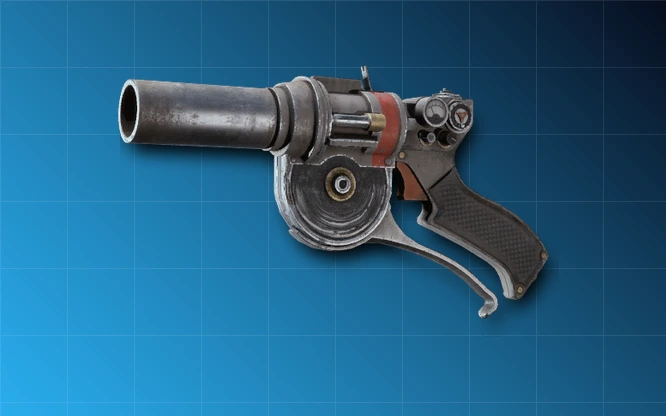
The ARC Raiders Tether Launcher fires two anchors and joins whatever those shots hit with a connecting wire. The gadget can tether different objects, surfaces, ARC or Raiders, restricting movement between the connected points. It is distinct from the Grappling Hook, which moves your Raider across terrain.
The crafting blueprint can be researched at Research Station Level 2 for 2,000 Research Points, 3 Steel Cable and 1 Unusable Weapon. Once learned, crafting a launcher at Utility Station Level 2 costs 2 Steel Cable, 1 Advanced Electrical Components and 1 Calculator.
Tether Launcher exact blueprint and crafting costs
Research Station II is required for the Tether Launcher Blueprint research. It consumes 2,000 Research Points, three Steel Cable and an Unusable Weapon. Scavenging is another listed source of the blueprint. Once learned, the Utility Station II recipe creates the gadget from two Steel Cable, one Advanced Electrical Components and one Calculator.
For the first ARC Raiders Tether Launcher made entirely through research, budget five Steel Cable in total: three for the blueprint and two for the item. Later copies cost only the Utility Station materials.
ARC Raiders Tether Launcher: How to unlock the blueprint
Finish Sheltered Retreat to access the Outpost and Research Station, then expand the Outpost enough to upgrade Research Station to II. Select the Tether Launcher Blueprint project, contribute its exact resources and learn the schematic once it is available.
Learning a blueprint is not the same as crafting equipment. You still need a Level 2 Utility Station and its recipe materials for an actual ARC Raiders Tether Launcher in your inventory.
ARC Raiders Tether Launcher: How to fire and connect two anchors
Equip the launcher in a quick-use slot. Aim and fire the first shot at one anchor point. Fire again at a second valid point; the wire connects those two impacts. Use a stable surface or object as one anchor when trying to restrict something that moves.
Embark describes the ARC Raiders Tether Launcher as part of its tether-and-constraint system. You can connect Raiders to ARC or pin two targets relative to each other, creating a control opportunity for you or your squad.
Best combat uses for a Tether Launcher

Use the first shot on an enemy or moving object and the second on a suitable fixed surface. A connection can restrict movement, interrupt an easy escape and set up teammates to take clear shots. Tethering an ARC to another target can make the movement of both harder to predict.
The ARC Raiders Tether Launcher is not a direct-damage weapon, so a successful anchor is a setup rather than a guaranteed kill. Have a firearm ready to take advantage of the restricted position.
Where to find Steel Cable, Calculator and other parts
Steel Cable can be scavenged around Pendola Pass, including its Railyard, and Celeste offers it through Seeds. Calculators turn up in electrical and technological loot. Advanced Electrical Components come from electrical crafting supplies and relevant scavenging. Keep an Unusable Weapon if you intend to pay for the research project.
The ARC Raiders Tether Launcher recipe competes with Outpost projects for Steel Cable. Check whether you need three cables for your next room expansion before spending them on the gadget.
Tether Launcher versus Yank Grenade
The Tether Launcher makes a connection between two separate hits. The Yank Grenade is a single throwable that anchors a line and pulls its affected target at the point of impact. Both belong to the same tether system, but their deployment is different.
Choose the ARC Raiders Tether Launcher when you can deliberately set up two anchor points. Use the Yank Grenade when you need a brief immediate pull, and the Grappling Hook when the goal is moving your own character.
ARC Raiders Tether Launcher repair after Update 2.2.0
ARC Raiders Tether Launcher repairs work in-round again as of the October 20, 2026 update. Embark specifically fixed a bug that prevented the gadget being repaired during a raid. Previously, the repair action could fail even with Field Repair unlocked. The October fix restores the intended in-round interaction.
To repair it Topside, you need the Field Repair skill in the Survival tree. Field Repair restores some durability during a raid; the exact amount and any resource requirement should be checked in the in-game prompt for your current version. Make sure Field Repair is unlocked, inspect your damaged launcher in your equipment menu and choose its repair option where offered. If the interaction is still missing, check the installed version and try again in a new raid. Avoid spending repair supplies on another gadget by mistake.
Repairs are separate from the blueprint at Research Station II and manufacturing at Utility Station II. You do not need to unlock the blueprint a second time to repair an existing launcher. The October 13 update also corrected Field Repair failing to activate until a restart when it was unlocked mid-session; the October 20 patch then addressed the Tether Launcher itself. Exact in-round repair material costs aren’t specified in Embark’s patch notes, so check the in-game repair prompt before spending supplies.
Tether Launcher crafting and repair problems
If the recipe is missing, check the learned blueprint first. The Research Station needs to reach Level 2 for its project and the Utility Station needs to reach Level 2 for manufacturing. Research Points alone do not substitute for the Steel Cable and Unusable Weapon.
If the launcher fires but no tether appears, confirm both shots hit valid targets. The first dart alone cannot create a connecting line.
Official source: Embark Studios Update 2.2.0 patch notes.