Transfer Pokémon in Pokémon GO by opening Pokémon storage, selecting a Pokémon, opening its menu and choosing Transfer, or by long-pressing in storage to select multiple Pokémon for a mass transfer. Each normal transfer removes the Pokémon permanently and awards species Candy, so storage cleanup should be deliberate rather than rushed.
How to transfer one Pokémon
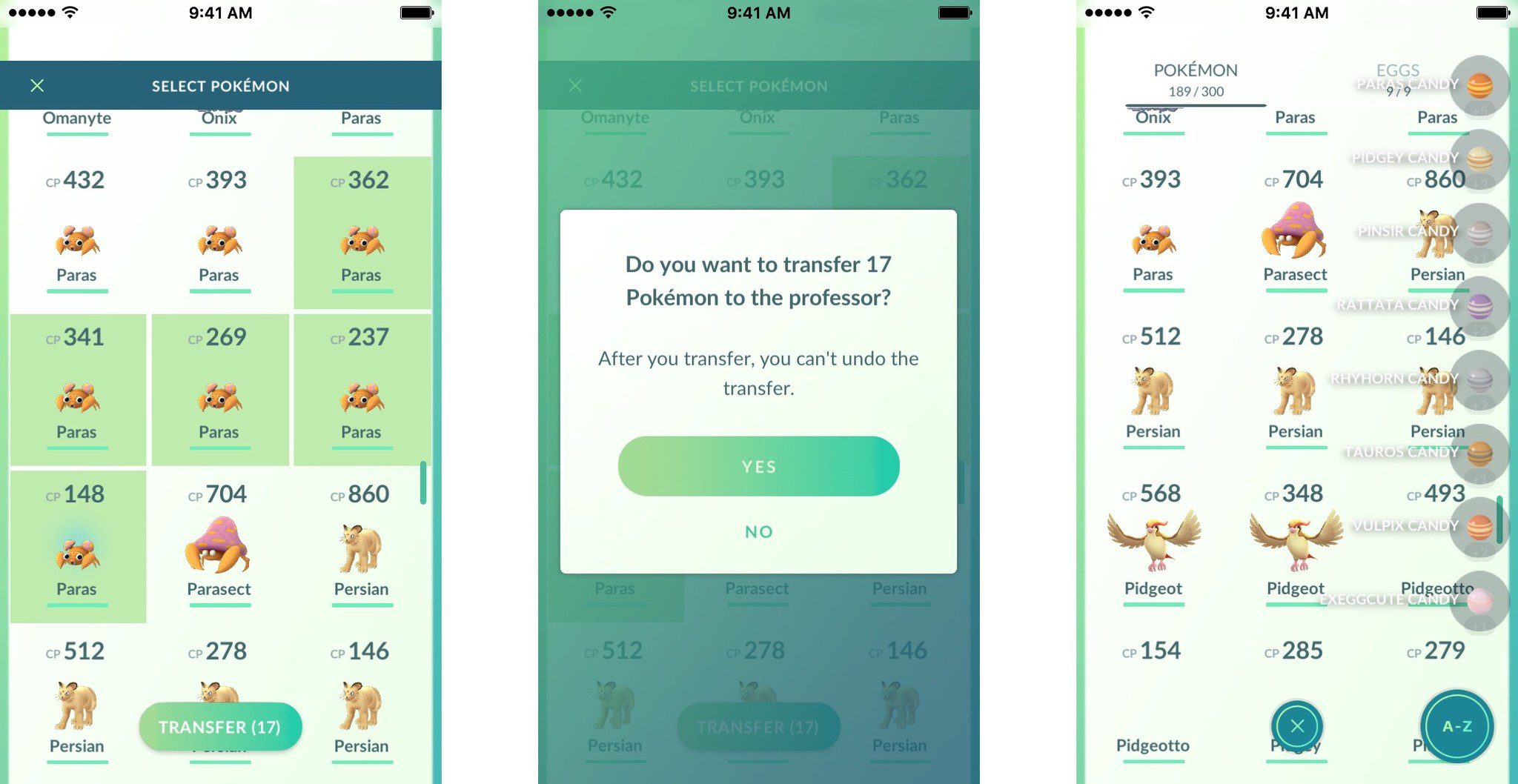
Open the Main Menu, tap Pokémon and select the Pokémon you want to remove. Open the action menu and tap Transfer, then confirm the warning.
That is the safest way to transfer Pokémon in Pokémon GO when the Pokémon is unusual or you want to inspect appraisal, moves, catch date and tags first.
Once confirmed, the transfer cannot be reversed through normal gameplay. There is no recycle bin or grace period after the confirmation screen.
How to mass transfer
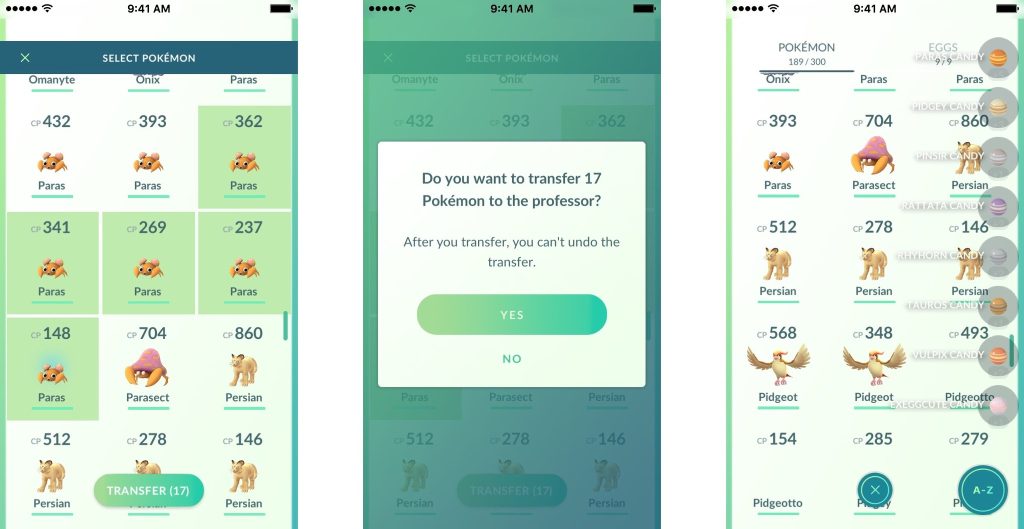
From Pokémon storage, press and hold one Pokémon until multi-select mode opens. Tap additional Pokémon, then use the Transfer button to send the whole selection at once.
Mass transfer Pokémon in Pokémon GO is much faster after Community Days or Spotlight Hours, but the speed also makes mistakes easier. Favorite valuable Pokémon first and use search filters to isolate obvious duplicates before selecting hundreds at once.
You receive Candy
A normal transfer awards Candy for that Pokémon’s evolution family. Event bonuses can increase transfer Candy, and some events also award extra Candy XL for eligible Trainers.
If a double-transfer-Candy Spotlight Hour is approaching, holding rare duplicates can be worthwhile.
Do not keep thousands of common Pokémon indefinitely, though. Transfer Pokémon in Pokémon GO often enough that storage remains usable during events.
Favorites cannot be transferred
Favoriting a Pokémon protects it from transfer until the star is removed. This is one of the simplest safety tools in the game.
Favorite hundos, important PvP builds, rare Shinies, strong Shadows, sentimental Pokémon and anything waiting for a future evolution event.
Before you mass transfer Pokémon in Pokémon GO, search `favorite` or visually confirm the stars on anything valuable.
Some special Pokémon need extra confirmation
Shiny, Legendary, Mythical, costume and other valuable Pokémon can trigger additional warnings or may be excluded from normal mass-transfer behavior depending on settings and current game rules.
The game also has an expanded group transfer option that can allow broader mass selection when enabled.
Treat every warning seriously. The goal is to transfer Pokémon in Pokémon GO efficiently, not to discover afterward that a rare costume or background Pokémon was in the batch.
Use search strings before transferring
Storage search makes cleanup much safer. Filters such as `0*`, `1*`, `2*`, species names, age filters and `duplicate`-style manual combinations can narrow the list.
Avoid blindly transferring everything below three stars because PvP candidates often use low Attack IVs and can have poor-looking overall appraisal ratings.
Search first, appraise anything questionable, then transfer Pokémon in Pokémon GO only after the candidates are genuinely disposable.
Traded Pokémon and transfer
A Pokémon received in a trade can be transferred normally, but it cannot be traded again. Trading rerolls IVs, so appraise the result before deciding whether to keep it.
Lucky Pokémon are especially worth checking because they have a high IV floor and cheaper Stardust power-up costs.
Do not mass transfer Pokémon in Pokémon GO immediately after a large trade session until you have reviewed Lucky results and useful PvP rerolls.
Pokémon sent to HOME are different
Moving a Pokémon to Pokémon HOME is not the same as transferring it to Professor Willow. HOME transfer uses the GO Transporter system and sends the Pokémon into another service where normal Pokémon GO return is not possible.
Both choices are effectively one-way from Pokémon GO’s perspective, so check the destination before confirming.
If you simply need Candy and storage space, the normal Transfer button is the straightforward option.
Best storage-cleaning routine
Favorite everything important, tag projects, search low-value duplicates and clear storage in smaller batches instead of one enormous selection. During events, leave enough free slots before the event starts so you are not sorting while rare spawns are active.
Transfer Pokémon in Pokémon GO is a basic mechanic, but careful use saves both storage and regret. Candy is replaceable; a transferred Shiny, hundo, rare background or perfect PvP candidate usually is not.
Official site: Pokémon GO