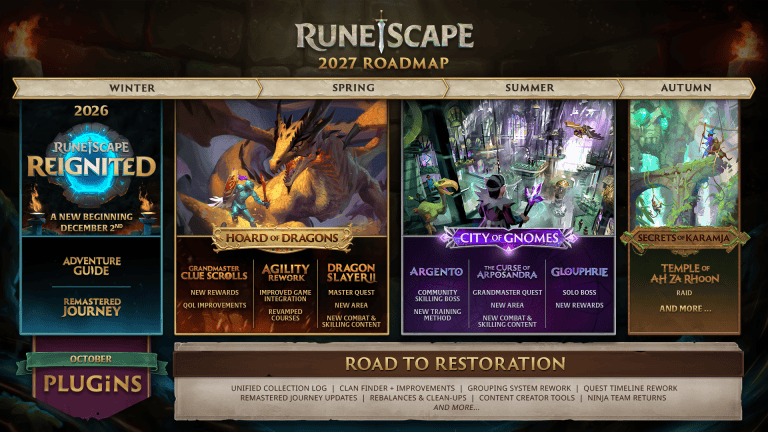
The RuneScape Plugin Hub has been live since 19 October 2026. You can install community-made plugins from inside modern RuneScape, with no RuneLite download and no need to wait for the cancelled Reignited project.
Quest Helper, Menu Entry Swapper, Tilemarkers, Entity Hider and Job Gauges were the five plugins available at launch. Jagex reviews submissions before they appear in the hub, while the creators remain responsible for building and updating their own plugins. Here’s how to get them working.
How to open the RuneScape Plugin Hub
In RuneScape, look for a toolbox icon in the Ribbon menu at the bottom right of the game interface. Its location depends on which interface layout you use, so don’t assume it will appear in the same place as somebody else’s screenshot.
In Classic interface mode, the toolbox appears on the Ribbon by default. With the default Modern ribbon, hover over the Settings button to find it. With a customised ribbon, the game puts it at the end if there’s room. If it isn’t showing, edit the ribbon and add the toolbox.
The RuneScape Plugin Hub opens in-game. It is not an external plugin installer, and you don’t have to copy files into a RuneLite folder. Jagex’s approved plugins run within the RuneScape client and its own interface limits.
RuneScape Plugin Hub installation steps
- Open the in-game toolbox from the Ribbon or Settings area.
- Use the hub’s browsing section to find the approved plugin you want.
- Select the plugin and choose Install.
- Follow the mod.io account and email verification prompts if this is your first plugin.
- Check the Manage tab if the plugin asks for permissions or does not enable automatically.
- Return to the game and use the plugin’s own interface or settings where available.
Jagex says plugins normally enable themselves after installation. If one requires additional permissions, you’ll need to accept them and may have to enable it from Manage. You can return to the RuneScape Plugin Hub to manage or uninstall a plugin later.
Which official RuneScape plugins are available?
The original five included Quest Helper, which launched with support for 69 quests, and Menu Entry Swapper, which lets you customise certain item and entity interaction menus. See our RuneScape Quest Helper plugin guide and RuneScape Menu Entry Swapper guide for those two specifically.
The other launch plugins were Tilemarkers for highlighting useful positions, Entity Hider for hiding selected on-screen entities, and Job Gauges for additional combat-related information. Their specific controls depend on each plugin’s installed version.
More plugins are on the way. Jagex’s 26 October FAQ targets 5 November for the next release batch, but that doesn’t guarantee any particular plugin will arrive then. Clue Trainer hadn’t been formally submitted for moderation at the time. Check Browse for what’s actually available.
Why the toolbox or plugins might be missing
If you can’t see the toolbox, check the Ribbon layout before doing anything else. Classic mode displays it by default, Modern’s parent-only ribbon places it under Settings, and a custom ribbon may need to be edited to make room. This is the most direct fix for the common “where is the Plugin Hub?” question.
If the RuneScape Plugin Hub opens but you can’t install anything, check your mod.io email verification. Jagex recommends using the same address as your Jagex Account, but it isn’t required. The developer also confirmed problems with some addresses containing a plus sign (+). If verification fails with one of those, try another email address.
If a plugin installs without appearing to work, open Manage and check whether it requires a permission or still needs to be enabled. If you’re looking for a plugin that doesn’t appear in Browse, it may not have been approved yet. Jagex’s announced moderation process does not guarantee a release date for individual submissions.
Can I use the RuneScape Plugin Hub on mobile?
Not yet. Jagex says mobile support is planned, but hasn’t announced a date. These installation steps cover the desktop RuneScape client.
Is the RuneScape Plugin Hub the same as RuneLite?
No. The RuneScape Plugin Hub is part of the modern RuneScape game, often called RS3. RuneLite serves Old School RuneScape. They are separate games and plugin systems; a RuneLite guide showing a particular button or menu option isn’t automatically applicable here.
Jagex also prohibits plugins that play the game for you. Menu Entry Swapper has restrictions on actions such as making Drop or Teleport the default item left-click, and shop Buy All shortcuts are not supported. The Menu Entry Swapper restrictions guide explains why those aren’t faulty installations.
How to manage and report problems with plugins
Use the RuneScape Plugin Hub’s Manage section to check installed plugins, adjust permissions where requested, and remove something you no longer need. If the problem concerns a particular plugin, Jagex directs players to the developer’s support channel listed on its mod.io page, which you can reach from the hub.
For an issue with the hub, use RuneScape’s bug report or its official Plugin Discord. If one particular plugin is misbehaving, check its mod.io page for the creator’s support details. Plugins go through Jagex moderation, but that isn’t a promise that every plugin will be bug-free.
The RuneScape Plugin Hub starts at the toolbox on your Ribbon. Pick the plugin you need, verify your mod.io email if prompted, and check Manage if it needs permission. You don’t need to change clients or install unofficial software.
Official source: Jagex’s RuneScape plugins launch announcement.