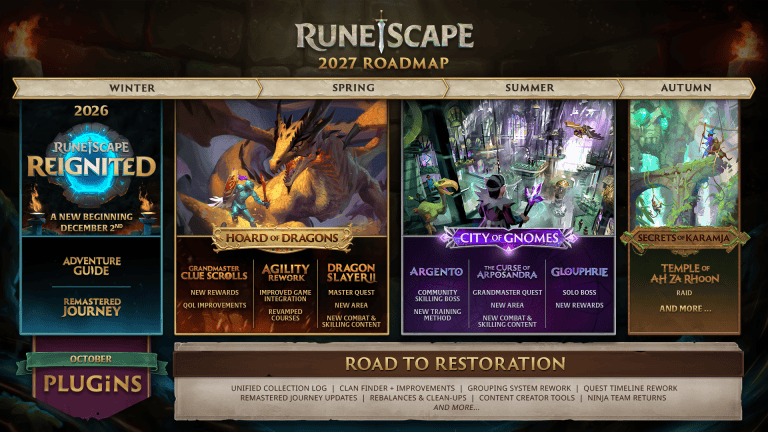
The RuneScape Quest Helper plugin launched on 19 October 2026 with guides for 69 quests. It works through the official in-game Plugin Hub in modern RuneScape, so you don’t need RuneLite or a separate installer.
It helps you follow quest steps while you play, rather than completing the quest for you. Jagex confirmed the launch total but didn’t publish a complete list of 69 names. The most useful way to check one particular quest is through the installed plugin.
How to install the RuneScape Quest Helper plugin
Start RuneScape and look for the toolbox icon in your Ribbon menu at the bottom right. On the Classic interface it appears in the Ribbon by default. If you’re using the default Modern ribbon, hover over Settings. If you’ve customised your Ribbon, edit it to add the toolbox when there isn’t room for the icon.
- Open the toolbox to enter the RuneScape Plugin Hub.
- Browse the approved plugin list and select Quest Helper.
- Choose Install and complete any mod.io email verification requested.
- Check the plugin’s requested permissions, if any.
- Open the Manage tab if it didn’t enable automatically, then enable it.
- Use the installed plugin while playing a quest it currently supports.
The RuneScape Quest Helper plugin is community-made but distributed through Jagex’s approved hub. Zoinkwiz, Techpure and JosTheFarmer were named as its developers during the original beta. You can manage or uninstall it from the same in-game hub.
Which 69 quests does RuneScape Quest Helper support?
Jagex confirmed support for 69 quests at launch on 19 October 2026. This is a coverage count, not a promise that every quest in modern RuneScape already has a walkthrough. The earlier open beta had fewer supported quests, so a pre-launch screenshot or older guide may show a different number.
Open the RuneScape Quest Helper plugin and check its supported quest options in the version you have installed. Screenshots from the beta may be outdated: it began with 62 quests before the supported total reached 69 for launch.
Jagex’s 26 October FAQ says the developers began with shorter early-game quests and will choose future additions based on community demand and technical complexity. They haven’t promised a date for every quest. Don’t assume a later story quest is covered just because it’s listed in RuneScape’s normal quest journal.
How to use Quest Helper once it is installed
After installing the RuneScape Quest Helper plugin, open the plugin’s own interface and choose a quest it supports. The guidance is there to help you follow the quest while you control your character. You still need to speak to characters, travel, solve the relevant parts and take the required actions yourself.
Check the quest’s requirements and your in-game progress as you go. The helper may show guidance based on the supported quest’s steps, but it is not a button that collects rewards or skips the adventure. Jagex’s plugin rules specifically forbid automatic play.
If the option for the quest you’re doing isn’t available, don’t assume the plugin is broken. First check whether that quest is among the supported choices in the version installed. Jagex planned to approve more plugins and updates in batches, but that isn’t confirmation that every requested quest has been added.
Why the RuneScape Quest Helper plugin isn’t working
If it isn’t in your installed list, return to the Plugin Hub and make sure you selected Install rather than just viewing its description. If it has been installed, open Manage: Jagex says most plugins enable automatically, but some require permissions that must be accepted before they can run.
If you can’t open the Hub at all, check the toolbox placement for your Ribbon layout. On a customised Ribbon the icon may need adding manually. If mod.io access is stopping installation, check that the email address you’re using has been verified.
Your mod.io email doesn’t have to match your Jagex Account, but it must be verified. Jagex has also warned that some addresses containing a plus sign (+) can cause problems; using a different email is its suggested workaround while it investigates.
RuneScape Quest Helper plugin versus OSRS RuneLite
A common cause of confusion is the RuneLite Quest Helper used for Old School RuneScape. This article covers modern RuneScape, where the official Plugin Hub launched in October 2026. Menus, quest coverage and plugin features are not interchangeable between the two games.
If you also want to adjust the options shown when interacting with items or characters, that’s a different official plugin. Our RuneScape Menu Entry Swapper guide explains what it can change, including Jagex’s restrictions on Drop, Teleport and Buy All.
Can Quest Helper complete quests automatically?
No. The RuneScape Quest Helper plugin offers guidance rather than playing in your place. You still need to meet quest requirements and perform the actions in the game. Its job is to help you understand what to do, not to bypass encounters or award quest points without completion.
If you’re returning after a long break, try the RuneScape Quest Helper plugin on an early quest that appears in its supported list. It’s a useful way to learn the interface before tackling a longer quest.
The RuneScape Quest Helper plugin is already available. Open the toolbox, install it from Browse, and check Manage and your mod.io email verification if it doesn’t start.
Official source: Jagex’s official RuneScape Plugin Hub launch guide.