Pokémon Champions Championship Points can be earned in the 2027 Global Challenge II, but entering the tournament isn’t enough to make your results eligible. You need a Pokémon Trainer Central account before registration, the correct Pokémon Champions Support ID in Play! Pokémon Access, and your accounts linked until rewards are awarded.
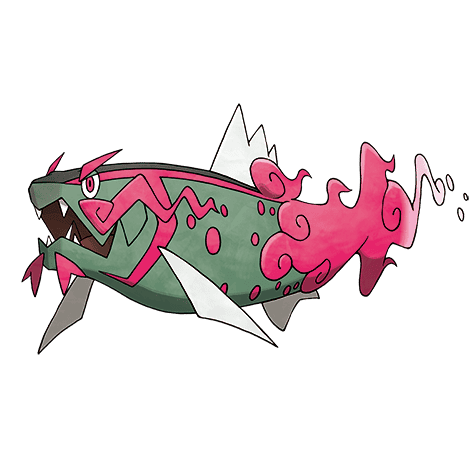
Global Challenge II runs until Monday 2 November 2026 at 01:59 GMT in the UK. Players who finish three matches with wins or losses can earn male Basculegion, even without the Championship Points account setup. If you want competitive points as well, check your connection before submitting your tournament entry.
Pokémon Champions Championship Points: what the event requires
For Pokémon Champions Championship Points, set up your Pokémon Trainer Central account before registering for the Online Competition. If you’re entering Global Challenge II, do the account work first and then register your Battle Team.
The account must then be linked in the Play! Pokémon Access app. Pokémon also requires the player’s Pokémon Champions Support ID to be entered there.
Keep the accounts linked
Keep the Trainer Central and Play! Pokémon Access connection active until the tournament rewards have been awarded. Pokémon Champions Championship Points depend on that link being in place through the reward process.
Once points have been earned, unlinking in the future does not remove those Championship Points. The key timing concern is the period from registration through reward processing.
Do you need this setup to play?
You can enter the Global Challenge without linking Trainer Central to Play! Pokémon Access. The link matters for Pokémon Champions Championship Points eligibility, not for joining the competition.
For Global Challenge II, the separate participation Pokémon is male Basculegion. Complete three matches that end with wins or losses to qualify for it, even if you aren’t earning competitive points.
Pokémon Champions Championship Points: Global Challenge II Requirements
Global Challenge II runs from 30 October at 02:00 GMT until 2 November at 01:59 GMT. Registration remains open while battles are underway. If you want Championship Points, arrange your Trainer Central and Access connection before registering rather than doing it afterward.
- Create or sign in to a Pokémon Trainer Central account with a Play! Pokémon Player ID before registering for Global Challenge II.
- Open Play! Pokémon Access and connect the relevant Trainer Central account.
- Find your Pokémon Champions Support ID on the game’s start screen or under Submenu → Legal Info & More, then enter and submit it in the Access app.
- Check that the linked account and ID are correct, and keep them linked until the event’s rewards have been allocated.
- Register your legal Regulation Set M-C Battle Team through Battle → Online Competitions → 2027 Global Challenge II and compete.
Pokémon Champions Championship Points are awarded according to eligible competitive results and final rankings. They aren’t granted simply for registering or playing three matches. The three-match requirement is for the separate male Basculegion participation prize.
For the full entry route and locked-team rules, see our Global Challenge II registration guide. Our male Basculegion reward guide explains the three-match condition and how to collect the Pokémon after results are posted.
Do You Need Play! Pokémon Access for the Basculegion Reward?
No. Linking accounts is necessary for Championship Points, but Pokémon lets you enter Global Challenge II without it. Complete three matches that finish with recorded wins or losses, check the final ranking results in Online Competitions after the event, then claim male Basculegion from the in-game mailbox.
If you discover an ID mismatch, contact official Play! Pokémon support rather than registering a second account to get around the restriction. Pokémon says each Player ID can only be linked to one Champions Support ID, and that link can’t be changed through the normal app controls.
Global Challenge I and the 2027 season
Pokémon Champions Championship Points count towards the 2027 Championship Series. Global Challenge I ran in September, and Global Challenge II follows on 30 October to 2 November. Both are online competitions in Pokémon Champions.
World Championships invitations are based on Championship Point standings, with qualification limits that vary by rating zone and age division. A Global Challenge result contributes to that wider season rather than awarding an automatic invitation.
Pokémon Champions Championship Points: How to link your Support ID
To earn Pokémon Champions Championship Points from eligible competitions, your game profile must be connected to a valid Play! Pokémon Player ID. Pokémon’s support team clarified the process on October 12, 2026. The link is made through the Play! Pokémon Access app, not through the battle menu or a Pokémon HOME transfer.
You need a Pokémon Trainer Central login with an existing Player ID, the Play! Pokémon Access app from Google Play or the Apple App Store, and the Support ID for the Pokémon Champions profile you intend to use in tournaments. The Player ID and Support ID are different identifiers. Don’t submit until you’ve checked which account each belongs to.
Where to find the Pokémon Champions Support ID
Your Support ID appears on the Pokémon Champions start screen. You can also open Submenu → Legal Info & More within the game to find it. Both Nintendo Switch and mobile players can retrieve the ID this way. Copy it carefully, especially if two characters look similar.
The Support ID is the identifier used to connect your Pokémon Champions results to your Play! Pokémon profile. A Nintendo Account or Pokémon HOME connection doesn’t replace this step.
Step-by-step: link Pokémon Champions to Play! Pokémon Access
- Open Play! Pokémon Access and log in with the Pokémon Trainer Central account that contains your valid Player ID.
- Tap Menu at the bottom of the app.
- Select Pokémon Champions Support ID.
- Enter the Support ID displayed on the Pokémon Champions start screen or under Submenu → Legal Info & More.
- Enter the same Support ID again in the second field to confirm it.
- Check both entries carefully and select Submit.
- On success, the linked Support ID appears in Play! Pokémon Access so you can check it later.
Once your Support ID is linked, you can register for a competition. Linking alone doesn’t enter you into a tournament or guarantee Pokémon Champions Championship Points; those come from eligible competitive results.
Can you change the Support ID after linking?
No. Each Player ID can be linked to only one Pokémon Champions Support ID, and Pokémon says that linked Support ID cannot be changed afterward. If you play on several profiles, check the ID and your Trainer Central account before selecting Submit. This is not a setting you can simply undo and repeat with a different game profile.
If you’ve already linked the wrong identifier, contact official Play! Pokémon support. There is no published self-service way to swap it, so don’t assume creating another login will solve your Pokémon Champions Championship Points issue.
Pokémon Champions Championship Points: Support ID menu missing
When the Pokémon Champions Support ID menu doesn’t appear, Pokémon says to check your Player ID and account login. The option isn’t shown to guests or users signed in to a Trainer Central account without a linked Player ID. Sign in with the correct account rather than hunting for an extra setting in Pokémon Champions.
If you don’t have a Player ID yet, sign in to Pokémon Trainer Central, open Play! Pokémon, select Create a Play! Pokémon Account and follow the setup steps. If a tournament organiser already gave you a Player ID and PIN, choose I have a Player ID; otherwise choose I do not have a Player ID to generate one. Then return to the Access app.
Why is the Submit button unavailable?
The app only enables Submit when both Support ID fields match. Compare every character and remove accidental spaces. You don’t need to win a game or finish a tournament to make the button work. Correcting those two entries is the fix given in Pokémon’s October 12 instructions.
Pokémon Champions Championship Points: Fix linking errors
If the app shows an error after you select Submit, Pokémon recommends reopening Play! Pokémon Access and trying again. If it continues to fail, contact Pokémon customer support and include both your Player ID and your Pokémon Champions Support ID. The support team needs those two IDs to investigate the connection.
| Problem | What Pokémon support recommends |
|---|---|
| No Support ID menu | Sign in to Pokémon Trainer Central with a linked Player ID, not a guest account. |
| Submit button greyed out | Enter exactly the same Support ID in both text fields. |
| Error after submission | Close and reopen Play! Pokémon Access, then try again. |
| Error keeps appearing | Contact Pokémon customer support with your Player ID and Pokémon Champions Support ID. |
Don’t post your identifying IDs publicly when asking other players for help. For Global Challenge II, check your IDs and resolve account-linking problems before submitting your entry rather than relying on Pokémon Champions Championship Points being credited after the event.
What the link does and doesn’t unlock
The account link lets Pokémon attribute competition results to the right player. Global Challenge I and II both require the Trainer Central account to exist before registration for Championship Points eligibility, with the Access connection maintained through reward allocation.
The Archaludon distribution for Global Challenge I was a different reward: players needed three completed matches to qualify for the in-game Pokémon, whether or not they were set up for Pokémon Champions Championship Points. The Support ID link isn’t an automatic Archaludon claim, and the in-game prize doesn’t prove that your CP eligibility is complete.
Once Pokémon Champions Championship Points are earned, Pokémon says they remain credited if you unlink the relevant accounts in the future. That statement doesn’t override the separate rule that an already submitted Support ID can’t be changed to a different one.
A simple pre-registration checklist
Before you press Register, check your Trainer Central Player ID and your Champions Support ID in Play! Pokémon Access. Keeping the account link correct through the event is essential for Pokémon Champions Championship Points.
Register your Battle Team only after that setup is finished. You can then focus on the tournament, knowing the account-linking steps were completed in the right order.
For Global Challenge II, remember that male Basculegion is a participation reward. Championship Points depend on the linked-account requirements and your eligible competition results, while Basculegion requires three completed matches.
Related Guides
Continue with our Pokémon Champions Championship Points, Global Challenge II, Regulation M-C and reward guides:
- Global Challenge II Registration: Deadline and Battle Team
- Global Challenge II Basculegion: Three Matches and Mailbox Claim
- Pokémon Champions Regulation M-C Rules
- Pokémon Champions Best Doubles Team Ideas
- Pokémon Champions Global Challenge I Registration
- Male Basculegion in Pokémon Champions
- Pokémon Champions Regulation M Explained
- Pokémon Champions Beginner Guide
Official source: The Pokémon Company, 2027 Global Challenge II tournament announcement.