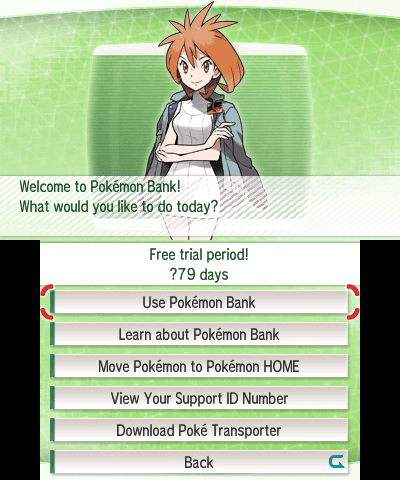
Pokémon Bank without a 3DS is still accessible through Pokémon HOME if the Nintendo Network ID used for your Bank collection is linked to the Nintendo Account you’re using with HOME. You need HOME Premium, but not the old console or a Moving Key. The main catch is that this option moves every Pokémon already stored in Bank at once, not a selection of boxes.
It’s especially useful if the 3DS was lost or stopped working years ago. But this option only sees Pokémon already deposited in Bank’s online boxes, not the creatures still on a cartridge or an old game’s save file. Bank closes on 26 February 2027 at 03:00 UTC, so complete the transfer before then.
Requirements for Pokémon Bank without a 3DS
For Pokémon Bank without a 3DS, the original Nintendo Network ID must be linked to the Nintendo Account you use with Pokémon HOME. Sign in to HOME on Switch or mobile with that Nintendo Account and make sure HOME Premium is active. The Basic tier doesn’t support Bank transfers, and Nintendo Switch Online is not required.
Only Pokémon that were already deposited in Bank’s online boxes are eligible. A lost 3DS containing Pokémon in Pokémon X or another game’s local save cannot be accessed through this method. If those Pokémon never entered Bank, HOME has no direct way to reach them. Pokémon from Black, White and supported 3DS Virtual Console games must first enter Bank through Poké Transporter.
How to move Pokémon Bank without a 3DS on Switch
To transfer Pokémon Bank without a 3DS from Nintendo Switch or Switch 2, open HOME with the Nintendo Account linked to your old Bank ID. The process happens inside HOME and doesn’t need a three-minute Moving Key.
- Open Pokémon HOME and choose Move on the main screen.
- Select No Nintendo 3DS.
- Choose Check to confirm the Nintendo Network ID associated with Bank is linked correctly.
- Read the confirmation, including the fact that the entire Bank collection will move.
- Select Begin and allow the transfer to finish.
- Open your HOME boxes to inspect the Pokémon that were received.
Unlike the usual Bank transfer, the no-console route does not ask you to generate a three-minute Moving Key. The key is for players using their 3DS to choose which individual Bank boxes to send. Both routes move Pokémon one way into HOME.
How to use Pokémon HOME on mobile
You can also transfer Pokémon Bank without a 3DS using the iOS or Android HOME app. Open the bottom menu, select Options → Move Pokémon → No Nintendo 3DS → Continue, check the linked Nintendo Network ID and confirm Begin.
Use the same Nintendo Account in HOME on mobile and Switch to see the same Pokémon Boxes. If they’re showing different collections, check which account the phone was linked to during its first-time setup. Pokémon Support warns that a mobile HOME account may not be linkable to a different Nintendo Account later, so avoid creating another account just to troubleshoot.

Why does the Nintendo Network ID matter?
The old Nintendo Network ID (NNID) used on 3DS is different from your modern Nintendo Account. The Pokémon Bank without a 3DS option works by checking the link between those two accounts. Nintendo says NNID-to-Nintendo Account linking remains supported, even though signing into a Nintendo Account with an NNID was discontinued.
If you can still access any 3DS signed into the correct NNID, check System Settings → Nintendo Network ID Settings. Otherwise, inspect the Nintendo Account’s linked-user information or ask Nintendo Support about recovering the older NNID. HOME can’t identify a different Bank collection just because you have Premium.
Does it move every Pokémon?
Yes. With Pokémon Bank without a 3DS, the No Nintendo 3DS option transfers every Pokémon presently in Bank’s boxes. You cannot tick individual boxes or exclude one particular Pokémon. That’s why the regular Moving Key method is preferable if you still own a working 3DS and want to decide what to send.
Once the transfer finishes, the Pokémon are in HOME and can’t be returned to Bank, even if you later recover the old 3DS. If you stop paying for HOME Premium afterwards, Pokémon outside your Basic Box won’t all be accessible until you renew. Complete the transfer with the correct account before changing subscriptions.
Can you recover Pokémon after Bank shuts down?
No. The Pokémon Bank without a 3DS option still uses Bank’s online service; it does not provide an offline backup. The Pokémon Company says Bank and Bank-to-HOME moves end on 26 February 2027 at 03:00 UTC. Transfers must finish beforehand, and no replacement route has been announced.
Already transferred Pokémon will stay in HOME, subject to HOME’s service rules. Which modern games they can enter depends on species compatibility. Bank closing doesn’t mean HOME closes too.
Why isn’t your collection appearing in HOME?
If Pokémon Bank without a 3DS isn’t working, check HOME Premium, the Nintendo Account signed into HOME and the exact NNID linked to that account. Nintendo still supports linking an NNID to a Nintendo Account. If the Pokémon never reached Bank before you lost the 3DS, this method won’t find them, regardless of which account you use.
Don’t confuse this route with the direct HOME transfer in newer Switch games. Our FireRed and LeafGreen guide, Pokémon Champions HOME guide and Pokémon GO return-transfer guide cover different situations.
Related Guides
Official sources: Pokémon Support’s no-console transfer steps, Nintendo’s NNID-linking confirmation, and Pokémon Bank’s closure announcement.