Poké Transporter is the Nintendo 3DS application that moves Pokémon from Black, White, Black 2, White 2 and supported 3DS Virtual Console games into Pokémon Bank. From Bank, those Pokémon can be sent to Pokémon HOME using a paid HOME Premium Plan. The full route ends when Bank shuts down on 26 February 2027 at 03:00 UTC.
If you’re moving a long-held collection, make sure both apps are already installed on the same 3DS and check which old games need an intermediate transfer. The Nintendo 3DS eShop stopped offering new downloads of Bank and Transporter in March 2023, so Pokémon HOME alone cannot replace the missing software.
Which Pokémon games work with Poké Transporter?
Poké Transporter supports Pokémon Black, White, Black 2 and White 2, plus the Nintendo 3DS Virtual Console versions of Red, Blue, Yellow, Gold, Silver and Crystal. The Japanese 3DS Virtual Console release of Green is also supported where it was sold. By contrast, X, Y, Omega Ruby, Alpha Sapphire, Sun, Moon, Ultra Sun and Ultra Moon use Bank directly.
| Older game | Required transfer route |
|---|---|
| Black, White, Black 2, White 2 | Transporter → Bank → HOME |
| 3DS Virtual Console Red, Blue, Yellow, Gold, Silver, Crystal | Transporter → Bank → HOME |
| X, Y, Omega Ruby, Alpha Sapphire | Bank → HOME |
| Sun, Moon, Ultra Sun, Ultra Moon | Bank → HOME |
| Diamond, Pearl, Platinum, HeartGold, SoulSilver | Transfer to a Generation V game first, then Transporter → Bank → HOME |
| Game Boy Advance titles | Migration into compatible DS and Generation V games before Transporter |
An original Game Boy cartridge is not interchangeable with its 3DS Virtual Console release. The older Game Boy Advance games also need a chain of compatible DS and Generation V titles; Bank cannot read the GBA cartridge directly. Transporter moves Pokémon forward, not back into those old saves.
How to transfer Pokémon from Black and White
To use Poké Transporter with Black, White, Black 2 or White 2, place the Pokémon you want in PC Box 1, then save. Insert the game into your 3DS, launch Transporter, choose the detected game and confirm the transfer. It sends the eligible Pokémon from Box 1 into Pokémon Bank’s Transport Box, up to 30 at a time.
Open Bank and move the arrivals out of its Transport Box into normal Bank storage before starting another batch. Transporter won’t send a new Box 1 while the Transport Box still contains Pokémon. You also need a compatible 3DS-era Pokémon save file available to access Bank’s box-management functions.
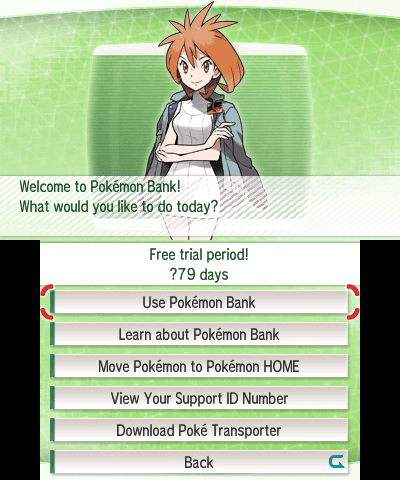
Once the Pokémon are in Bank’s regular boxes, you can use Bank’s Move Pokémon to Pokémon HOME command. In HOME Premium, generate a Moving Key and enter it on the 3DS within three minutes. That final move cannot be reversed, so finish organising and checking your collection in Bank first. If your Pokémon are already in Bank but you no longer have the 3DS, HOME’s linked-account method can transfer the entire stored collection.
How to move Virtual Console Pokémon
Poké Transporter can read supported 3DS Virtual Console Red, Blue, Yellow, Gold, Silver and Crystal saves. For these games, prepare the Pokémon in Box 1 of the PC, save, then follow Transporter’s instructions. Western Virtual Console boxes hold up to 20 Pokémon per transfer. You still have to clear the Transport Box in Bank before repeating the process.
Pokémon moved out of Virtual Console games can’t be sent back. If you want to withdraw them from Bank into another 3DS title first, they can go to Sun, Moon, Ultra Sun or Ultra Moon, not X, Y, Omega Ruby or Alpha Sapphire. They can also continue onwards into HOME through Bank.
Can you still download Poké Transporter?
No. Poké Transporter and Pokémon Bank stopped being available for new Nintendo 3DS eShop downloads when the store closed on 27 March 2023. The Pokémon Company’s official announcement explicitly includes both applications. HOME Premium doesn’t grant a new Transporter installation.
Already-installed copies can still perform supported transfers while Bank is operating. Before moving a large collection, check that Transporter can open, Bank is up to date and you have a compatible 3DS Pokémon save for managing Bank boxes. Buying HOME Premium won’t make the closed eShop offer new copies of either app.

What happens when Bank closes in February 2027?
The Poké Transporter route into HOME depends on Pokémon Bank. On 26 February 2027 at 03:00 UTC, Bank ends service, and Bank-to-HOME transfers cease. Pokémon that have already reached HOME remain there, but anything still waiting in Bank or an older game will no longer be able to use the closed Bank route.
If you’re bringing Pokémon forward from several generations, finish each link in the chain and empty the Bank Transport Box between batches. Poké Transporter isn’t a substitute for the migration features required to get Diamond, Pearl or GBA Pokémon into a Generation V game first.
Why won’t Poké Transporter find your Pokémon?
If Poké Transporter isn’t recognising your collection, check that the game is compatible and that the Pokémon are in Box 1. It will not move Eggs, and Pokémon holding items in Gold, Silver or Crystal Virtual Console saves are left behind. For Black and White, held items are returned to the Bag when possible. Move items off your Pokémon before transferring to avoid problems.
If another batch refuses to start, empty the Transport Box in Bank first. If Bank won’t show the HOME transfer option, check that Bank is updated to version 1.5 or later. Transporter can’t be newly downloaded from the closed 3DS eShop, and the receiving HOME account still needs Premium for the final move.
For newer transfers, see The Click’s FireRed and LeafGreen HOME guide, Pokémon Champions connection guide and Pokémon GO and HOME return rules. Those routes are separate from the 3DS service.
Related Guides
Official sources: Pokémon’s download restrictions, official compatible games, the Bank shutdown notice, and Nintendo’s transfer instructions. Additional Box 1 and Transport Box mechanics: Bulbapedia’s Poké Transporter documentation.