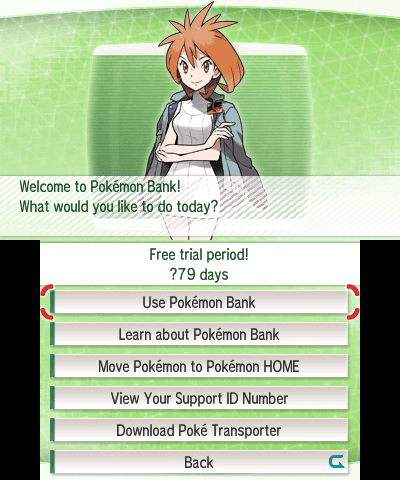
Pokémon Bank to Pokémon HOME transfers end on 26 February 2027 at 03:00 UTC (3 AM GMT). To move a collection, open Bank on your Nintendo 3DS, select the boxes, generate a Moving Key in Pokémon HOME and enter it in Bank within three minutes. You need an active HOME Premium subscription, but Nintendo Switch Online is not required.
Bank is no longer available for new downloads, so check your 3DS now. The move cannot be reversed: Pokémon sent to HOME cannot return to Bank or their old games. There is another method for players without a 3DS, but it transfers every Pokémon stored in Bank rather than selected boxes.
Pokémon Bank to Pokémon HOME requirements
For Pokémon Bank to Pokémon HOME transfers, check Bank is installed and updated to version 1.5 or later, so the HOME option appears. Your Pokémon must be in Bank boxes. You’ll also need internet access, HOME on Switch or mobile and an active HOME Premium Plan. HOME Basic cannot receive Bank transfers, but Bank itself is free.
If Bank says its pass has expired, choose No at the purchase prompt, press A as directed and select Use Pokémon Bank. You don’t need another Bank pass; HOME Premium is the paid subscription required for the move.
How to transfer using your Nintendo 3DS
For the standard Pokémon Bank to Pokémon HOME process, keep both devices ready because the Moving Key only lasts three minutes. The official steps are:
- On the Nintendo 3DS, open Pokémon Bank and select Move Pokémon to Pokémon HOME.
- Select your Bank boxes, press Y and select Yes.
- On Nintendo Switch HOME, choose Move → Begin Move → Begin → Ready! → Display to generate a Moving Key.
- Enter the Moving Key in Bank before the three-minute timer expires.
- Wait for the move to complete and follow HOME’s box-placement instructions.
On mobile, open HOME’s menu and choose Options → Move Pokémon → Begin move! → Begin → Ready! → Display Moving Key!. The 3DS portion is unchanged. Moving Keys never use the letters O, I or Z. If the code expires, generate a new one rather than re-entering the previous code.
Pokémon Bank to Pokémon HOME without a 3DS
If you no longer own a 3DS, Pokémon Support confirms another Pokémon Bank to Pokémon HOME route. The Nintendo Network ID originally used with Bank must be linked to the Nintendo Account used for HOME. This moves all Pokémon stored in Bank at once and cannot select particular boxes.
In Switch HOME, select Move → No Nintendo 3DS → Check, check the connected account, then Begin. On mobile, choose Menu → Options → Move Pokémon → No Nintendo 3DS → Continue, then Begin. This method only reaches Pokémon already deposited in Bank, not Pokémon remaining on a lost physical game’s save file.
Which older Pokémon games work?
Pokémon Bank to Pokémon HOME supports Pokémon deposited from X, Y, Omega Ruby, Alpha Sapphire, Sun, Moon, Ultra Sun and Ultra Moon directly through Bank. Black, White, Black 2, White 2 and compatible 3DS Virtual Console games need Poké Transporter to bring Pokémon into Bank first.
Older GBA and Nintendo DS games can require several steps through intermediate games and compatible hardware before their Pokémon reach Black or White. Bank does not read GBA cartridges directly. Poké Transporter also stopped being available for new downloads with the 3DS eShop’s closure.

What happens to Pokémon left in Bank?
The Pokémon Bank to Pokémon HOME connection closes at 03:00 UTC on Friday 26 February 2027. The Pokémon Company explicitly asks players to move Pokémon they wish to carry forward before then. Anything still stored only in Bank after the shutdown won’t have a supported route into HOME, and no replacement recovery service has been announced.
Pokémon that reach HOME before Bank closes stay there. They can’t return to Bank, and not every species can enter every modern game. If HOME Premium expires, Pokémon beyond the Basic Box become inaccessible until you renew, not automatically deleted.
Pokémon Bank to Pokémon HOME not working?
If a Pokémon Bank to Pokémon HOME move fails, check HOME Premium first. Then confirm Bank is online, the correct Nintendo Account is in use and the Moving Key has not expired. The no-3DS method only works when the old Nintendo Network ID is linked to your HOME account. If Bank was never installed on the console, you cannot newly download it from the eShop.
Pokémon still in the older games must first reach Bank through the relevant game transfer route. The no-3DS method cannot extract them directly from a cartridge. When choosing boxes on your 3DS, take a moment to check the selection, because moving from Bank to HOME is permanent.
The Click also has guides to FireRed and LeafGreen Pokémon HOME transfers, Pokémon Champions HOME connections and the HOME-to-GO return restriction.
Related Guides
Official sources: Pokémon Bank shutdown announcement and Pokémon Support transfer instructions.