
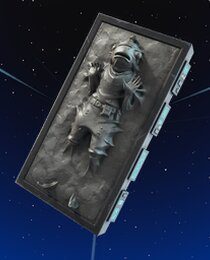
The Carbonite Fishstick Back Bling is a free Fortnite reward for linking an eligible MyDisney account to your Epic Games account. You don’t have to buy an Outfit or spend V-Bucks. The promotion closes on 31 October 2026, so this is one account bonus worth picking up before Halloween ends.
Unlike a quest reward, this one is unlocked outside the game. You make the connection on Epic’s website, then open Fortnite and look for the item in your Locker. Here’s how to make sure you’re using the right account and what to do if the reward hasn’t arrived.
How to get the Carbonite Fishstick Back Bling for free
The Carbonite Fishstick Back Bling is awarded after you connect eligible Epic Games and MyDisney accounts. Epic’s official Fortnite and Disney page confirms the promotion, deadline and the required connection process.
- Sign into the Epic Games account connections page.
- Make sure you’re using the account that contains your Fortnite Locker, especially if you normally play through a console.
- Under Apps and Accounts, look for the MyDisney account option.
- Press Connect and follow the Disney sign-in and authorisation prompts.
- Return to Epic’s account page and check that the MyDisney connection is active.
- Start Fortnite and find the Back Bling in your Locker.
You can complete those steps in a browser. There is no in-game voucher, code or NPC for this reward. It also doesn’t require a Disney subscription purchase; account eligibility is what matters.
Carbonite Fishstick Back Bling deadline and eligibility
Epic lists 31 October 2026 as the end of the Carbonite Fishstick Back Bling promotion. It doesn’t give a clearly stated final hour for every region on the public promotion page. Don’t leave the account connection until the last few minutes of the day, particularly if you live outside the US.
If the connection page says you’re not eligible, read the information Epic presents about your account. Changing browsers won’t override account eligibility. Be particularly careful with secondary Epic logins attached to PlayStation, Xbox or Nintendo profiles; linking Disney to the wrong login won’t move the cosmetic to your main Fortnite Locker.
What if Carbonite Fishstick Back Bling is missing?
If you linked your accounts but the Carbonite Fishstick Back Bling doesn’t appear, begin by checking the connection itself. Open Apps and Accounts again and confirm MyDisney is listed as connected. Then restart Fortnite and check the Back Bling section, not Outfits or Gliders.
Epic has acknowledged a separate issue affecting some people who previously linked, unlinked and then re-linked their Disney account. Its support article explains the affected group. That situation isn’t the same as a first-time account link failing, and repeated unlinking can make troubleshooting more complicated.
People who already linked eligible accounts during the earlier distribution were due to receive the item automatically. Look through your Locker before attempting another connection, and use Epic’s support if the account is connected but the item is absent.
Is this a free Fishstick skin?
No. The Carbonite Fishstick Back Bling is a cosmetic worn on an Outfit. It isn’t a playable Fishstick Outfit or a complete Star Wars bundle. That distinction matters if you’ve seen pictures of Fishstick dressed for a crossover and assumed a new skin was being given away.
The item doesn’t use the Battle Pass’s free track either. Finishing Fortnitemares quests, winning a Ranked Cup and enabling two-factor authentication unlock different rewards, but won’t award this particular back accessory.
Where to find more free Fortnite rewards
There’s more to collect while this offer is running. Our free Fortnite cosmetics tracker groups the current rewards by deadline, with pictures alongside the claim instructions. If you have only a few minutes, check the ending-soon section before starting longer events.
The Fortnitemares quest rewards are earned by playing, while the Sprite Mastery rewards depend on collecting and mastering Sprites. Both are separate from the Carbonite Fishstick Back Bling account-link reward, so it’s possible to earn all three without buying the cosmetics.
Once you’ve confirmed the Disney connection, there’s no reason to keep returning to the linking screen. The reward should be associated with your Fortnite account, and you can go back to the Halloween quests or other free promotions.
Related Guides
Official source: Fortnite’s Disney account-linking promotion.





