To restore natural pet colours in Adopt Me, visit the Salon, select the colour bubble for the part you want to change and choose Natural Color in the Pet Paint Menu. The option arrived on November 20 and lets you bring back the original colour of one region without resetting the entire pet.
Say you’ve painted your pet pink but miss its original markings. You can keep the pink coat and restore those markings instead of starting the makeover from scratch. It’s a small change to the Salon that makes a big difference when you’re experimenting with colours.
How to restore natural pet colours in Adopt Me
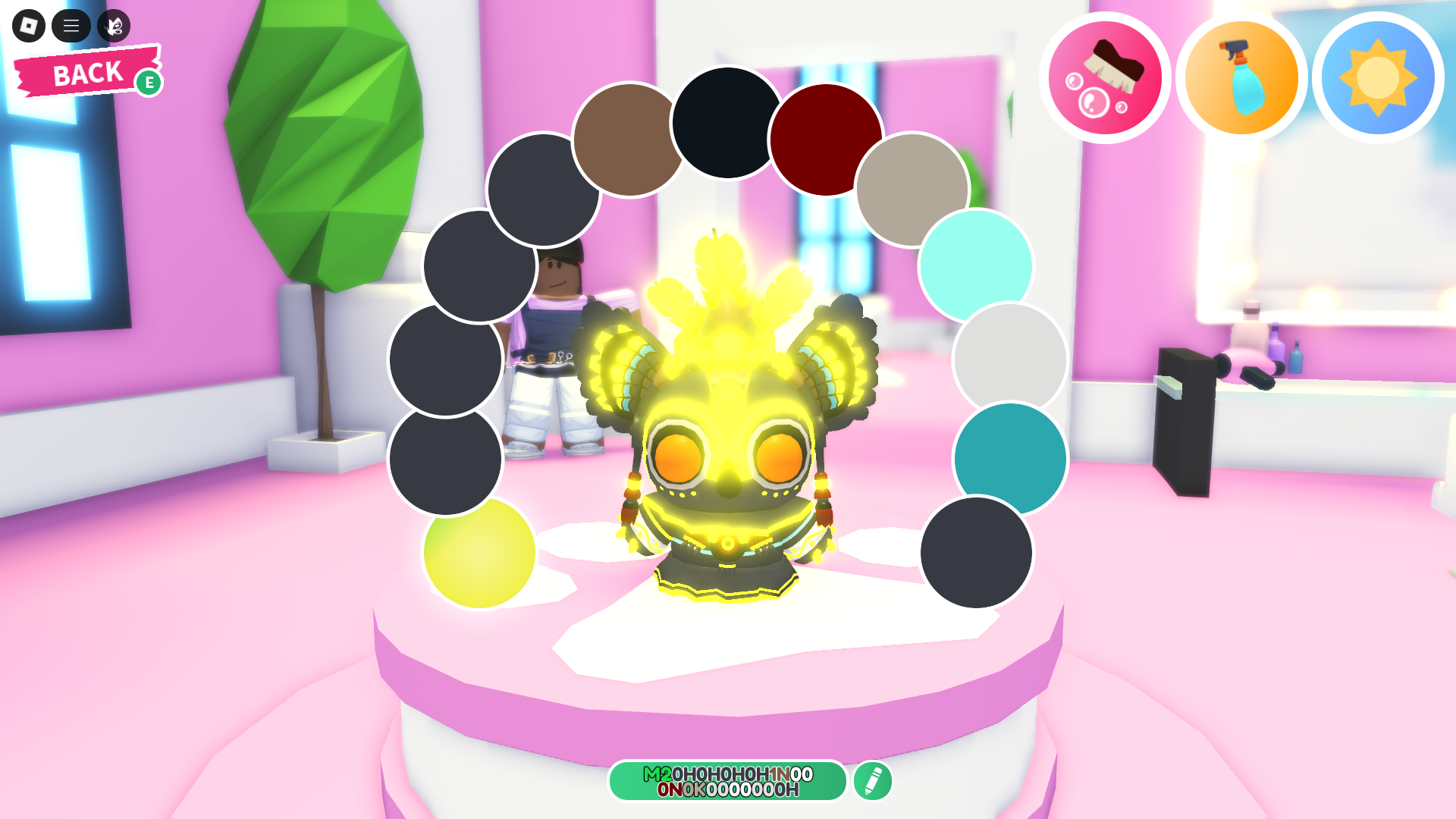
Equip the pet you want to recolour and take it to the Salon on Adoption Island. Open the pet painting interface, then look at the bubbles surrounding your pet. Each one represents a colour region on that particular animal.
Choose the bubble for the region you want to restore and select Natural Color from the Pet Paint Menu. Check how it looks on the model. If you want another part to go back to its original shade, select that region separately and repeat the process.
The bubbles available depend on the pet’s design. For an animal with several similar colours, it helps to work through them one at a time so you can see which part you’ve changed.
Can you restore natural pet colours in Adopt Me without losing the rest of a design?
Yes. The update specifically adds restoration of individual parts. If you like the colour you’ve put on your pet’s ears but want its natural body colour back, select the body region and leave the ears alone.
To restore natural pet colours in Adopt Me across the whole pet, select Natural Color for each painted region. That’s also a useful way to start a fresh makeover when you’ve tried several colours and aren’t happy with the result.
Do you need to buy a paint to restore natural pet colours in Adopt Me?
Natural Color is a menu option, not one of the 25 new shades in the shop. There’s no need to search for a purchasable paint that happens to resemble your pet’s original coat. For example, Silky Vanilla may look close to a pale natural coat, but it’s a separate Common shade costing 500 Bucks.
If you’re looking for a new shade rather than the original one, the November collection includes several browns, greens, blues and pinks. Our Adopt Me Pet Paints price list breaks those down by rarity and price.
Can you reuse paint after you restore natural pet colours in Adopt Me?
Unlocked paints have unlimited uses, so if you still own the shade you removed, you can apply it again at the Salon. This is handy when you aren’t sure whether a new combination works and want to compare it with the natural colour.
There is one situation worth checking before recolouring. If you sealed a paint onto your pet and subsequently traded the paint itself away, make sure you can still access that shade before replacing it. A Paint Sealer preserves the colour on the pet after a trade; it isn’t a substitute for having that paint available to apply again.
Why can’t you restore natural pet colours in Adopt Me?
Start by checking that you’ve selected a colour bubble inside the Salon’s Pet Paint Menu. Older tutorials show the interface before Natural Color was introduced, and some paint categories have also been reorganised. The option belongs to the new menu, rather than the pet’s ordinary Dress-Up screen.
If you’re trying to undo the process of making a Neon or Mega Neon, the Salon isn’t where you do that. Restoring paint is cosmetic. It brings back a colour region, not a previous growth stage or version of the pet.
For players who want a different glow rather than the original coat, the Adopt Me Mega Neon Paints guide covers the new palettes and their Robux prices.
Official source: Adopt Me — November 20 Quality of Life Improvements.