
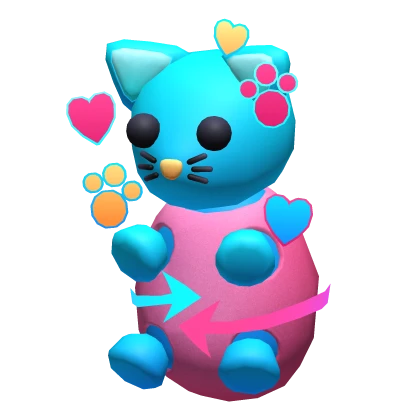
The KittyKånka Not Showing after the Adopt Me Hunt usually means the 2019 completion and the central hub reward have not lined up yet. Hatching the Throwback Egg inside Adopt Me does not automatically mean the avatar accessory has already been claimed from The Hunt: Roblox 20.
If The KittyKånka Not Showing is your problem, keep the Adopt Me completion on your account and return to the official Hunt hub. The 2019 year reward is handled through the Hunt progression, so the correct fix is to check the year state and reward podium before repeating the egg quest.
The KittyKånka Not Showing: check the 2019 Hunt reward
The KittyKånka Not Showing Image Uplift Games.
For The KittyKånka Not Showing, first confirm you completed the correct Adopt Me event objective on the same Roblox account. The main 2019 route uses the Throwback Egg, then the Hunt hub handles the avatar reward.
- Confirm the Adopt Me Hunt quest completed.
- Return to The Hunt Roblox 20 hub.
- Go back to the 2019 Adopt Me year area.
- Check the normal 2019 reward podium.
- Rejoin the hub if the podium remains blacked out.
- Check your Roblox avatar inventory for The KittyKånka.
Why the Adopt Me pet is not the same as The KittyKånka
A common cause of The KittyKånka Not Showing confusion is expecting the temporary egg hatch or in-game pet to be the Roblox avatar accessory. They are different rewards in different systems.
The Throwback Egg can hatch an Adopt Me pet, while The KittyKånka is the Hunt’s 2019 avatar item. Completing the game objective makes the hub reward available, but you still need the Hunt progression to recognise it.
What if the badge exists but the accessory is missing?
If The KittyKånka Not Showing but your Adopt Me completion badge exists, do not delete the badge. The Click’s wider Hunt troubleshooting already documents why removing an earned event badge can make a sync issue harder to recover.
Leave and rejoin the Hunt hub, return to 2019 and check the podium again. If the year is already marked complete, preserve that state while troubleshooting the reward claim.
Do you need to finish earlier Hunt years?
The KittyKånka Not Showing can also happen when a player completes something inside Adopt Me directly but has not progressed the central Hunt timeline far enough. Roblox’s official event structure advances through the historical years in order.
If 2019 is not properly unlocked in your hub route yet, continue the Hunt progression until the Adopt Me year is available and then claim the reward there.
What if you already moved past 2019?
If The KittyKånka Not Showing after you advanced to a later year, use the Hunt’s previous-years route once backward travel is available. Do not reset unrelated quests just to get back to the 2019 podium.
The safest event rhythm is always complete the featured game, return to the hub, claim the year reward and only then move forward.
The KittyKånka still missing after a clean rejoin
When The KittyKånka Not Showing continues after the badge, hub return and podium check are all complete, compare the account inventory with the live 2019 state. A delayed inventory update is different from an unclaimed podium.
If the item remains missing but the year is clearly complete, keep screenshots of the completion and reward state rather than deleting progress. The event only runs for a limited window, so preserving evidence is safer than experimenting with destructive fixes.
Roblox explains the normal complete-quest-and-return-to-hub loop on the official Hunt page.
Live event bugs can behave differently from one server to another, so a fresh server is a useful test before assuming the whole quest is broken. Keep any badge or reward that already registered and change only one troubleshooting step at a time.
Live event bugs can behave differently from one server to another, so a fresh server is a useful test before assuming the whole quest is broken. Keep any badge or reward that already registered and change only one troubleshooting step at a time.
Live event bugs can behave differently from one server to another, so a fresh server is a useful test before assuming the whole quest is broken. Keep any badge or reward that already registered and change only one troubleshooting step at a time.





