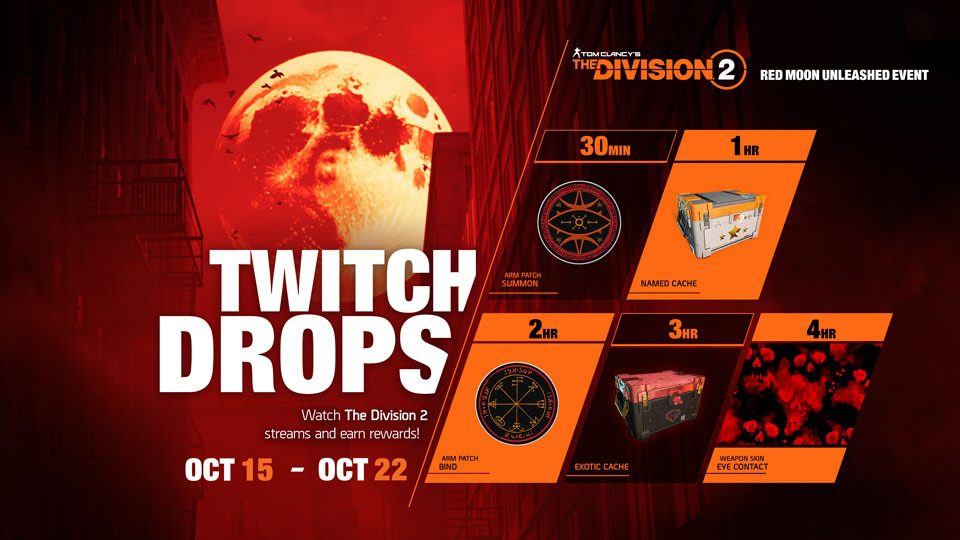
The Division 2 Red Moon Unleashed Twitch Drops run from October 15 to October 22, 2026, with five rewards unlocked across four hours of cumulative watch time. The final reward is the Eye Contact Weapon Skin, while the earlier milestones include two Arm Patches and both Named and Exotic Caches.
Any drop-enabled stream from Ubisoft’s partnered creators counts. Your watch time carries across eligible channels, so you can move between streams without losing progress as long as Twitch is linked to the right Ubisoft Connect account.
All The Division 2 Red Moon Unleashed Twitch Drops
| Watch time | Reward |
|---|---|
| 30 minutes | Summon Arm Patch |
| 1 hour | Named Cache |
| 2 hours | Bind Arm Patch |
| 3 hours | Exotic Cache |
| 4 hours | Eye Contact Weapon Skin |
The four-hour total is cumulative. The earlier rewards unlock on the way to the Eye Contact Weapon Skin, so you are not starting a new timer after each claim.
How to claim the Red Moon Unleashed Twitch Drops
Before you start watching, sign into Twitch and link it to Ubisoft Connect. Then check that the PC, PlayStation or Xbox account you use for The Division 2 is connected to that same Ubisoft account.
Watch an eligible partnered stream while logged in, then claim each reward from Twitch as it unlocks. The Division 2 Red Moon Unleashed Twitch Drops are not delivered just because the progress bar reaches 100%; you still need to press Claim in Twitch.
Can you switch streams and keep your watch time?
Yes. Ubisoft confirms that watch time for The Division 2 Red Moon Unleashed Twitch Drops stacks across eligible channels. You can leave one partnered creator and continue on another without restarting the timer.
The account link is the bit to get right before you settle in for four hours. If Twitch is connected to a different Ubisoft account, the rewards can end up attached to the wrong game profile.
Do the Twitch Drops work on PC, PlayStation and Xbox?
Yes. Ubisoft tells players to check that their preferred gaming platform is linked in Ubisoft Connect before watching. That includes PC, PlayStation and Xbox accounts.
If you play on more than one platform, check the Ubisoft Connect links before claiming The Division 2 Red Moon Unleashed Twitch Drops. The reward delivery follows the linked Ubisoft account setup rather than whichever console or PC you happen to launch first.
Red Moon Unleashed Twitch Drops not showing
If Twitch shows 100% but the reward is missing in-game, open your Drops inventory first and make sure you actually claimed it. A completed progress bar on its own is not the final claim step.
If it is already claimed, check that Twitch and your game platform are linked to the same Ubisoft Connect account, then restart The Division 2. An account mismatch is the first thing to rule out before treating the drop as missing.
Do you need four hours for every reward?
No. The Division 2 Red Moon Unleashed Twitch Drops use one cumulative four-hour track. The 30-minute, one-hour, two-hour and three-hour rewards unlock on the way to the four-hour Eye Contact Weapon Skin, so reaching four hours completes the full five-reward campaign.
When do The Division 2 Red Moon Unleashed Twitch Drops end?
The Division 2 Red Moon Unleashed Twitch Drops end on October 22, 2026. The Red Moon Unleashed in-game event itself continues beyond the Twitch campaign, so the Twitch deadline is the one that matters if you want the Eye Contact Weapon Skin and both event Arm Patches.
Related Guides
Ubisoft confirms the October 15-22 schedule, account-linking steps and all five watch-time rewards in its official Red Moon Unleashed Twitch Drops announcement.